


 Video Converter


Niet alle videospelers kunnen MPG-bestanden afspelen. Converteren MPG naar OGG Dit is de beste optie als je MPG-bestanden hebt die niet op je pc geopend kunnen worden. Ben je op zoek naar een manier om MPG-bestanden naar OGG-formaat te converteren? In deze handleiding bespreken we een aantal effectieve methoden om MPG-bestanden naar OGG te converteren. Laten we de beste methode vinden die aansluit bij jouw workflow en behoeften.
Inhoud: Deel 1: Wat zijn MPG- en OGG-bestanden?Deel 2: MPG-bestanden converteren naar OGG op Windows/MacDeel 3: MPG-bestanden gratis online converteren naar OGGDeel 4: conclusie
Deel 1: Wat zijn MPG- en OGG-bestanden?
Wat is MPG?
MPG, ook wel bekend als MPEGMPG is een multimediabestandsformaat dat voornamelijk wordt gebruikt voor het afspelen van video. Het maakt gebruik van MPEG-1- of MPEG-2-compressie, waardoor een relatief hoge videokwaliteit mogelijk is bij kleinere bestandsgroottes. MPG-bestanden worden breed ondersteund door mediaspelers en bewerkingssoftware, waardoor ze een populaire keuze zijn voor de distributie van videocontent. Het formaat ondersteunt zowel audio- als videostreams in één bestand en wordt vaak gebruikt voor films, digitale tv-uitzendingen en video-cd's.
Wat is OGG?
OGG OGG is een open-source multimediacontainerformaat, ontwikkeld door de Xiph.Org Foundation. Het staat vooral bekend om het opslaan van audiogegevens, met name de Ogg Vorbis-audiocodec, die geluid van hoge kwaliteit levert bij lagere bitrates dan MP3. OGG-bestanden worden gebruikt voor het streamen en comprimeren van hoogwaardige audiocontent. Doordat OGG patentvrij en royaltyvrij is, is het een populaire keuze onder ontwikkelaars en audio-enthusiasten.
 Gerelateerde artikelen: MP3 versus OGG: welk formaat is beter?
Wat is het verschil tussen MPG en OGG?
Het voornaamste verschil zit hem in hun doel en inhoud: MPG is een videoformaat dat zowel video als audio kan bevatten, terwijl OGG een audioformaat is. MPG is complexer vanwege de videocodering, terwijl OGG is geoptimaliseerd voor geluidskwaliteit en efficiëntie. Het converteren van MPG naar OGG houdt in feite in dat de audiotrack uit een videobestand wordt gehaald en opgeslagen in een hoogwaardig, gecomprimeerd audioformaat.
Deel 2: MPG-bestanden converteren naar OGG op Windows/Mac
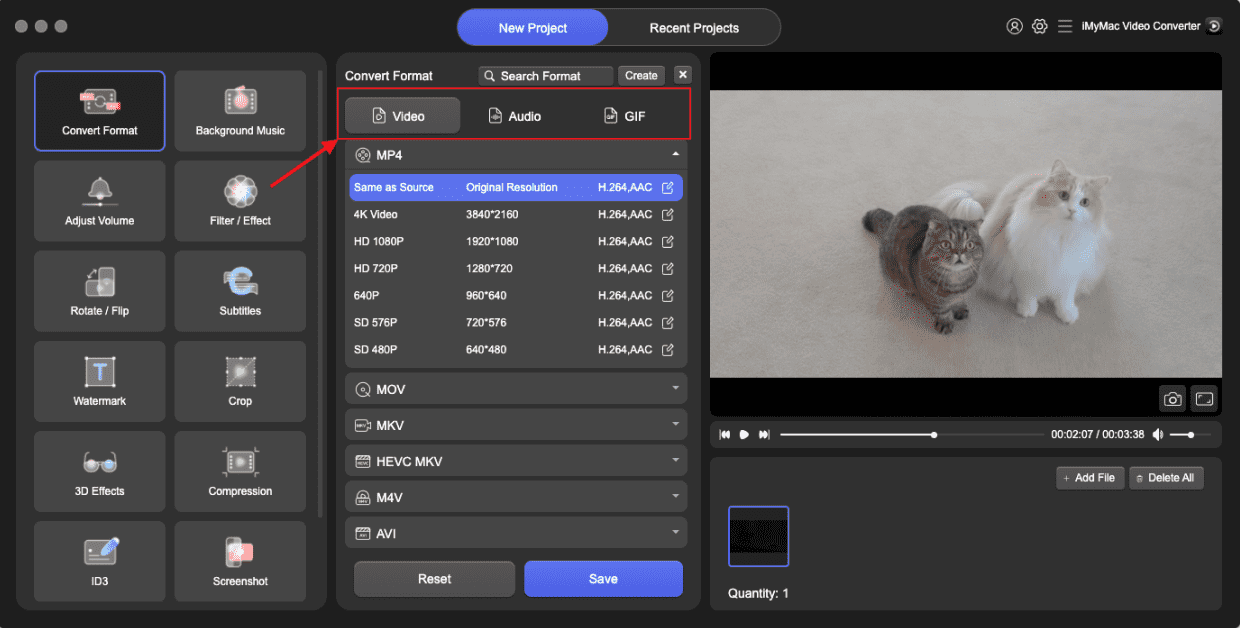
Zoekt u een betrouwbare en hoogwaardige oplossing om MPG naar OGG te converteren op uw desktop? iMyMac-video-omzetter is een uitstekende optie. Deze software is compatibel met zowel Windows als Mac en biedt een gebruiksvriendelijke interface, geavanceerde bewerkingsopties en ondersteuning voor een breed scala aan formaten. Naast OGG kunt u met deze krachtige software ook eenvoudig uw MPG-bestanden converteren naar MP4, WMV, MPG, AVI en meer, met slechts een paar klikken.
Waarom kiezen voor iMyMac Video Converter?
- Conversie met hoge snelheid: Ondersteunt hardwareversnelling voor snellere resultaten.
- BatchconversieConverteer meerdere MPG-bestanden tegelijk.
- MaatwerkBiedt volledige controle over de uitvoerinstellingen.
- Hoge kwaliteitBehoudt een uitstekende audiokwaliteit na conversie.
Stapsgewijze handleiding voor het gebruik van iMyMac Video Converter:
Laten we eens kijken hoe je MPG naar OGG kunt converteren met iMyMac Video Converter:
- Start de iMyMac Video Converter-software op uw computer, de Mac- of Windows-versie. Zodra u klaar bent, logt u in op uw account.
- Het MPG-bestand naar het scherm van het systeem slepen of neerzetten werkt altijd.
- Nadat je 'Converteren naar formaat' hebt gekozen, verschijnt er een keuzelijst waarmee je het type bestand kunt selecteren waarnaar het origineel moet worden geconverteerd, bijvoorbeeld OGG.
- Dankzij de gebruiksvriendelijke interface is het nu veel gemakkelijker om wijzigingen in bestanden te vinden. De bestanden kunnen op elke gewenste manier worden bewerkt.
- U kunt al uw wijzigingen opslaan door Opslaan te selecteren.
- Kies een conversieoptie in de werkbalk om het conversieproces te starten.
Deel 3: MPG-bestanden gratis online converteren naar OGG
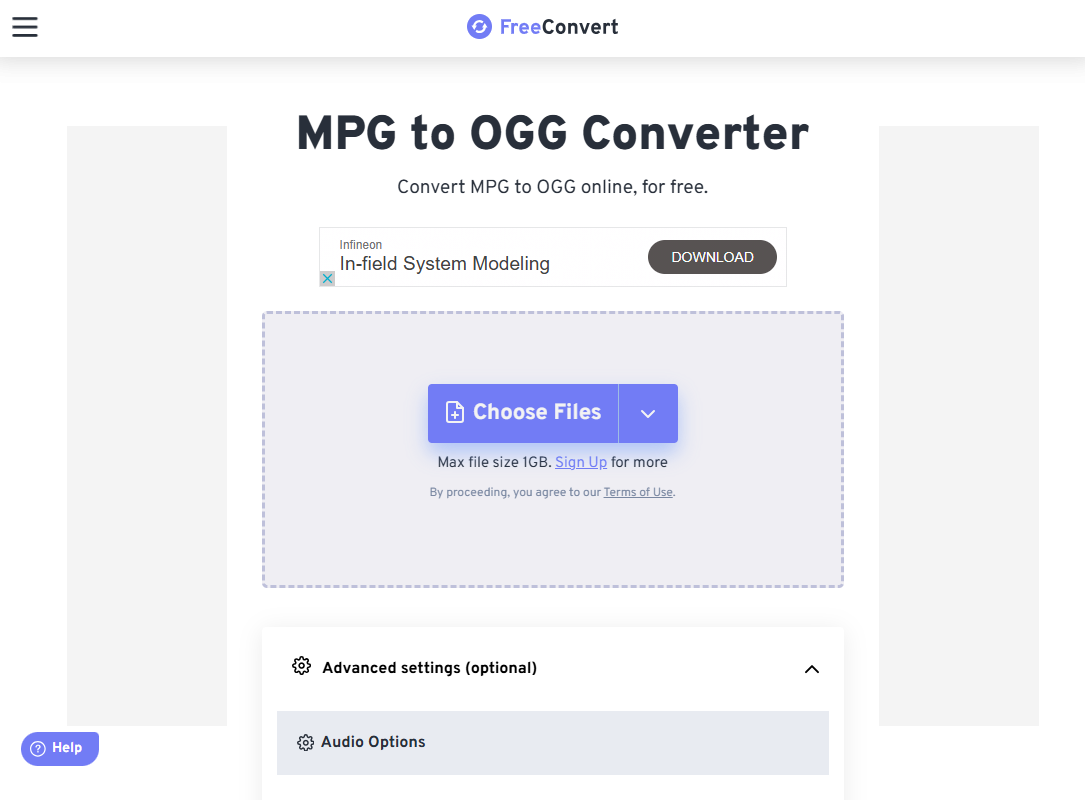
Voor gebruikers die liever geen software downloaden, is FreeConvert een krachtige en toegankelijke online tool waarmee je moeiteloos MPG naar OGG kunt converteren. Het is gratis te gebruiken en ondersteunt een breed scala aan invoer- en uitvoerformaten. FreeConvert werkt direct in je browser. Basisconversies zijn gratis. Het ondersteunt uploaden/downloaden naar Dropbox en Google Drive.
Stappen om MPG-bestanden naar OGG te converteren met FreeConvert:
- Open je browser en ga naar FreeConvert MPG naar OGG Converter.
- Klik op "Bestanden kiezen" en selecteer uw MPG-bestand van uw computer. FreeConvert ondersteunt ook bestanden van Dropbox, Google Drive en URL's.
- De website detecteert automatisch dat u wilt converteren naar OGG. Indien nodig kunt u op het instellingenpictogram klikken om de uitvoerkwaliteit, audiocodec en het volume aan te passen.
- Klik op de knop 'Converteren'. De tool verwerkt uw bestand online. De conversietijd kan variëren afhankelijk van de bestandsgrootte en uw internetsnelheid.
- Zodra de conversie is voltooid, klikt u op 'Downloaden' om het OGG-bestand op uw apparaat op te slaan.
FreeConvert is ideaal voor gebruikers die op zoek zijn naar een snelle, probleemloze oplossing voor incidentele conversies zonder software te hoeven installeren. Gratis accounts hebben echter een maximale bestandsgrootte. Bovendien heb je een stabiele internetverbinding nodig.
Deel 4: conclusie
Het converteren van MPG naar OGG is een eenvoudig proces, of u nu een desktopprogramma zoals iMyMac Video Converter gebruikt of een online platform zoals FreeConvert. Desktopsoftware is beter geschikt voor gebruikers die geavanceerde functies en frequente conversies nodig hebben, terwijl online tools snelle en gemakkelijke toegang bieden voor eenmalig of incidenteel gebruik.
Door de verschillen tussen de MPG- en OGG-formaten te begrijpen, kunt u de beste tool voor uw behoeften kiezen en bent u verzekerd van een hoogwaardige audio-uitvoer. Wat uw voorkeur ook is, beide opties maken het eenvoudig om audio effectief uit uw videobestanden te extraheren en te converteren.


