


 Video Converter


Hoewel TP-bestanden een uitstekende videokwaliteit behouden, hebben ze vaak compatibiliteitsproblemen, waardoor ze moeilijk af te spelen, te bewerken of te delen zijn tussen apparaten en platforms. Daarom is het essentieel om TP-bestanden te converteren naar een toegankelijker en breder ondersteund formaat. In dit artikel bespreken we de belangrijkste verschillen tussen TP- en AVI-bestanden en leggen we uit hoe je ze kunt converteren. TP naar AVIOf u nu een incidentele gebruiker bent of iemand die regelmatig met grote videobestanden werkt, wij helpen u de juiste methode te kiezen die aansluit bij uw behoeften.
Inhoud: Deel 1. Verschil tussen TP- en AVI-formaatDeel 2. TP-bestanden converteren naar AVI op Windows/MacDeel 3. TP-bestanden online converteren naar AVIDeel 4. Conclusie
Deel 1. Verschil tussen TP- en AVI-formaat
TP en AVI zijn beide videobestandsformaten, maar ze dienen heel verschillende doeleinden en bieden contrasterende functies.
TP, ofwel Transport Stream Packet, is een formaat dat voornamelijk wordt gebruikt voor het opnemen van HD-televisie-uitzendingen. Deze bestanden worden doorgaans vastgelegd door tv-tunerkaarten en bevatten niet alleen de video- en audiostream, maar ook metadata zoals programma-informatie en kanaalgegevens. TP-bestanden Ze zijn zo gestructureerd dat ze bestand zijn tegen fouten tijdens gegevensoverdracht, waardoor herstel mogelijk is bij fouten of verloren gegevens tijdens het streamen over netwerken. Dit maakt ze ideaal voor uitzendingen, maar minder geschikt voor weergave op gewone mediaspelers of apparaten. TP-bestanden zijn vaak groot en vereisen mogelijk gespecialiseerde software voor een soepele weergave of conversie.
Daarentegen is AVI, wat staat voor Audio Video Interleave, een veel breder ondersteund containerformaat dat is ontwikkeld door Microsoft. Het wordt veel gebruikt voor het lokaal afspelen en bewerken van video. AVI-bestanden slaan audio- en videogegevens op een manier op die synchroon afspelen mogelijk maakt, en het formaat ondersteunt verschillende codecs, waardoor het zeer flexibel is. AVI-bestanden zijn breed compatibel met mediaspelers, bewerkingsprogramma's en zelfs oudere hardware.
Hoewel TP is geoptimaliseerd voor streamingomgevingen en het behoud van de uitzendkwaliteit, is AVI geoptimaliseerd voor toegankelijkheid, consistente weergave en bewerkingsprestaties. Door van TP naar AVI te converteren, verandert uw video in feite van een uitzendklaar formaat naar een formaat dat geschikt is voor persoonlijk of professioneel gebruik op een breed scala aan platforms.
Deel 2. TP-bestanden converteren naar AVI op Windows/Mac
Hoe converteer ik TP naar AVI? iMyMac-video-omzetter Dit is professionele, maar gebruiksvriendelijke videobewerkingssoftware die naadloos werkt op zowel Windows- als Mac-platforms. Het is ontworpen om een breed scala aan bestandsformaten te verwerken, waaronder TP, en deze om te zetten naar meer gangbare formaten zoals AVI. Dit maakt het een krachtige oplossing voor iedereen die op een eenvoudige manier hoogwaardige video's van HDTV-opnames wil verwerken.
Het mooie van deze tool is dat jij dat ook kunt bewerk je video's Je kunt er bijvoorbeeld video's mee roteren, inkorten, knippen of bijsnijden. Je kunt er ook voor kiezen om de verzadiging, tint, helderheid en andere instellingen met de tool te bewerken.
Belangrijkste kenmerken van iMyMac Video Converter:
- Ondersteunt meer dan 1000 formaten: Inclusief TP, AVI, MP4, MOV, MKV en meer.
- Snelle conversie: Dankzij hardwareversnelling en multithreading.
- Batch-conversie: Converteer meerdere bestanden tegelijk om tijd te besparen.
- Hulpmiddelen voor videobewerking: Basisbewerkingsopties zoals bijsnijden, inkorten, watermerken toevoegen, helderheid/contrast aanpassen en ondertitels invoegen.
- Verliesloze conversie: Behoudt de oorspronkelijke videokwaliteit en optimaliseert tegelijkertijd de bestandsgrootte.
Stapsgewijze handleiding voor het gebruik van iMyMac
Laten we eens kijken hoe je iMyMac Video Converter kunt gebruiken om TP-bestanden moeiteloos naar AVI te converteren.
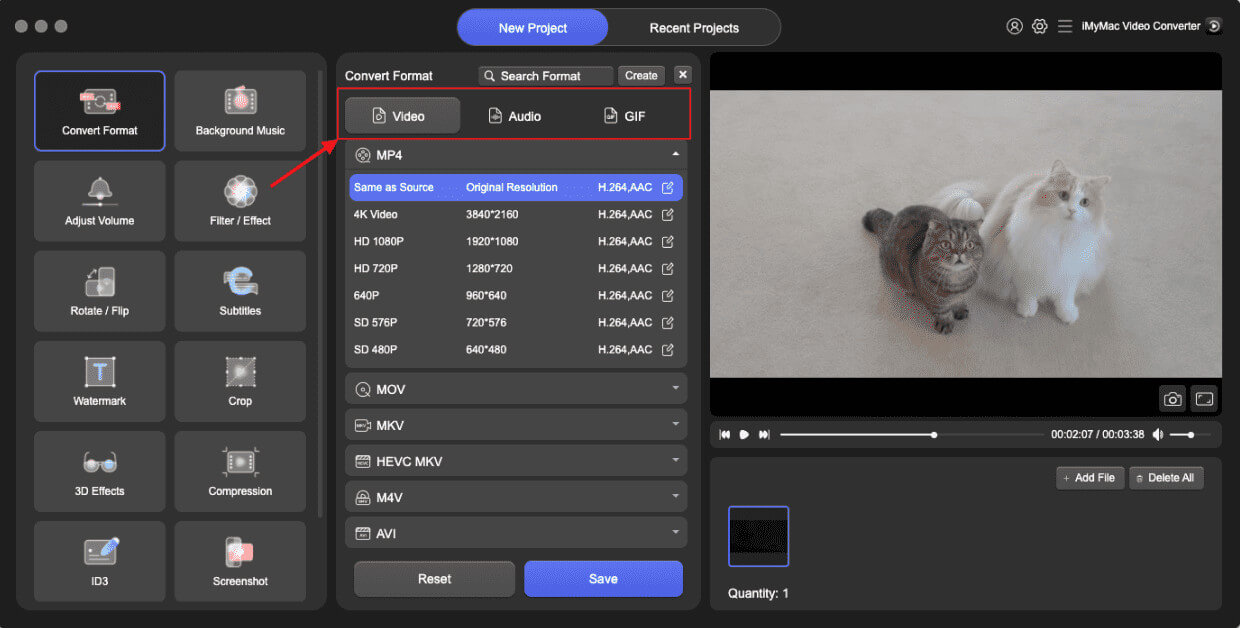
- Start de Mac- of Windows-versie van het iMyMac Video Converter-programma op uw computer. Log in op uw account nadat u klaar bent.
- Een extra optie is het slepen en neerzetten van het TP-bestand op het systeemscherm.
- Wanneer u op 'Converteren naar formaat' klikt, verschijnt een keuzemenu waarmee u het gewenste bestandstype kunt selecteren, bijvoorbeeld AVI.
- Dankzij de gebruikersinterface is het nu eenvoudiger om bestandswijzigingen te vinden. U kunt alle gewenste wijzigingen in de bestanden aanbrengen.
- Door Opslaan te kiezen, kunt u al uw wijzigingen opslaan.
- Selecteer een conversieoptie in de werkbalk om het conversieproces te starten.
Deel 3. TP-bestanden online converteren naar AVI
Als je op zoek bent naar een snelle oplossing waarvoor geen installatie nodig is, zijn er verschillende mogelijkheden. gratis online video-omzetters Je kunt TP naar AVI converteren. Hier zijn drie populaire en betrouwbare opties:
1. CloudConvert
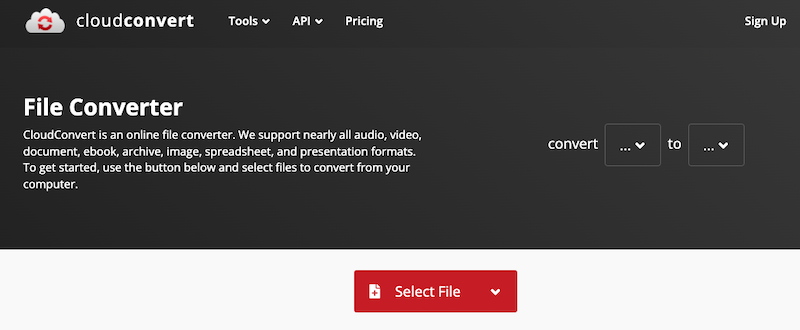
CloudConvert is een robuuste webgebaseerde service voor het converteren van bestanden die een breed scala aan formaten ondersteunt, waaronder TP en AVI. CloudConvert integreert ook met cloudopslagservices zoals Google Drive, Dropbox en OneDrive, waardoor het beheren van bestanden eenvoudiger wordt. Hoewel het ideaal is voor incidentele conversies, kan het zeer grote bestanden mogelijk niet zo efficiënt verwerken als desktopsoftware.
2. Convertio
Convertio is een cloudgebaseerde tool die is ontworpen voor snelle en eenvoudige bestandsconversies. Het ondersteunt meer dan 300 bestandstypen en biedt optionele aanpassingsmogelijkheden zoals codec- en kwaliteitsinstellingen. Uploads kunnen vanaf uw lokale schijf of cloudopslag komen. Bestanden worden na 24 uur automatisch verwijderd, waardoor de privacy van de gebruiker gewaarborgd is.
3. Online-Convert
Online-Convert biedt een uitgebreid platform voor videoconversie met geavanceerde instellingen. Het ondersteunt TP naar AVI-conversie en stelt gebruikers in staat de videoresolutie, beeldverhouding, framesnelheid en audiokwaliteit aan te passen.
Deel 4. Conclusie
Het converteren van TP naar AVI verbetert de compatibiliteit, gebruiksvriendelijkheid en afspeelprestaties op een breed scala aan apparaten en platforms. Hoewel online tools zoals CloudConvert, Convertio en Online-Convert snelle oplossingen bieden, zijn ze het meest geschikt voor kleine bestanden en incidenteel gebruik. Voor diegenen die te maken hebben met grote videobestanden of die hoogwaardige, snelle en aanpasbare conversies nodig hebben, is iMyMac Video Converter de beste keuze. Het is rijk aan functies, betrouwbaar en geoptimaliseerd voor zowel prestaties als gebruiksgemak. Of u nu HD-opnames archiveert of bestanden voorbereidt voor bewerking, het converteren van TP-bestanden naar AVI is nog nooit zo eenvoudig geweest.


