


 PowerMyMac


Niezależnie od tego, czy jesteś powieściopisarzem, dziennikarzem, blogerem czy studentem, najlepsze aplikacje dla pisarzy na Macu może znacząco wpłynąć na szybkość i przejrzystość przelewania myśli na papier. Narzędzia te oferują środowiska wolne od rozpraszaczy, rozbudowane funkcje organizacji, obsługę Markdown, sugestie gramatyczne i synchronizację między urządzeniami Apple. Niezależnie od tego, jak wygląda Twój proces pisania, znajdziesz tu aplikację, która pomoże Ci usprawnić jego przepływ. W tym przewodniku zebraliśmy najlepsze aplikacje do pisania zaprojektowane specjalnie dla Ciebie. macOS które wykraczają poza podstawowe przetwarzanie tekstu. Zanurzmy się w temat!
Spis treści: Część 1. 8 najlepszych aplikacji na Maca, które pomogą Ci pisać więcej i lepiejCzęść 2. Bonus: Wyczyść pamięć podręczną bez utraty ważnych dokumentówCzęść 3. Wniosek
Część 1. 8 najlepszych aplikacji na Maca, które pomogą Ci pisać więcej i lepiej
Istnieje tak wiele różnych, przydatnych narzędzi dla pisarzy. Zebrałem najlepsze aplikacje dla pisarzy na Maca. Mamy nadzieję, że niektóre z nich pomogą kreatywnym pisarzom zwiększyć produktywność.
1. Pisarz
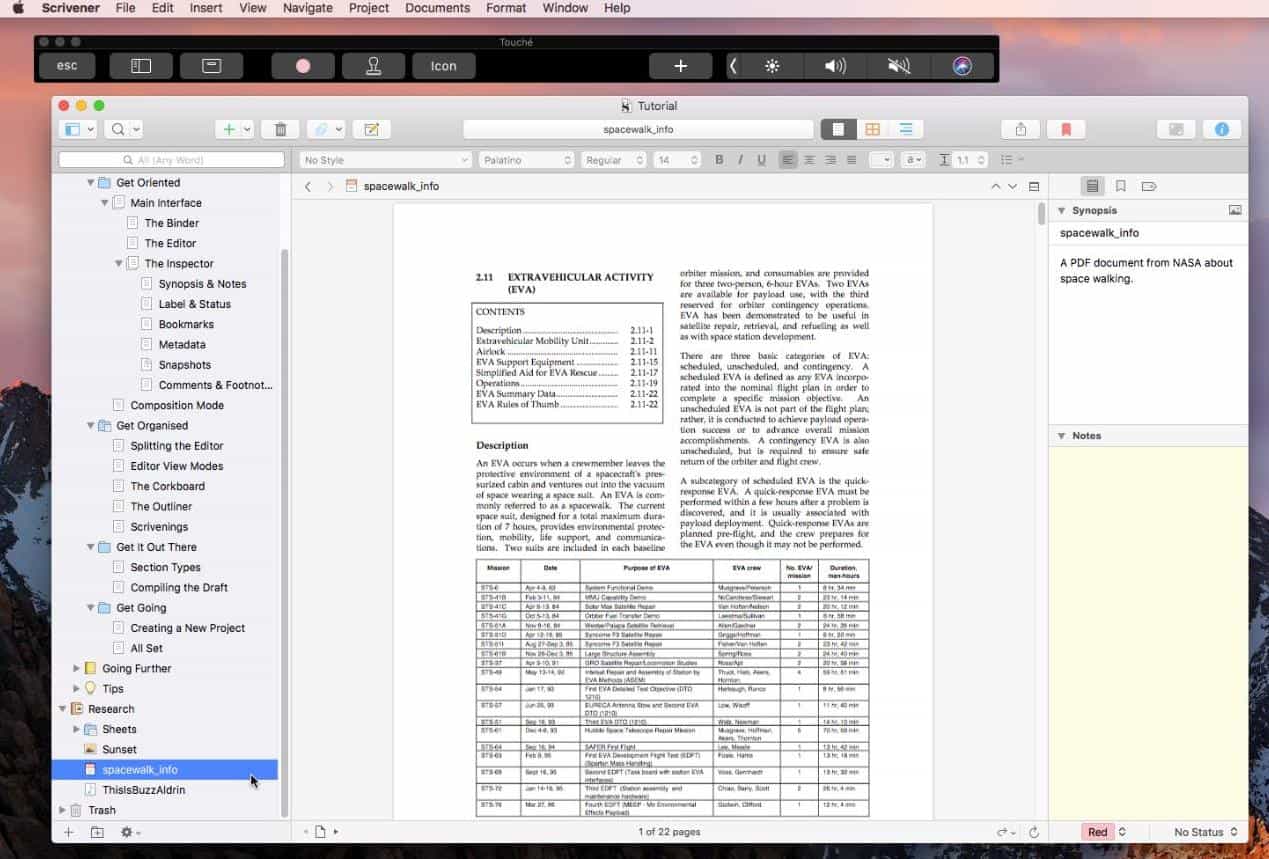
Scrivener jest powszechnie uważany za narzędzie dla autorów dłuższych tekstów. Niezależnie od tego, czy pracujesz nad powieścią, rozprawą, czy scenariuszem, Scrivener pozwala podzielić tekst na łatwe w zarządzaniu fragmenty. Jego rozbudowana tablica korkowa, segregator na badania i funkcje „przeciągnij i upuść” dają pełną kontrolę nad strukturą narracji. Obsługuje również eksport do wielu formatów, takich jak EPUB, PDF i DOCX, co czyni go idealnym rozwiązaniem dla procesów wydawniczych.
Cena: 59.99 USD (jednorazowo)
Powody, dla których warto wybrać:
- Doskonale nadaje się do dużych, złożonych projektów
- Wysoce konfigurowalny interfejs
- Wbudowane narzędzia badawcze i konspektowe
Powody, których należy unikać:
- Bardziej stroma krzywa uczenia się dla początkujących
- Interfejs użytkownika może wydawać się przestarzały w porównaniu z nowszymi aplikacjami
2. Ulysses
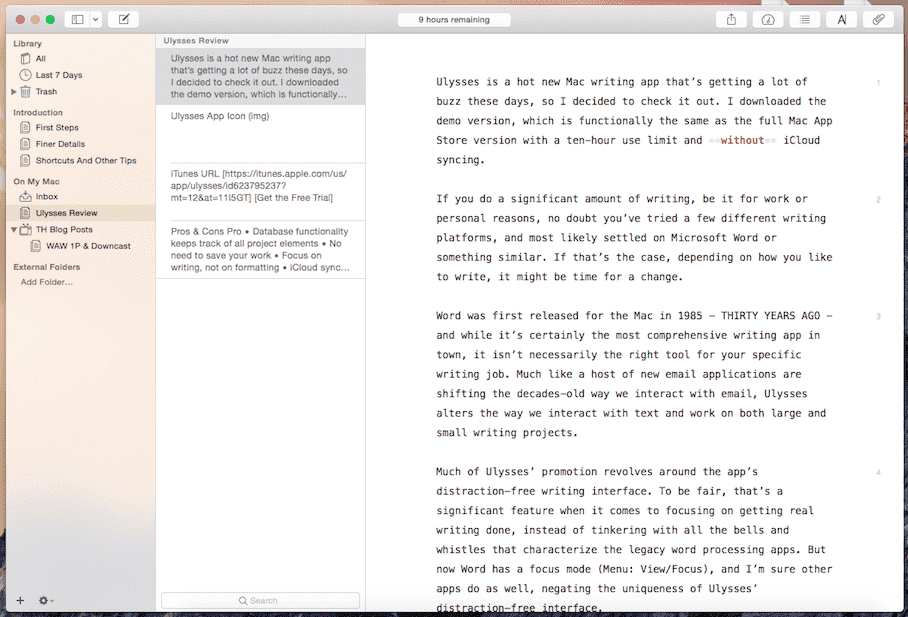
Szukasz najlepszych aplikacji dla pisarzy na Maca? Ulysses to najlepszy wybór. Oferuje przejrzyste, pozbawione rozpraszaczy środowisko do pisania z pięknym interfejsem natywnym dla systemu macOS. Używa Markdowna do formatowania i obsługuje synchronizację z iCloud na wszystkich urządzeniach Apple. Dzięki ujednoliconej bibliotece, śledzeniu celów i płynnemu publikowaniu w WordPressie i Medium, jest ulubioną aplikacją blogerów i twórców treści.
Cena: 5.99 USD / miesiąc lub 49.99 USD / rok
Powody, dla których warto wybrać:
- Elegancki, minimalistyczny interfejs
- Wyznaczanie celów i śledzenie liczby słów
- Łatwy eksport do wielu formatów
Powody, których należy unikać:
- Ceny oparte na subskrypcji
- Brakuje zaawansowanych narzędzi do tworzenia konspektów dla powieściopisarzy
3. Strony
Aplikacja Pages firmy Apple to zaskakująco wydajny edytor tekstu. Oferuje piękne szablony, integrację z iCloud i funkcje współpracy, a wszystko to w środowisku Mac. Może nie ma wszystkich bajerów Scrivenera, ale dla wielu jest więcej niż wystarczający.
 Powiązany artykuł: 10 najlepszych edytorów tekstu dla komputerów Mac (bezpłatne i płatne)
Cena: Bezpłatna (wbudowana na Macu)
Powody, dla których warto wybrać:
- Bezpłatny i natywny dla komputerów Mac
- Nadaje się do pisania na poziomie podstawowym i średnio zaawansowanym
- Współpraca w czasie rzeczywistym
Powody, których należy unikać:
- Nie jest idealny do złożonych projektów pisemnych
- Mniej opcji eksportowych w porównaniu z innymi
4. Pisarz LibreOffice
LibreOffice Writer to kolejny komponent pakietu LibreOffice do przetwarzania tekstu – darmowej, otwartej alternatywy dla pakietu Microsoft Office. To potężna i bogata w funkcje aplikacja dostępna na macOS, Windows i Linux, przeznaczona do wszystkiego, od prostych listów po złożone dokumenty z obrazami, tabelami i odnośnikami.
Cena: Bezpłatny (otwarte źródło)
Powody, dla których warto wybrać:
- 100% za darmo, bez subskrypcji
- Doskonałe dla użytkowników potrzebujących zaawansowanych opcji formatowania
- Idealny do dokumentów akademickich, prawnych lub biznesowych
Powody, których należy unikać:
- Interfejs wydaje się nieco przestarzały w porównaniu do nowoczesnych aplikacji natywnych dla komputerów Mac
- Niewielka krzywa uczenia się, jeśli jesteś przyzwyczajony do prostszych edytorów
- Synchronizacja w chmurze nie jest tak płynna jak w przypadku iCloud lub Dokumentów Google
5. Niedźwiedź

Bear to również jedna z najlepszych aplikacji dla pisarzy na Maca. To elastyczna aplikacja do pisania, idealna dla osób robiących notatki i piszących krótkie teksty. Dzięki edytorowi opartemu na Markdownie i organizacji opartej na hashtagach, łatwo utrzymać porządek. Wersja Pro odblokowuje synchronizację, motywy i opcje eksportu, dzięki czemu jest doskonałym towarzyszem codziennego pisania.
Cena: Bezpłatnie, 1.49 USD/miesiąc lub 14.99 USD/rok w wersji Pro
Powody, dla których warto wybrać:
- Piękny i intuicyjny interfejs
- Szybka organizacja za pomocą tagów
- Doskonałe do notatek i krótkich treści
Powody, których należy unikać:
- Ograniczone narzędzia formatowania
- Najlepiej nadaje się do krótkich tekstów, a nie do długich projektów
6. Autor
Jeśli jesteś użytkownikiem Apple i szukasz najlepszych aplikacji dla pisarzy na Maca, Author zasługuje na Twoją uwagę. Author to darmowa, minimalistyczna aplikacja do pisania, zaprojektowana specjalnie dla użytkowników macOS, szczególnie tych zajmujących się pisaniem akademickim i badawczym. Wyróżnia się integracją zaawansowanych narzędzi, takich jak mapowanie pojęć i zarządzanie cytowaniem, w przejrzystym, nierozpraszającym uwagi interfejsie.
Cena: Bezpłatna, 19.99 USD za pełną wersję
Powody, dla których warto wybrać:
- Dostosowany do pisania prac naukowych i badawczych, z solidnymi narzędziami do cytowania
- Unikalna funkcja mapowania koncepcji pomaga w porządkowaniu złożonych pomysłów
- Minimalistyczny design sprzyja skupionym sesjom pisania
- Integracja AI zapewnia inteligentną pomoc w pisaniu
Powody, których należy unikać:
- Funkcje eksportu i sztucznej inteligencji są dostępne wyłącznie w wersji płatnej
- Interfejs może być zbyt uproszczony dla użytkowników poszukujących zaawansowanych opcji formatowania
7. Gramatyka
Grammarly nie jest aplikacją do pisania per se, ale jest niezbędna do dopracowania tekstu. Ta natywna aplikacja na Maca integruje się ze wszystkimi narzędziami do pisania i sprawdza gramatykę, interpunkcję, przejrzystość i styl. To idealne rozwiązanie dla każdego, kto chce pisać profesjonalnie i unikać kłopotliwych literówek.
Cena: Bezpłatna, Premium od 12 USD/miesiąc
Powody, dla których warto wybrać:
- Potężna kontrola gramatyki i stylu
- Działa na wszystkich platformach do pisania
- Sugestie dotyczące tonu i przejrzystości
Powody, których należy unikać:
- Premium może być drogi
- Do pełnej funkcjonalności wymagany jest dostęp do Internetu
8. Wolność
Freedom to jedna z najlepszych aplikacji dla pisarzy na Macu, która blokuje rozpraszacze. Pomaga utrzymać koncentrację, blokując strony internetowe, aplikacje, a nawet cały internet na wszystkich urządzeniach (Mac, Windows, iOS, Android). Samo w sobie nie jest narzędziem do pisania, ale narzędziem zwiększającym produktywność, które daje Ci przestrzeń do pisania bez konieczności wciągania się w e-maile, media społecznościowe czy w pułapki.
Cena: Bezpłatnie, 8.99 USD/miesiąc, 39.99 USD/rok lub jednorazowa płatność w wysokości 99.50 USD za wersję Premium
Powody, dla których warto wybrać:
- Znacznie zwiększa koncentrację i czas pisania
- Łatwy w użyciu i wysoce konfigurowalny
- Działa na wszystkich urządzeniach, więc rozpraszacze nie będą Cię dręczyć
Powody, których należy unikać:
- Może wydawać się rygorystyczne (i o to właśnie chodzi!).
- Niektóre funkcje są dostępne za opłatą (np. planowanie lub cykliczne sesje)
Część 2. Bonus: Wyczyść pamięć podręczną bez utraty ważnych dokumentów
Wymienione powyżej najlepsze aplikacje dla pisarzy na Macu po prostu ułatwiają i uprzyjemniają pisanie. Jednak pobieranie zbyt wielu aplikacji może powodować spowolnienie działania Maca. Wyczyszczenie pamięci podręcznej może pomóc, ale ręczne wykonanie tej czynności wiąże się z ryzykiem utraty ważnych danych aplikacji. Właśnie tutaj iMyMac PowerMyMac jest cala
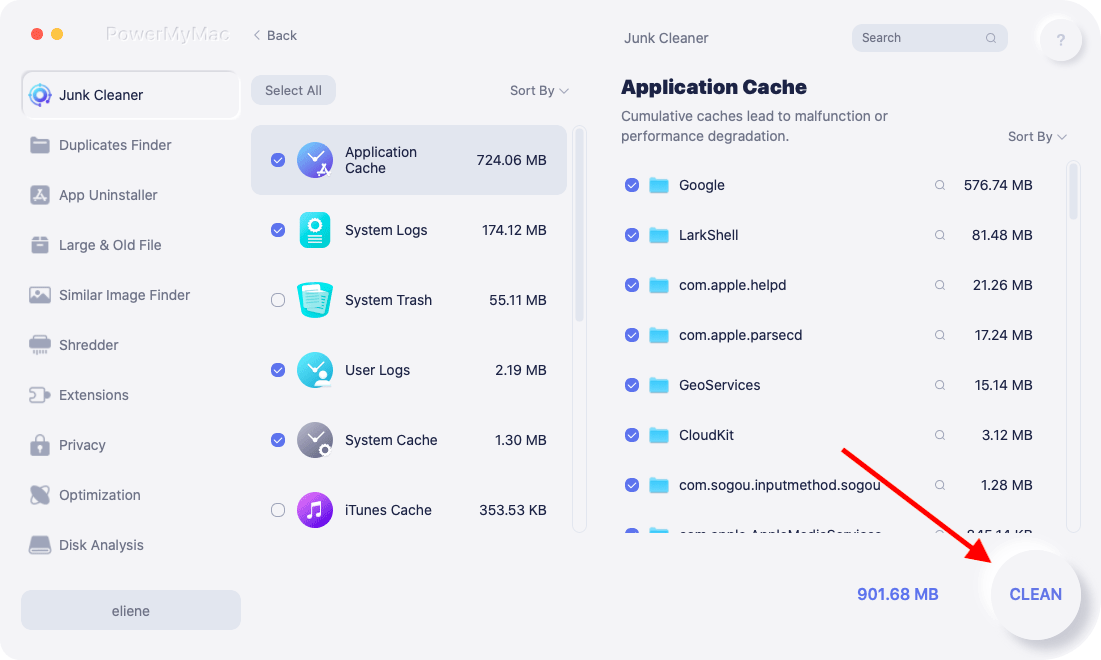
PowerMyMac to kompleksowe narzędzie do czyszczenia komputerów Mac, które bezpiecznie usuwa zbędne pliki, w tym pamięć podręczną systemu i aplikacji, bez naruszania ważnych dokumentów. Funkcja inteligentnego skanowania identyfikuje, co można bezpiecznie usunąć, a Ty możesz przejrzeć wszystkie dane przed kliknięciem „Wyczyść”. To idealne rozwiązanie dla pisarzy, którzy chcą mieć szybszego Maca bez obawy o utratę szkiców lub wyników badań.
Powiązany artykuł: Jak wyczyścić pamięć podręczną na komputerze Mac ręcznie lub automatycznie
PowerMyMac zawiera również moduły do odinstalowywania aplikacji, monitorowania użycia procesora/pamięci i zarządzania rozszerzeniami. Dzięki PowerMyMac Twoje urządzenie będzie działać jak nowe.
Część 3. Wniosek
Posiadanie odpowiedniej aplikacji do pisania może całkowicie odmienić Twoją produktywność. Niezależnie od tego, czy piszesz powieść w Scrivenerze, blogujesz w Ulysses, czy edytujesz w Grammarly, te najlepsze aplikacje dla pisarzy na Macu pomogą Ci pisać szybciej, lepiej i z większym skupieniem. Połącz to z inteligentną konserwacją systemu za pomocą narzędzia takiego jak iMyMac PowerMyMac, a zapewnisz sobie nieprzerwany przepływ kreatywności. Wybierz narzędzie dopasowane do Twojego trybu pracy i wróć do tego, co robisz najlepiej – pisania.


