


 Konwerter wideo


Chociaż pliki TP zachowują doskonałą jakość wideo, często występują problemy ze zgodnością, co utrudnia ich odtwarzanie, edycję lub udostępnianie na różnych urządzeniach i platformach. Z tego powodu konwersja plików TP do bardziej dostępnego i powszechnie obsługiwanego formatu staje się niezbędna. W tym artykule omówimy kluczowe różnice między formatami TP i AVI, a następnie przeprowadzimy Cię przez proces konwersji. TP do AVINiezależnie od tego, czy jesteś okazjonalnym użytkownikiem, czy osobą często pracującą z dużymi plikami wideo, pomożemy Ci wybrać odpowiednią metodę odpowiadającą Twoim potrzebom.
Spis treści: Część 1. Różnica między formatem TP a AVICzęść 2. Konwersja plików TP do AVI w systemie Windows/MacCzęść 3. Konwersja plików TP do AVI onlineCzęść 4. Wniosek
Część 1. Różnica między formatem TP a AVI
TP i AVI to formaty plików wideo, jednak służą różnym celom i oferują odmienne funkcje.
TP, czyli Transport Stream Packet, to format używany głównie do nagrywania programów telewizyjnych w wysokiej rozdzielczości. Pliki te są zazwyczaj przechwytywane przez karty tunerów telewizyjnych i zawierają nie tylko strumienie wideo i audio, ale także metadane, takie jak informacje o programie i dane kanału. Pliki TP Są one skonstruowane tak, aby były odporne na błędy podczas transmisji danych, umożliwiając odzyskiwanie danych po błędach lub utraconych danych podczas przesyłania strumieniowego przez sieci. To sprawia, że idealnie nadają się do celów nadawczych, ale nie są zbyt wydajne w przypadku odtwarzania na popularnych odtwarzaczach multimedialnych lub urządzeniach. Pliki TP są często duże i mogą wymagać specjalistycznego oprogramowania do płynnego odtwarzania lub konwersji.
Z kolei AVI, czyli Audio Video Interleave, to znacznie bardziej uniwersalny format kontenera opracowany przez firmę Microsoft. Jest powszechnie używany do lokalnego odtwarzania i edycji wideo. Pliki AVI przechowują dane audio i wideo w sposób umożliwiający synchroniczne odtwarzanie, a format obsługuje różne kodeki, co zapewnia jego dużą elastyczność. Pliki AVI są szeroko kompatybilne z odtwarzaczami multimedialnymi, programami do edycji, a nawet starszym sprzętem.
Podczas gdy format TP jest zoptymalizowany pod kątem środowisk streamingowych i zachowania integralności transmisji, format AVI jest zoptymalizowany pod kątem dostępności, spójności odtwarzania i wydajności edycji. Konwersja z formatu TP do AVI zasadniczo przenosi wideo z formatu gotowego do transmisji na format nadający się do użytku osobistego lub profesjonalnego na szerokiej gamie platform.
Część 2. Konwersja plików TP do AVI w systemie Windows/Mac
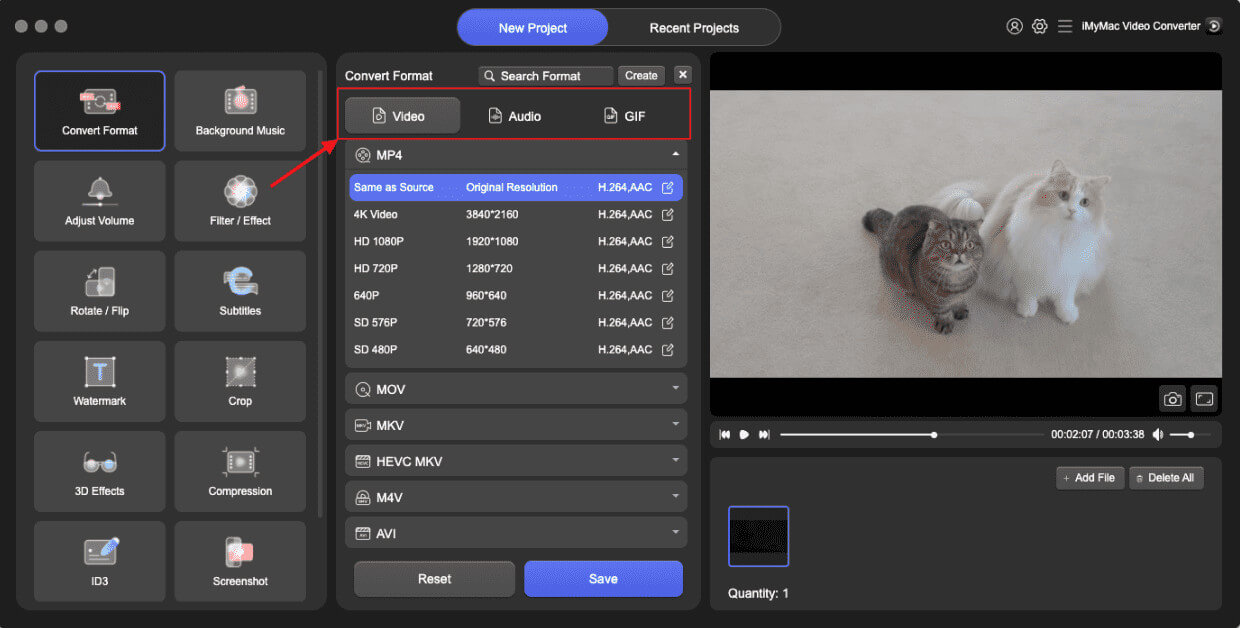
Jak przekonwertować TP do AVI? Konwerter wideo iMyMac to profesjonalne, a zarazem przyjazne dla użytkownika oprogramowanie do konwersji wideo, które działa bezproblemowo zarówno na platformach Windows, jak i Mac. Zostało zaprojektowane z myślą o obsłudze szerokiej gamy formatów plików – w tym TP – i konwersji ich do bardziej praktycznych formatów, takich jak AVI. To sprawia, że jest to potężne rozwiązanie dla każdego, kto chce z łatwością przetwarzać wysokiej jakości filmy z nagrań HDTV.
Wspaniałą rzeczą w tym narzędziu jest to, że Ty też możesz edytować swoje filmy z nim. Na przykład możesz obracać, przycinać, wycinać lub kadrować filmy. Możesz również wybrać edycję nasycenia, odcienia, jasności i innych ustawień za pomocą tego narzędzia.
Główne funkcje programu iMyMac Video Converter:
- Obsługuje ponad 1000 formatów: W tym TP, AVI, MP4, MOV, MKV i inne.
- Szybka konwersja: Dzięki przyspieszeniu sprzętowemu i wielowątkowości.
- Konwersja wsadowa: Konwertuj wiele plików jednocześnie, aby zaoszczędzić czas.
- Narzędzia do edycji wideo: Podstawowe opcje edycji, takie jak przycinanie, kadrowanie, dodawanie znaków wodnych, dostosowywanie jasności/kontrastu i wstawianie napisów.
- Konwersja bezstratna: Zachowuje oryginalną jakość wideo, optymalizując jednocześnie rozmiar pliku.
Przewodnik krok po kroku dotyczący korzystania z iMyMac
Sprawdźmy, jak za pomocą programu iMyMac Video Converter bez trudu przekonwertować pliki TP na AVI.
- Uruchom wersję Mac lub Windows programu iMyMac Video Converter na swoim komputerze. Zaloguj się na swoje konto po zakończeniu.
- Dodatkową opcją jest przeciągnięcie i upuszczenie pliku TP na ekran systemu.
- Po kliknięciu przycisku „Konwertuj format” zostanie wyświetlona rozwijana opcja umożliwiająca wybranie typu pliku, do którego ma zostać przekonwertowany oryginał, np. AVI.
- Dzięki interfejsowi użytkownika lokalizowanie zmian w plikach jest teraz prostsze. Możesz wprowadzać dowolne zmiany w plikach.
- Wybierając Zapisz, możesz zapisać wszystkie swoje modyfikacje.
- Wybierz opcję konwersji z paska narzędzi, aby rozpocząć proces konwersji.
Część 3. Konwersja plików TP do AVI online
Jeśli szukasz szybkiego rozwiązania, które nie wymaga instalacji, istnieje kilka darmowe konwertery wideo online Potrafi konwertować TP do AVI. Oto trzy popularne i niezawodne opcje:
1. CloudConvert
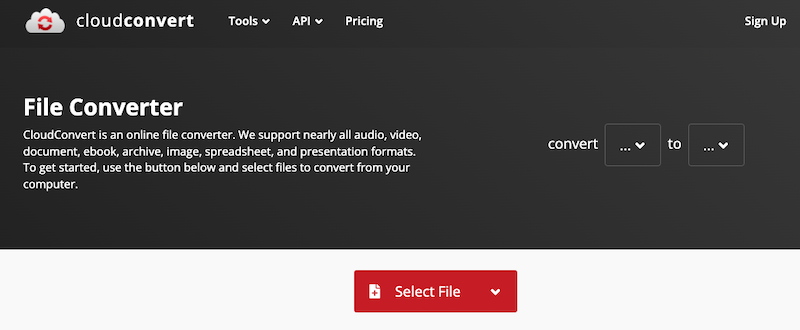
CloudConvert to solidna internetowa usługa konwersji plików, która obsługuje szeroką gamę formatów, w tym TP i AVI. CloudConvert integruje się również z usługami przechowywania danych w chmurze, takimi jak Google Drive, Dropbox i OneDrive, ułatwiając obsługę plików. Chociaż idealnie nadaje się do sporadycznych konwersji, może nie obsługiwać bardzo dużych plików tak wydajnie, jak oprogramowanie desktopowe.
2. Convertio
Convertio to narzędzie w chmurze, stworzone z myślą o szybkiej i łatwej konwersji plików. Obsługuje ponad 300 typów plików i oferuje opcjonalne ustawienia, takie jak kodek i jakość. Pliki można przesyłać z dysku lokalnego lub z chmury. Pliki są automatycznie usuwane po 24 godzinach, co zapewnia prywatność użytkownika.
3. Konwersja online
Online-Convert oferuje szczegółową platformę konwersji wideo z zaawansowanymi ustawieniami. Obsługuje konwersję TP do AVI i pozwala użytkownikom dostosować rozdzielczość wideo, proporcje obrazu, liczbę klatek na sekundę i jakość dźwięku.
Część 4. Wniosek
Konwersja TP do AVI poprawia kompatybilność, użyteczność i wydajność odtwarzania na szerokiej gamie urządzeń i platform. Chociaż narzędzia online, takie jak CloudConvert, Convertio i Online-Convert, oferują szybkie rozwiązania, najlepiej sprawdzają się w przypadku małych plików i okazjonalnego użytkowania. Dla osób pracujących z dużymi plikami wideo lub wymagających wysokiej jakości, szybkich i konfigurowalnych konwersji, iMyMac Video Converter wyróżnia się jako najlepszy wybór. Jest bogaty w funkcje, niezawodny i zoptymalizowany pod kątem wydajności i łatwości obsługi. Niezależnie od tego, czy archiwizujesz nagrania HD, czy przygotowujesz pliki do edycji, konwersja plików TP do AVI nigdy nie była prostsza.


