


 Konwerter wideo


Jeśli kiedykolwiek nagrywałeś programy telewizyjne w wysokiej rozdzielczości za pomocą karty tunera telewizji cyfrowej, prawdopodobnie spotkałeś się z plikami o rozszerzenie .tpPliki te to zazwyczaj wysokiej jakości formaty wideo strumieniowego przesyłu danych, ale wiążą się z problemami ze zgodnością. Większość urządzeń i odtwarzaczy multimedialnych nie obsługuje plików TP, co utrudnia odtwarzanie, udostępnianie lub edycję treści bez konwersji.
Na szczęście konwersja TP do MP4 — uniwersalnie obsługiwany format wideo — może natychmiast rozwiązać te problemy. Pliki MP4 są szeroko kompatybilne na różnych platformach, w tym ze smartfonami, telewizorami Smart TV i oprogramowaniem do edycji. W tym poradniku pokażemy, jak szybko przekonwertować pliki TP do MP4. Zanurzmy się w temat i zwiększmy dostępność Twoich plików wideo.
Spis treści: Część 1. Czym są pliki TP?Część 2. Konwersja plików TP do formatu MP4 w systemie Windows/MacCzęść 3. Konwersja plików TP do MP4 onlineCzęść 4. Wniosek
Część 1. Czym są pliki TP?
Plik TP to plik wideo rejestrowany przez karty tunerów telewizyjnych lub cyfrowe rejestratory wideo. Skrót „TP” oznacza „Transport Stream Packet”, czyli format kontenera używany do transmisji telewizji wysokiej rozdzielczości. Pliki te zazwyczaj przechowują MPEG-2 dane wideo wraz z dźwiękiem i metadanymi, nagrane z transmisji telewizyjnych nadawanych drogą bezprzewodową.
Dlaczego powinniśmy konwertować TP do MP4?
- zgodnośćPliki TP nie są kompatybilne z większością standardowych odtwarzaczy multimedialnych. Konwersja do formatu MP4 sprawia, że filmy można odtwarzać praktycznie na każdym urządzeniu, w tym na telefonach, tabletach, telewizorach Smart TV i konsolach do gier.
- Wydajność przechowywaniaPliki TP są często duże ze względu na swoją nieskompresowaną lub mniej skompresowaną naturę. Pliki MP4 wykorzystują zaawansowane techniki kompresji (takie jak H.264), które znacznie zmniejszają rozmiar pliku przy jednoczesnym zachowaniu wysokiej jakości wideo.
- Edytowanie i udostępnianieFormat MP4 jest szeroko obsługiwany przez oprogramowanie do edycji wideo i platformy mediów społecznościowych, dzięki czemu praca z materiałami wideo staje się o wiele łatwiejsza.
- Wydajność:Odtwarzanie plików TP może zużywać więcej mocy procesora w porównaniu do plików MP4, które są zoptymalizowane pod kątem wydajności i przesyłania strumieniowego.
Część 2. Konwersja plików TP do formatu MP4 w systemie Windows/Mac
Jak przekonwertować TP na MP4? Konwerter wideo iMyMac jest idealny dla użytkowników poszukujących niezawodnego rozwiązania offline do konwersji wideo. To potężne i przyjazne dla użytkownika narzędzie desktopowe, które obsługuje szeroką gamę formatów wideo, w tym TP. Największą zaletą tego narzędzia jest możliwość… edytować swoje filmy z nim. Na przykład możesz obracać, przycinać, wycinać lub kadrować filmy. Możesz również wybrać edycję nasycenia, odcienia, jasności i innych ustawień za pomocą tego narzędzia.
Najważniejsze funkcje konwertera wideo iMyMac
- Obsługuje konwersję partii.
- Oferuje wiele formatów wyjściowych, w tym MP4, MOV, AVI i inne.
- Wbudowany edytor wideo z możliwością przycinania, kadrowania i dodawania efektów.
- Przyspieszenie GPU dla szybszego przetwarzania.
Jak korzystać z konwertera wideo iMyMac
Sprawdźmy, jak za pomocą programu iMyMac Video Converter bez problemu przekonwertować plik TP na MP4.
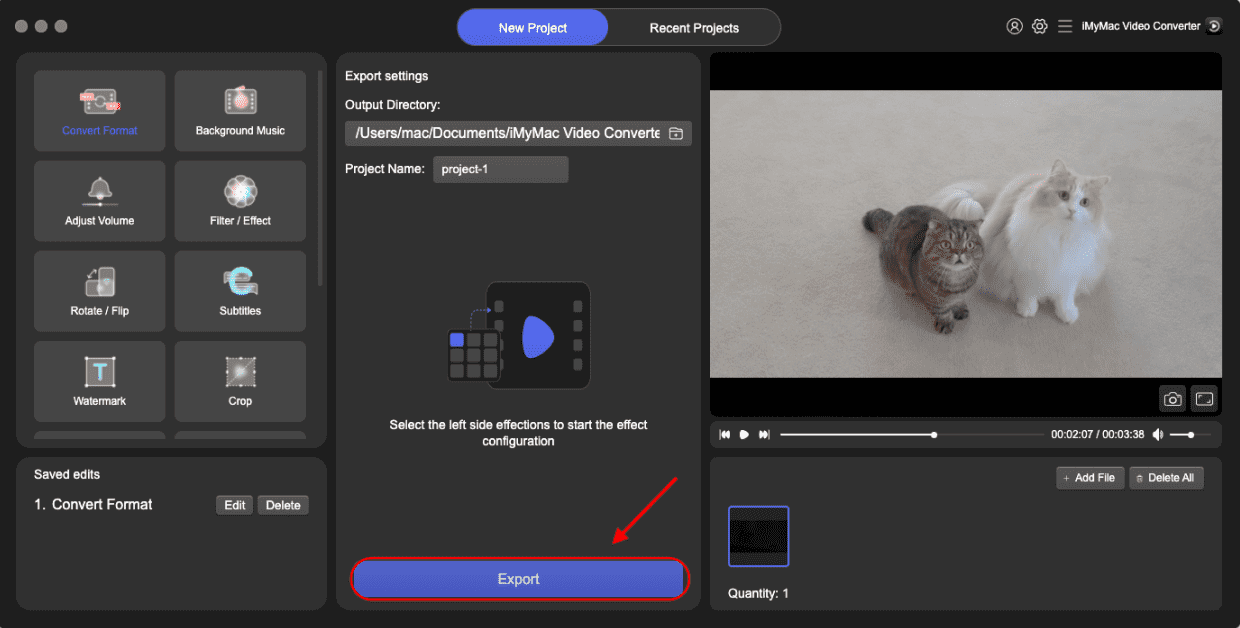
- Uruchom oprogramowanie iMyMac Video Converter na swoim komputerze, w wersji Mac lub Windows. Po zakończeniu zaloguj się na swoje konto.
- Inną możliwością jest przeciągnięcie i upuszczenie pliku TP na ekran systemu.
- Po kliknięciu przycisku „Konwertuj format” pojawi się menu rozwijane, umożliwiające wybranie rodzaju pliku, do którego ma zostać przekonwertowany oryginalny plik, np. MP4.
- Znajdowanie modyfikacji plików jest teraz łatwiejsze dzięki interfejsowi użytkownika. Możesz dowolnie edytować pliki, które wybierzesz.
- Możesz zapisać wszystkie zmiany, wybierając opcję Zapisz.
- Aby rozpocząć proces konwersji, wybierz opcję konwersji z paska narzędzi.
Część 3. Konwersja plików TP do MP4 online
Jeśli wolisz rozwiązanie bez pobierania, istnieje kilka darmowe konwertery wideo online które obsługuje konwersję TP do MP4. Oto kilka niezawodnych narzędzi:
1. CloudConvert
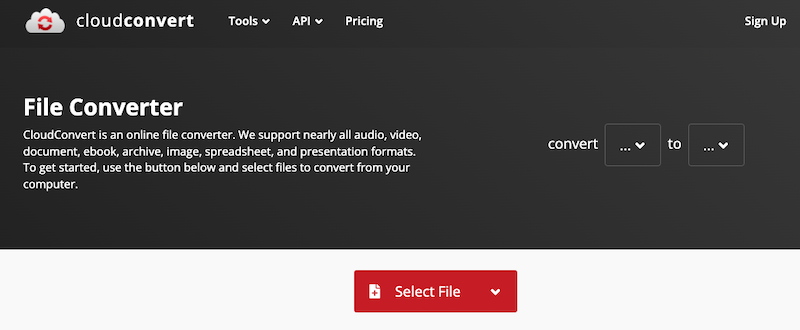
CloudConvert to internetowa usługa konwersji plików, która obsługuje ponad 200 formatów, w tym pliki wideo, audio, dokumenty, obrazy i archiwa. Umożliwia użytkownikom łatwą konwersję plików TP do MP4 bez instalowania oprogramowania. Chociaż usługa jest darmowa w ograniczonym zakresie, CloudConvert oferuje również płatne plany dla większych plików, większej liczby konwersji i szybszego przetwarzania z priorytetowym wsparciem technicznym.
2. Convertio
Convertio to popularna internetowa platforma do konwersji plików, która obsługuje szeroką gamę formatów, w tym wideo, audio, obrazy, dokumenty i wiele innych. Umożliwia użytkownikom konwersję plików TP do MP4 bezpośrednio w przeglądarce, bez konieczności instalowania oprogramowania. Convertio oferuje prosty interfejs typu „przeciągnij i upuść” oraz umożliwia przesyłanie plików z komputera, Dysku Google, Dropboxa lub za pośrednictwem adresu URL. Użytkownicy wersji darmowej mają limit rozmiaru pliku (zwykle 100 MB), natomiast plany premium odblokowują wyższe limity i szybszą konwersję.
3. Bezpłatna konwersja
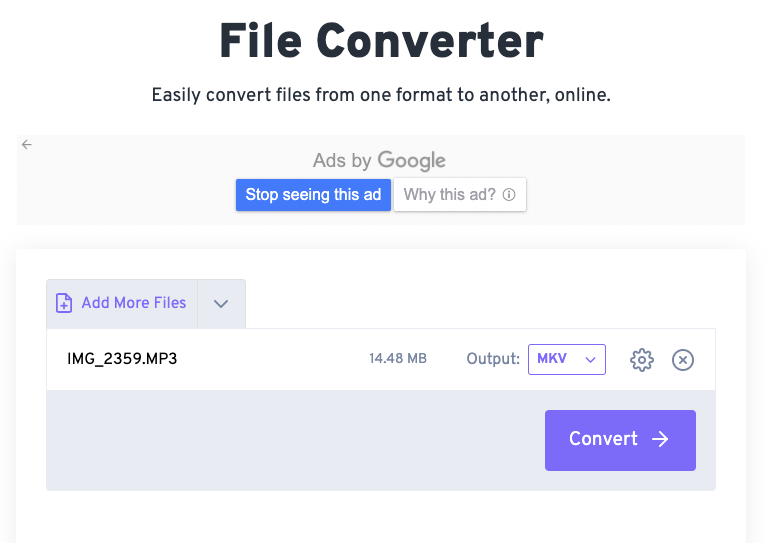
FreeConvert to wszechstronne narzędzie do konwersji plików online, które obsługuje wiele formatów, w tym pliki wideo, audio, obrazy, dokumenty i e-booki. FreeConvert oferuje przyjazny dla użytkownika interfejs i opcje personalizacji, takie jak kodek wideo, rozmiar ekranu, liczba klatek na sekundę i inne. Platforma wykorzystuje szyfrowanie SSL i usuwa pliki po dwóch godzinach, aby zapewnić prywatność. FreeConvert jest darmowy w wersji podstawowej, a plany premium oferują większe limity rozmiaru plików i szybsze przetwarzanie.
Uwaga:
Podczas gdy narzędzia online są wygodne do szybkich, małych konwersji, iMyMac Video Converter oferuje lepszą wydajność w przypadku dużych plików i przetwarzania wsadowego. Platformy online często ograniczają rozmiar pliku, prędkość i zależą od połączenia internetowego. Z kolei iMyMac działa całkowicie offline, zapewniając większą szybkość, wyższą jakość obrazu oraz większą kontrolę nad ustawieniami i edycją wideo.
Co więcej, akceleracja GPU w iMyMacu znacznie skraca czas przetwarzania, co jest idealne do konwersji wielu lub dużych plików TP. Jeśli często pracujesz z materiałami wideo lub potrzebujesz zaawansowanych funkcji, takich jak przycinanie, efekty i napisy, rozwiązanie desktopowe jest bardziej wszechstronne i niezawodne niż darmowe narzędzia online.
Część 4. Wniosek
Konwersja TP do formatu MP4 zapewnia większą kompatybilność i elastyczność. Chociaż format MP4 zyskał popularność w szerokiej gamie urządzeń i systemów, pliki TP są ograniczone do transmisji i charakteryzują się mniejszą kompatybilnością. Niezależnie od tego, czy preferujesz solidne rozwiązanie programowe, takie jak iMyMac Video Converter, czy też zależy Ci na prostocie narzędzi online, mamy rozwiązanie na każdą potrzebę.
Dla okazjonalnych użytkowników z małymi plikami, narzędzia online są szybkie i darmowe. Jednak do regularnego użytkowania, przetwarzania wsadowego lub dużych plików, dedykowany konwerter wideo, taki jak iMyMac, zapewnia lepszą wydajność i funkcjonalność. Wybierz metodę, która najlepiej pasuje do Twojego sposobu pracy i ciesz się filmami TP bezproblemowo.


