


 Video Converter


Не все видеоплееры способны воспроизводить файлы MPG. Конвертация MPG к OGG Это лучший вариант, если у вас есть файлы MPG, которые не открываются на вашем компьютере. Вы пытаетесь найти способ конвертировать файлы MPG в формат OGG? В этом руководстве мы рассмотрим несколько эффективных методов конвертации файлов MPG в OGG. Давайте начнем и найдем лучший метод, который подходит для вашего рабочего процесса и требований.
Содержание: Часть 1: Что такое файлы MPG и OGG?Часть 2: Преобразование файлов MPG в OGG в Windows/MacЧасть 3: Бесплатное онлайн-конвертирование файлов MPG в OGGЧасть 4: Заключение
Часть 1: Что такое файлы MPG и OGG?
Что такое MPG?
MPG, также известный как MPEGMPG — это мультимедийный формат файлов, используемый в основном для воспроизведения видео. Он использует сжатие MPEG-1 или MPEG-2, что позволяет добиться относительно высокого качества видео при уменьшенном размере файлов. Файлы MPG широко поддерживаются медиаплеерами и программами для редактирования, что делает их распространенным выбором для распространения видеоконтента. Формат поддерживает как аудио-, так и видеопотоки в одном файле и часто используется для фильмов, цифрового телевещания и видеодисков.
Что такое OGG?
OGG OGG — это формат мультимедийных контейнеров с открытым исходным кодом, разработанный фондом Xiph.Org. Он наиболее известен тем, что используется для хранения аудиоданных, в частности, аудиокодека Ogg Vorbis, который обеспечивает высокое качество звука при более низких битрейтах по сравнению с MP3. Файлы OGG используются для потоковой передачи и сжатия высококачественного аудиоконтента. Отсутствие патентов и лицензионных отчислений делает OGG популярным выбором среди разработчиков и аудиоэнтузиастов.
 Статьи по теме: MP3 против OGG: какой формат лучше?
В чём разница между MPG и OGG?
Основное различие заключается в их назначении и содержании: MPG — это видеоформат, который может включать как видео, так и аудио, в то время как OGG — это формат только с аудио. MPG сложнее из-за кодирования видео, тогда как OGG оптимизирован для качества звука и эффективности. Преобразование MPG в OGG по сути означает извлечение звуковой дорожки из видеофайла и сохранение её в высококачественном сжатом аудиоформате.
Часть 2: Преобразование файлов MPG в OGG в Windows/Mac
Если вы ищете надежное и качественное решение для преобразования MPG в OGG на вашем компьютере, Конвертер видео iMyMac Это отличный вариант. Программа совместима как с Windows, так и с Mac и предлагает удобный интерфейс, расширенные возможности редактирования и поддержку широкого спектра форматов. Помимо OGG, это мощное программное обеспечение также позволяет легко конвертировать ваши файлы. Преобразование файлов MPG в MP4WMV, MPG, AVI и многое другое — всего за несколько кликов.
Почему стоит выбрать iMyMac Video Converter?
- Высокоскоростное преобразование: Поддерживает аппаратное ускорение для более быстрых результатов.
- Пакетное преобразование: Преобразуйте несколько файлов MPG одновременно.
- Индивидуальная конфигурацияПредоставляет полный контроль над настройками вывода.
- Высокое качествоСохраняет отличное качество звука после преобразования.
Пошаговое руководство по использованию iMyMac Video Converter:
Давайте посмотрим, как конвертировать MPG в OGG с помощью iMyMac Video Converter:
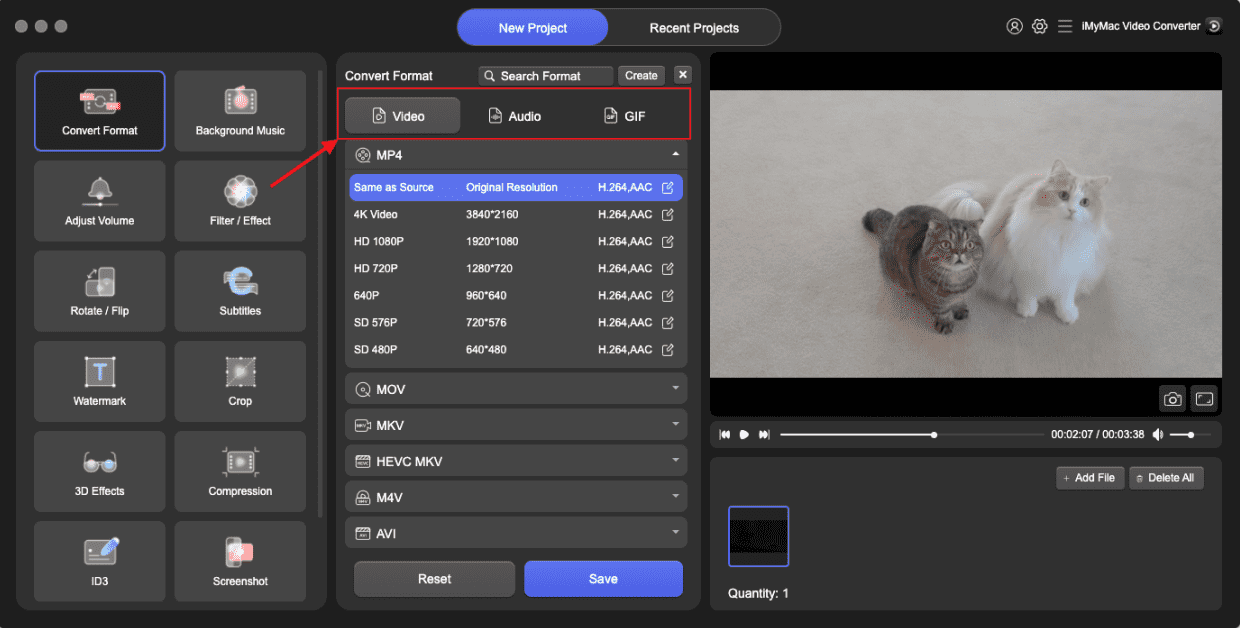
- Запустите программное обеспечение iMyMac Video Converter на своем компьютере, версию для Mac или Windows. Как только вы закончите, войдите в свою учетную запись.
- Перетаскивание файла MPG на экран системы всегда работает.
- После выбора пункта "Преобразовать формат" появляется выпадающее меню, позволяющее выбрать тип файла, в который следует преобразовать исходный файл, например, OGG.
- Благодаря пользовательскому интерфейсу, поиск изменений в файлах стал намного проще. Файлы можно редактировать любым удобным для вас способом.
- Вы можете сохранить все изменения, выбрав «Сохранить».
- Чтобы начать процесс преобразования, выберите вариант преобразования на панели инструментов.
Часть 3: Бесплатное онлайн-конвертирование файлов MPG в OGG
Для пользователей, которые предпочитают не скачивать никакое программное обеспечение, FreeConvert — это мощный и доступный онлайн-инструмент, позволяющий без труда конвертировать MPG в OGG. Он бесплатен и поддерживает широкий спектр входных и выходных форматов. FreeConvert работает непосредственно в вашем браузере. Базовые преобразования бесплатны. Он поддерживает загрузку/скачивание файлов через Dropbox и Google Drive.
Инструкция по конвертации файлов MPG в OGG с помощью FreeConvert:
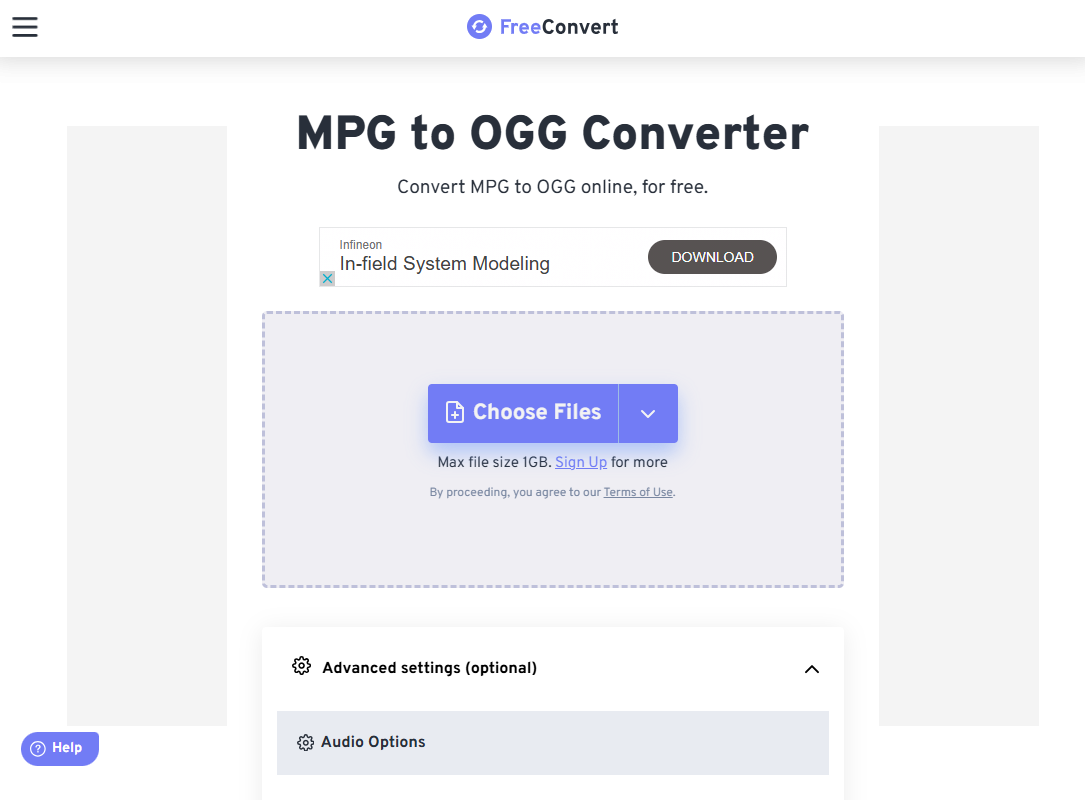
- Откройте браузер и перейдите на сайт FreeConvert MPG to OGG Converter.
- Нажмите «Выбрать файлы» и выберите файл MPG со своего компьютера. FreeConvert также поддерживает файлы из Dropbox, Google Drive и URL-адресов.
- Сайт автоматически определит, что вы хотите преобразовать файл в формат OGG. При необходимости вы можете нажать на значок настроек, чтобы отрегулировать качество вывода, аудиокодек и громкость.
- Нажмите кнопку «Конвертировать». Инструмент обработает ваш файл онлайн. Время конвертации может варьироваться в зависимости от размера файла и скорости интернета.
- После завершения преобразования нажмите «Скачать», чтобы сохранить файл OGG на ваше устройство.
FreeConvert идеально подходит для пользователей, которым нужно быстрое и простое решение для нечастых конвертаций без установки дополнительного программного обеспечения. Однако бесплатные аккаунты имеют ограничение по максимальному размеру файла. Кроме того, вам потребуется стабильное интернет-соединение.
Часть 4: Заключение
Преобразование MPG в OGG — это простой процесс, независимо от того, используете ли вы настольную программу, такую как iMyMac Video Converter, или онлайн-платформу, например FreeConvert. Настольные программы лучше подходят для пользователей, которым необходимы расширенные функции и частые преобразования, в то время как онлайн-инструменты предлагают быстрый и удобный доступ для разового или эпизодического использования.
Понимая различия между форматами MPG и OGG, вы сможете выбрать наиболее подходящий инструмент для своих нужд и каждый раз гарантировать высокое качество звука. Независимо от ваших предпочтений, оба варианта позволяют легко и эффективно извлекать и конвертировать аудио из видеофайлов.


