


 Video Converter


Хотя файлы TP сохраняют отличное качество видео, они часто имеют проблемы совместимости, что затрудняет их воспроизведение, редактирование или обмен между устройствами и платформами. По этой причине преобразование файлов TP в более доступный и широко поддерживаемый формат становится крайне важным. В этой статье мы рассмотрим ключевые различия между форматами TP и AVI, а затем покажем, как выполнить конвертацию. TP в AVIНезависимо от того, являетесь ли вы обычным пользователем или часто работаете с большими видеофайлами, мы поможем вам выбрать подходящий метод, отвечающий вашим потребностям.
Содержание: Часть 1. Разница между форматами TP и AVI.Часть 2. Преобразование файлов TP в AVI на Windows/MacЧасть 3. Конвертация файлов TP в AVI онлайн.Часть 4. Вывод
Часть 1. Разница между форматами TP и AVI.
TP и AVI — это форматы видеофайлов, но они служат совершенно разным целям и обладают различными характеристиками.
TP, или Transport Stream Packet (транспортный потоковый пакет), — это формат, используемый в основном для записи телевизионных трансляций высокой четкости. Эти файлы обычно захватываются ТВ-тюнерами и содержат не только видео- и аудиопотоки, но и метаданные, такие как информация о программе и данные о канале. ТП-файлы Они имеют устойчивую структуру, обеспечивающую возможность восстановления после ошибок или потери данных при потоковой передаче по сетям. Это делает их идеальными для вещания, но не очень эффективными для воспроизведения на обычных медиаплеерах или устройствах. Файлы TP часто имеют большой размер и могут потребовать специализированного программного обеспечения для плавной воспроизведения или конвертации.
В отличие от него, AVI (Audio Video Interleave) — это гораздо более универсальный формат контейнера, разработанный Microsoft. Он широко используется для локального воспроизведения и редактирования видео. Файлы AVI хранят аудио- и видеоданные таким образом, что обеспечивает синхронное воспроизведение, а формат поддерживает различные кодеки, что делает его очень гибким. Файлы AVI широко совместимы с медиаплеерами, программами для редактирования и даже более старым оборудованием.
В то время как TP оптимизирован для потоковой передачи и поддержания целостности вещания, AVI оптимизирован для доступности, стабильности воспроизведения и производительности редактирования. Преобразование из TP в AVI, по сути, переводит ваше видео из формата, готового для вещания, в формат, готовый для личного или профессионального использования на широком спектре платформ.
Часть 2. Преобразование файлов TP в AVI на Windows/Mac
Как преобразовать TP в AVI? Конвертер видео iMyMac Это профессиональное, но при этом удобное в использовании программное обеспечение для конвертации видео, которое безупречно работает как на платформах Windows, так и на Mac. Оно разработано для обработки широкого спектра форматов файлов, включая TP, и преобразования их в более практичные форматы, такие как AVI. Это делает его мощным решением для всех, кто хочет с легкостью обрабатывать высококачественное видео с записей HDTV.
В этом инструменте замечательно то, что вы также можете редактировать свои видео С его помощью. Например, вы можете вращать, обрезать, вырезать или кадрировать видео. С помощью этого инструмента вы также можете редактировать насыщенность, оттенок, яркость и другие параметры.
Основные характеристики iMyMac Video Converter:
- Поддерживает более 1000 форматов: Включая форматы TP, AVI, MP4, MOV, MKV и другие.
- Высокоскоростное преобразование: Благодаря аппаратному ускорению и многопоточности.
- Пакетное преобразование: Конвертируйте несколько файлов одновременно, чтобы сэкономить время.
- Инструменты для редактирования видео: Основные параметры редактирования, такие как обрезка, кадрирование, добавление водяных знаков, регулировка яркости/контраста и вставка субтитров.
- Преобразование без потерь: Сохраняет исходное качество видео, оптимизируя при этом размер файла.
Пошаговое руководство по использованию iMyMac
Давайте рассмотрим, как с помощью iMyMac Video Converter можно легко конвертировать TP в AVI.
- Запустите версию программы iMyMac Video Converter для Mac или Windows на своем компьютере. Войдите в свою учетную запись после того, как закончите.
- Дополнительная возможность — перетаскивание файла TP на дисплей системы.
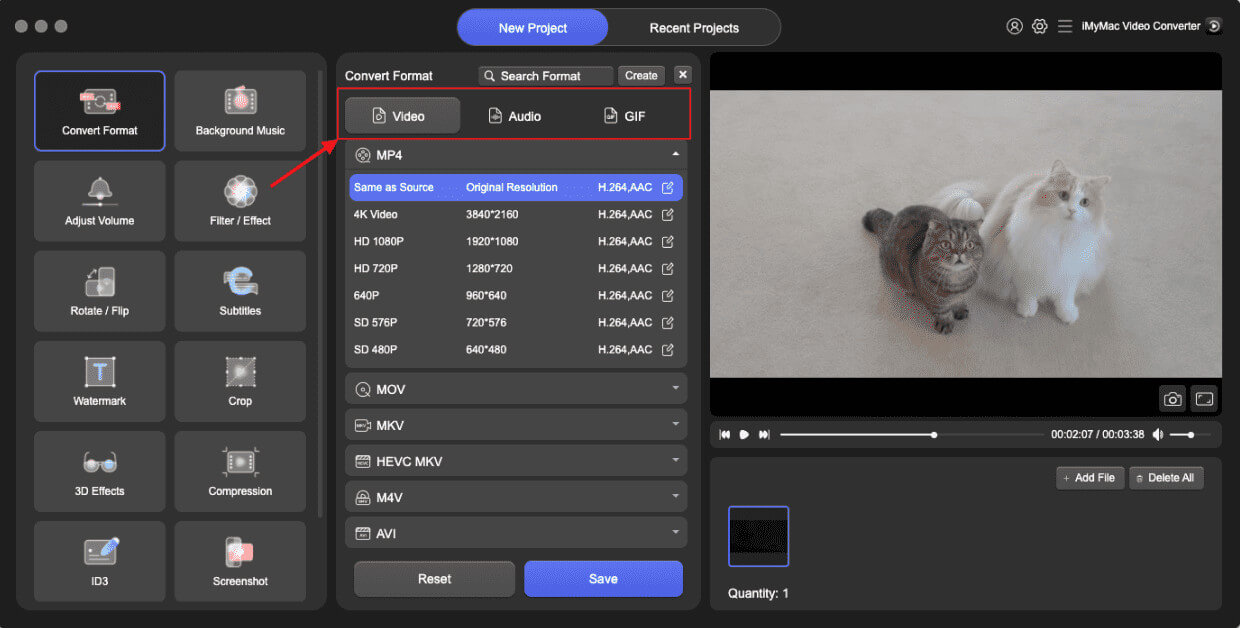
- При нажатии кнопки «Преобразовать формат» отобразится выпадающее меню, позволяющее выбрать тип файла, в который следует преобразовать исходный файл, например, AVI.
- Благодаря новому интерфейсу поиск изменений в файлах стал проще. Вы можете вносить в файлы любые необходимые изменения.
- Выбрав «Сохранить», вы можете сохранить все свои изменения.
- Выберите параметр преобразования на панели инструментов, чтобы начать процесс преобразования.
Часть 3. Конвертация файлов TP в AVI онлайн.
Если вам нужно быстрое решение, не требующее установки, то несколько вариантов подойдут. бесплатные онлайн-конвертеры видео Можно конвертировать TP в AVI. Вот три популярных и надежных варианта:
1. CloudConvert
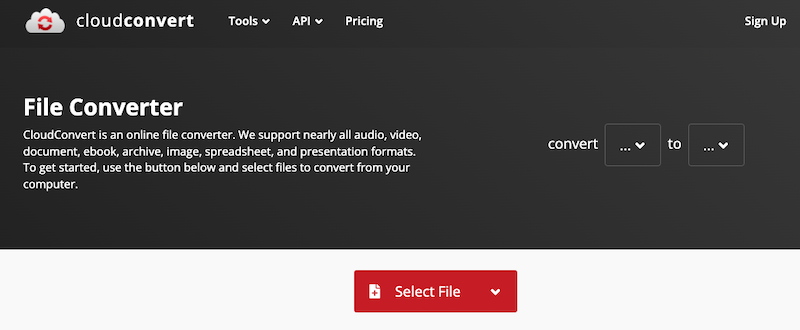
CloudConvert — это мощный веб-сервис для конвертации файлов, поддерживающий широкий спектр форматов, включая TP и AVI. CloudConvert также интегрируется с облачными хранилищами, такими как Google Drive, Dropbox и OneDrive, что упрощает работу с файлами. Хотя он идеально подходит для нечастых конвертаций, он может обрабатывать очень большие файлы не так эффективно, как настольные программы.
2. Convertio
Convertio — это облачный инструмент, разработанный для быстрого и простого преобразования файлов. Он поддерживает более 300 типов файлов и предлагает дополнительные возможности настройки, такие как параметры кодека и качества. Загрузки могут производиться с локального диска или из облачного хранилища. Файлы автоматически удаляются через 24 часа, обеспечивая конфиденциальность пользователя.
3. Интернет-Convert
Online-Convert предлагает подробную платформу для конвертации видео с расширенными настройками. Она поддерживает конвертацию TP в AVI и позволяет пользователям настраивать разрешение видео, соотношение сторон, частоту кадров и качество звука.
Часть 4. Вывод
Преобразование TP в AVI улучшает совместимость, удобство использования и производительность воспроизведения на широком спектре устройств и платформ. Хотя онлайн-инструменты, такие как CloudConvert, Convertio и Online-Convert, предлагают быстрые решения, они лучше всего подходят для небольших файлов и эпизодического использования. Для тех, кто работает с большими видеофайлами или нуждается в высококачественном, быстром и настраиваемом преобразовании, iMyMac Video Converter выделяется как лучший выбор. Он многофункционален, надежен и оптимизирован как для производительности, так и для простоты использования. Независимо от того, архивируете ли вы HD-записи или готовите файлы для редактирования, преобразование файлов TP в AVI никогда не было таким простым.


