


 محول الفيديو


لا تدعم جميع مشغلات الفيديو تشغيل ملفات MPG. التحويل من MPG إلى OGG يُعدّ هذا الخيار الأمثل إذا كانت لديك ملفات MPG لا تعمل على جهاز الكمبيوتر. هل تبحث عن طريقة لتحويل ملفات MPG إلى صيغة OGG؟ في هذا الدليل، سنستعرض بعض الطرق الفعّالة لتحويل ملفات MPG إلى OGG. لنبدأ ونجد الطريقة الأنسب لسير عملك واحتياجاتك.
المحتويات: الجزء الأول: ما هي ملفات MPG و OGG؟الجزء الثاني: تحويل ملفات MPG إلى OGG على نظامي التشغيل ويندوز/ماكالجزء الثالث: تحويل ملفات MPG إلى OGG مجاناً عبر الإنترنتالجزء 4: الخاتمة
الجزء الأول: ما هي ملفات MPG و OGG؟
ما هو ميلا في الغالون؟
MPG، والمعروف أيضًا باسم MPEGيُعدّ MPG تنسيق ملفات وسائط متعددة يُستخدم بشكل أساسي لتشغيل الفيديو. يعتمد على ضغط MPEG-1 أو MPEG-2، مما يُتيح جودة فيديو عالية نسبيًا مع أحجام ملفات مُصغّرة. تحظى ملفات MPG بدعم واسع النطاق من مشغلات الوسائط وبرامج التحرير، مما يجعلها خيارًا شائعًا لتوزيع محتوى الفيديو. يدعم هذا التنسيق كلاً من تدفقات الصوت والفيديو في ملف واحد، ويُستخدم غالبًا للأفلام والبث التلفزيوني الرقمي وأقراص الفيديو الرقمية.
ما هو OGG؟
OGG OGG هو تنسيق حاوية وسائط متعددة مفتوح المصدر، طوّرته مؤسسة Xiph.Org. يشتهر هذا التنسيق بقدرته على تخزين البيانات الصوتية، وخاصةً ترميز الصوت Ogg Vorbis، الذي يوفر جودة صوت عالية بمعدلات بت أقل مقارنةً بـ MP3. تُستخدم ملفات OGG لبث وضغط محتوى صوتي عالي الجودة. وبفضل خلوّه من براءات الاختراع والرسوم، يُعدّ OGG خيارًا شائعًا بين المطورين وعشاق الصوت.
 مقالات ذات صلة: MP3 مقابل OGG: أيهما أفضل؟
ما الفرق بين MPG و OGG؟
يكمن الاختلاف الرئيسي بينهما في الغرض والمحتوى: MPG هو تنسيق فيديو قد يتضمن الفيديو والصوت، بينما OGG هو تنسيق صوتي فقط. يُعدّ MPG أكثر تعقيدًا نظرًا لترميز الفيديو، بينما يُحسّن OGG جودة الصوت وكفاءة الأداء. تحويل MPG إلى OGG يعني ببساطة استخراج المسار الصوتي من ملف الفيديو وحفظه بتنسيق صوتي مضغوط عالي الجودة.
الجزء الثاني: تحويل ملفات MPG إلى OGG على نظامي التشغيل ويندوز/ماك
إذا كنت تبحث عن حل موثوق وعالي الجودة لتحويل ملفات MPG إلى OGG على جهاز الكمبيوتر الخاص بك، محول الفيديو iMyMac يُعد هذا البرنامج خيارًا ممتازًا. فهو متوافق مع نظامي التشغيل ويندوز وماك، ويتميز بواجهة سهلة الاستخدام، وخيارات تحرير متقدمة، ودعم لمجموعة واسعة من الصيغ. ليس هذا فحسب، بل يتيح لك هذا البرنامج القوي أيضًا تحويل ملفاتك بسهولة. تحويل ملفات MPG إلى MP4WMV و MPG و AVI وغيرها، ببضع نقرات فقط.
لماذا تختار iMyMac Video Converter؟
- تحويل عالي السرعةيدعم تسريع الأجهزة للحصول على نتائج أسرع.
- تحويل الدفعة: تحويل ملفات MPG متعددة في وقت واحد.
- التخصيصيوفر تحكمًا كاملاً في إعدادات الإخراج.
- الجودة العاليةيحافظ على جودة صوت ممتازة بعد التحويل.
دليل خطوة بخطوة لاستخدام برنامج iMyMac Video Converter:
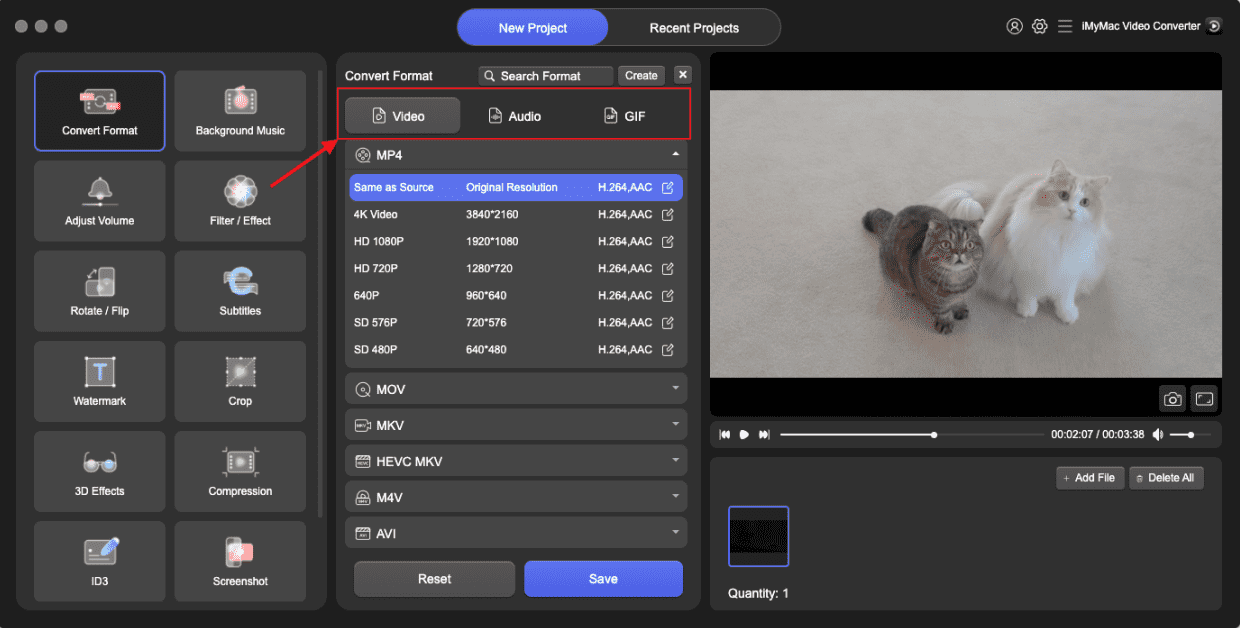
دعونا نرى كيفية تحويل ملفات MPG إلى OGG باستخدام برنامج iMyMac Video Converter:
- قم بتشغيل برنامج iMyMac Video Converter على جهاز الكمبيوتر الخاص بك ، سواء كان إصدار Mac أو Windows. بمجرد الانتهاء ، قم بتسجيل الدخول إلى حسابك.
- إن سحب أو إسقاط ملف MPG على شاشة النظام ينجح دائمًا.
- بعد اختيار "تحويل التنسيق"، يظهر خيار القائمة المنسدلة الذي يسمح لك باختيار نوع الملف الذي يجب تحويل الملف الأصلي إليه، مثل OGG.
- أصبح العثور على تعديلات الملفات أسهل بكثير الآن بفضل واجهة المستخدم. يمكنك تعديل الملفات بأي طريقة تختارها.
- يمكنك حفظ جميع تغييراتك عن طريق تحديد حفظ.
- لبدء عملية التحويل ، اختر خيار التحويل من شريط الأدوات.
الجزء الثالث: تحويل ملفات MPG إلى OGG مجاناً عبر الإنترنت
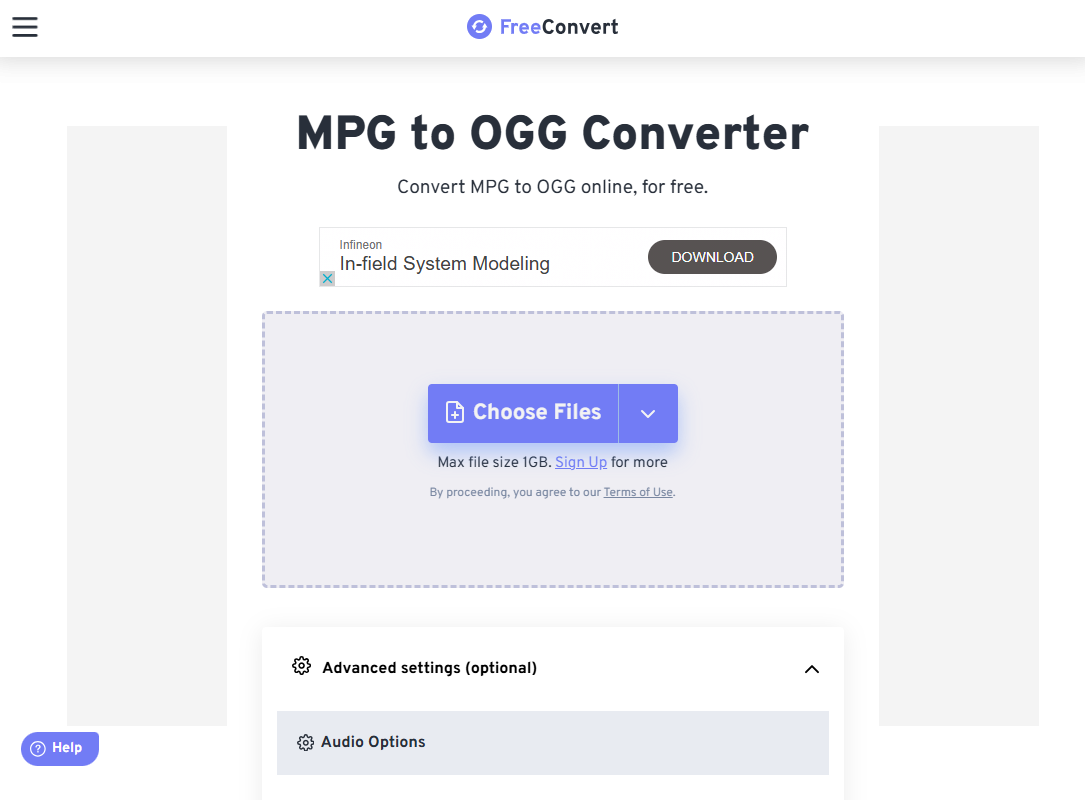
للمستخدمين الذين يفضلون عدم تحميل أي برامج، يُعدّ FreeConvert أداةً قوية وسهلة الاستخدام عبر الإنترنت، تُمكّنك من تحويل ملفات MPG إلى OGG بكل سهولة. استخدامه مجاني، ويدعم مجموعة واسعة من صيغ الإدخال والإخراج. يعمل FreeConvert مباشرةً من متصفحك. التحويلات الأساسية مجانية. كما يدعم تحميل الملفات وتنزيلها من Dropbox وGoogle Drive.
خطوات تحويل ملفات MPG إلى OGG باستخدام برنامج FreeConvert:
- افتح متصفحك وانتقل إلى موقع FreeConvert لتحويل ملفات MPG إلى OGG.
- انقر على "اختيار الملفات" وحدد ملف MPG من جهاز الكمبيوتر الخاص بك. يدعم برنامج FreeConvert أيضًا الملفات من Dropbox وGoogle Drive وعناوين URL.
- سيكتشف الموقع تلقائيًا رغبتك في التحويل إلى صيغة OGG. إذا لزم الأمر، يمكنك النقر على أيقونة الإعدادات لضبط جودة الإخراج، وبرنامج ترميز الصوت، ومستوى الصوت.
- انقر على زر "تحويل". ستقوم الأداة بمعالجة ملفك عبر الإنترنت. قد يختلف وقت التحويل حسب حجم الملف وسرعة الإنترنت.
- بمجرد اكتمال عملية التحويل، انقر فوق "تنزيل" لحفظ ملف OGG على جهازك.
يُعدّ FreeConvert خيارًا مثاليًا للمستخدمين الذين يبحثون عن حل سريع وسهل لتحويل الملفات بين الحين والآخر دون الحاجة إلى تثبيت برامج. مع ذلك، فإن الحسابات المجانية لها حد أقصى لحجم الملف، كما أنها تتطلب اتصالًا مستقرًا بالإنترنت.
الجزء 4: الخاتمة
يُعدّ تحويل ملفات MPG إلى OGG عمليةً بسيطة، سواءً اخترت استخدام برنامج مكتبي مثل iMyMac Video Converter أو منصة عبر الإنترنت مثل FreeConvert. يُناسب البرنامج المكتبي المستخدمين الذين يحتاجون إلى ميزات متقدمة وتحويلات متكررة، بينما توفر الأدوات عبر الإنترنت وصولاً سريعاً ومريحاً للاستخدام لمرة واحدة أو بشكل متقطع.
بفهمك للاختلافات بين صيغتي MPG و OGG، يمكنك اختيار الأداة الأنسب لاحتياجاتك وضمان جودة صوت عالية في كل مرة. بغض النظر عن تفضيلاتك، فإن كلا الخيارين يسهلان استخراج الصوت من ملفات الفيديو وتحويله بكفاءة.


