


 محول الفيديو


رغم أن ملفات TP تحافظ على جودة فيديو ممتازة، إلا أنها غالبًا ما تُعاني من مشاكل في التوافق، مما يجعل تشغيلها أو تعديلها أو مشاركتها عبر الأجهزة والأنظمة أمرًا صعبًا. لهذا السبب، يُصبح تحويل ملفات TP إلى صيغة أكثر سهولة في الاستخدام وأكثر دعمًا أمرًا ضروريًا. في هذه المقالة، سنستعرض الاختلافات الرئيسية بين صيغتي TP وAVI، ثم نُوضح لك كيفية التحويل. TP إلى AVIسواء كنت مستخدمًا عاديًا أو شخصًا يعمل مع ملفات الفيديو الكبيرة بشكل متكرر، فسوف نساعدك في اختيار الطريقة المناسبة التي تناسب احتياجاتك.
المحتويات: الجزء الأول: الفرق بين تنسيق TP وتنسيق AVIالجزء الثاني: تحويل ملفات TP إلى AVI على نظامي التشغيل ويندوز/ماكالجزء 3. تحويل ملفات TP إلى AVI عبر الإنترنتالجزء 4. استنتاج
الجزء الأول: الفرق بين تنسيق TP وتنسيق AVI
TP و AVI كلاهما تنسيقات ملفات فيديو، لكنهما يخدمان أغراضًا مختلفة تمامًا ويقدمان ميزات متباينة.
يُعدّ تنسيق TP، أو حزمة بيانات البث، تنسيقًا يُستخدم بشكل أساسي لتسجيل البث التلفزيوني عالي الوضوح. تُلتقط هذه الملفات عادةً بواسطة بطاقات موالف التلفزيون، ولا تقتصر على تدفقات الفيديو والصوت فحسب، بل تشمل أيضًا بيانات وصفية مثل معلومات البرنامج وبيانات القناة. ملفات TP صُممت هذه الملفات لتكون مرنة أثناء نقل البيانات، مما يسمح باستعادة البيانات في حال حدوث أخطاء أو فقدانها عند البث عبر الشبكات. وهذا يجعلها مثالية لأغراض البث، ولكنها ليست فعالة جدًا للتشغيل على مشغلات الوسائط أو الأجهزة العادية. غالبًا ما تكون ملفات TP كبيرة الحجم وقد تتطلب برامج متخصصة لتشغيلها أو تحويلها بسلاسة.
على النقيض من ذلك، يُعدّ تنسيق AVI، اختصارًا لـ Audio Video Interleave (الصوت والفيديو المتداخل)، تنسيقًا شائع الاستخدام ومُطوّرًا من قِبل مايكروسوفت. ويُستخدم عادةً لتشغيل وتحرير الفيديو محليًا. تخزّن ملفات AVI بيانات الصوت والفيديو بطريقة تسمح بالتشغيل المتزامن، كما يدعم هذا التنسيق العديد من برامج الترميز، مما يجعله مرنًا للغاية. تتوافق ملفات AVI على نطاق واسع مع مشغلات الوسائط وبرامج التحرير، وحتى مع الأجهزة القديمة.
بينما تم تحسين تنسيق TP لبيئات البث المباشر والحفاظ على جودة البث، تم تحسين تنسيق AVI لسهولة الوصول، واتساق التشغيل، وأداء التحرير. إن التحويل من TP إلى AVI ينقل الفيديو من تنسيق جاهز للبث إلى تنسيق جاهز للاستخدام الشخصي أو المهني عبر مجموعة واسعة من المنصات.
الجزء الثاني: تحويل ملفات TP إلى AVI على نظامي التشغيل ويندوز/ماك
كيفية تحويل ملف TP إلى AVI؟ محول الفيديو iMyMac هو برنامج احترافي وسهل الاستخدام لتحويل الفيديو، يعمل بسلاسة على نظامي التشغيل ويندوز وماك. صُمم البرنامج للتعامل مع مجموعة واسعة من صيغ الملفات، بما في ذلك TP، وتحويلها إلى صيغ أكثر عملية مثل AVI. هذا يجعله حلاً فعالاً لكل من يرغب في معالجة فيديوهات عالية الجودة من تسجيلات HDTV بسهولة.
إن الشيء العظيم في هذه الأداة هو أنه يمكنك أيضًا تحرير أشرطة الفيديو الخاصة بك باستخدامها. على سبيل المثال، يمكنك تدوير مقاطع الفيديو، أو قصها، أو قصها، أو اقتصاصها. كما يمكنك تعديل التشبع، والصبغة، والسطوع، وغيرها من الإعدادات باستخدام الأداة.
الميزات الرئيسية لبرنامج iMyMac Video Converter:
- يدعم أكثر من 1000 صيغة: بما في ذلك TP و AVI و MP4 و MOV و MKV وغيرها.
- تحويل عالي السرعة: بفضل تسريع الأجهزة والمعالجة المتعددة الخيوط.
- تحويل الدفعة: قم بتحويل عدة ملفات في وقت واحد لتوفير الوقت.
- أدوات تحرير الفيديو: خيارات التحرير الأساسية مثل القص والقص وإضافة العلامات المائية وضبط السطوع/التباين وإدراج الترجمة.
- تحويل بدون خسارة: يحافظ على جودة الفيديو الأصلية مع تحسين حجم الملف.
دليل خطوة بخطوة لاستخدام iMyMac
دعونا نستكشف كيف يمكنك استخدام برنامج iMyMac Video Converter لتحويل ملفات TP إلى AVI بسهولة.
- ابدأ تشغيل إصدار Mac أو Windows من برنامج iMyMac Video Converter على جهاز الكمبيوتر الخاص بك. قم بتسجيل الدخول إلى حسابك بعد الانتهاء.
- يعد سحب ملف TP وإفلاته على شاشة النظام خيارًا إضافيًا.
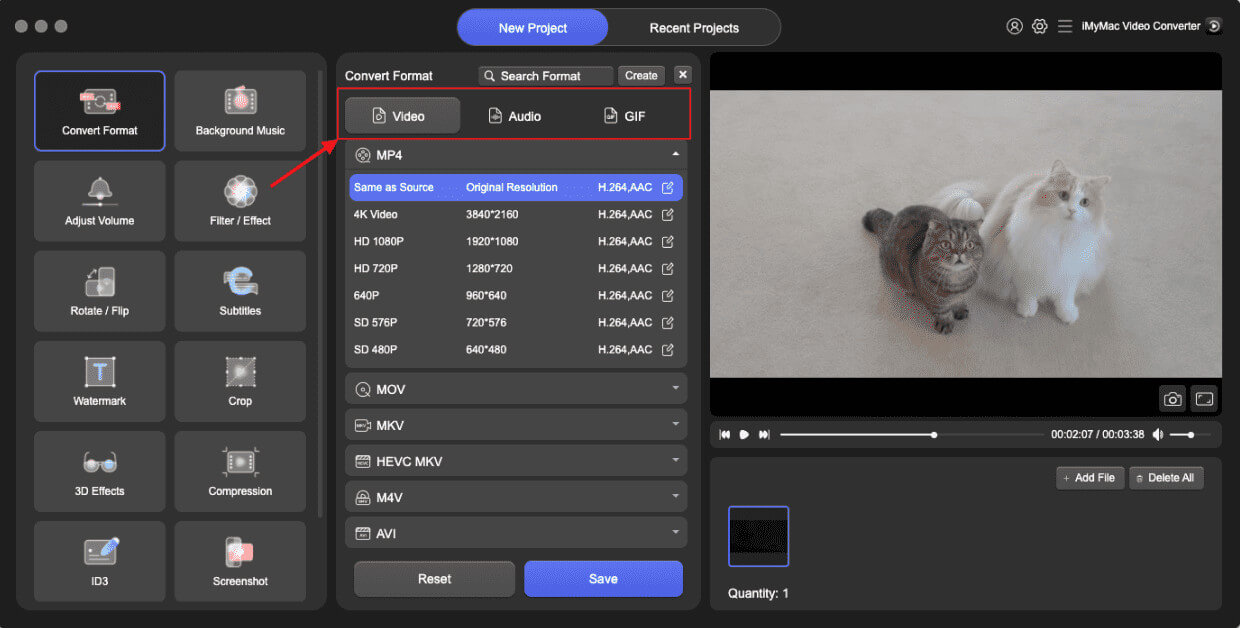
- عند النقر على "تحويل التنسيق"، سيظهر خيار منسدل يسمح لك باختيار نوع الملف الذي يجب تحويل الملف الأصلي إليه، مثل AVI.
- بفضل واجهة المستخدم، أصبح العثور على تعديلات الملفات أسهل. يمكنك إجراء أي تعديلات تريدها على الملفات.
- باختيار حفظ، يمكنك حفظ جميع تعديلاتك.
- حدد خيار التحويل من شريط الأدوات لبدء عملية التحويل.
الجزء 3. تحويل ملفات TP إلى AVI عبر الإنترنت
إذا كنت تبحث عن حل سريع لا يتطلب تثبيتًا، فهناك العديد من الحلول المتاحة. محولات الفيديو المجانية عبر الإنترنت يمكن تحويل ملفات TP إلى AVI. إليك ثلاثة خيارات شائعة وموثوقة:
1. CloudConvert
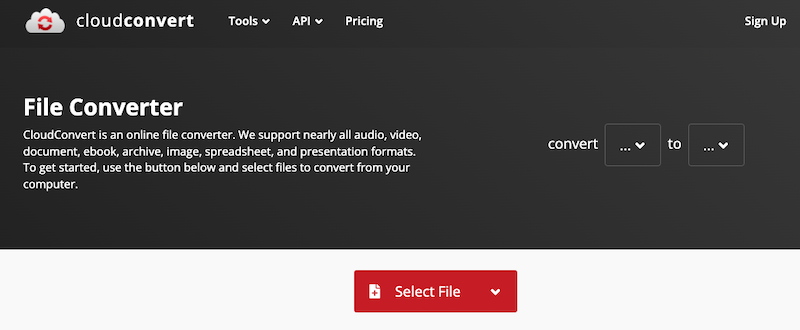
CloudConvert خدمة قوية لتحويل الملفات عبر الإنترنت، تدعم مجموعة واسعة من الصيغ، بما في ذلك TP وAVI. كما تتكامل CloudConvert مع خدمات التخزين السحابي مثل Google Drive وDropbox وOneDrive، مما يُسهّل إدارة الملفات. ورغم أنها مثالية للتحويلات العرضية، إلا أنها قد لا تتعامل مع الملفات الكبيرة بكفاءة برامج سطح المكتب.
2. تحويل
Convertio أداة سحابية مصممة لتحويل الملفات بسرعة وسهولة. تدعم أكثر من 300 نوع ملف، وتوفر خيارات تخصيص مثل إعدادات الترميز والجودة. يمكن تحميل الملفات من محرك الأقراص المحلي أو التخزين السحابي. تُحذف الملفات تلقائيًا بعد 24 ساعة، مما يضمن خصوصية المستخدم.
3. على الانترنت، تحويل
يوفر برنامج Online-Convert منصةً متطورةً لتحويل الفيديو مع إعدادات متقدمة. يدعم البرنامج تحويل الفيديو من صيغة TP إلى صيغة AVI، ويتيح للمستخدمين تعديل دقة الفيديو، ونسبة العرض إلى الارتفاع، ومعدل الإطارات، وجودة الصوت.
الجزء 4. استنتاج
يُحسّن تحويل ملفات TP إلى AVI التوافق وسهولة الاستخدام وأداء التشغيل على نطاق واسع من الأجهزة والأنظمة الأساسية. بينما تُقدّم أدوات الإنترنت مثل CloudConvert وConvertio وOnline-Convert حلولًا سريعة، إلا أنها تُناسب الملفات الصغيرة والاستخدام المتقطع. أما بالنسبة لمن يتعاملون مع ملفات فيديو كبيرة أو يحتاجون إلى تحويلات عالية الجودة وسريعة وقابلة للتخصيص، فإنّ iMyMac Video Converter هو الخيار الأمثل. فهو غني بالميزات، وموثوق، ومُحسّن للأداء وسهولة الاستخدام. سواءً كنتَ تُؤرشف تسجيلات عالية الدقة أو تُجهّز الملفات للتحرير، فإنّ تحويل ملفات TP إلى AVI أصبح أسهل من أي وقت مضى.


