


 PowerMyMac


Krypterade och autentiserade anslutningar mellan datornätverk kan upprättas med hjälp av SSL-protokollet (Secure Sockets Layer) och dess efterföljare. Men ibland kan SSL-certifikat ändras, och din Mac kan fortfarande lagra gamla eller utgångna certifikat i cachen, vilket orsakar anslutningsproblem med webbplatser.
Så hur man rensa SSL-cache på Mac och ta bort alla cacher förklaras här. Fortsätt bara läsa för att få detaljerna.
Innehåll: Del 1. Vad är SSL-cache?Del 2. Hur rensar jag min SSL-cache på Mac?Del 3. Hur återställer man SSL-cachen på en Mac?Del 4. Slutsats
Del 1. Vad är SSL-cache?
SSL (Secure Sockets Layer) cache lagrar SSL-sessionsdata för att snabba upp säkra anslutningar mellan klienter och servrar genom att återanvända tidigare etablerade sessionsparametrar. Denna cache innehåller sessions-ID:n, sessionsbiljetter och kryptografiska parametrar. Genom att återanvända dessa element blir SSL-handskakningsprocessen snabbare, vilket minskar latens och beräkningsbelastning på både klienten och servern. Att rensa SSL-cachen kan lösa anslutningsproblem, säkerställa uppdaterad säkerhet och hjälpa till med felsökning av problem relaterade till SSL-certifikat.
Är det säkert att rensa SSL-status?
Ja, det är säkert att rensa SSL-statusen på din dator. Genom att göra detta tas cachade SSL-certifikat och sessionsdata bort, vilket kan lösa problem med säkra anslutningar genom att säkerställa att föråldrad eller skadad data inte används. Denna åtgärd påverkar inte systemets övergripande säkerhet och kan hjälpa till att felsöka anslutningsproblem. Det tvingar helt enkelt ditt system att upprätta nya SSL-handskakningar med servrar, vilket säkerställer att de senaste säkerhetsparametrarna och certifikaten används.
Del 2. Hur rensar jag min SSL-cache på Mac?
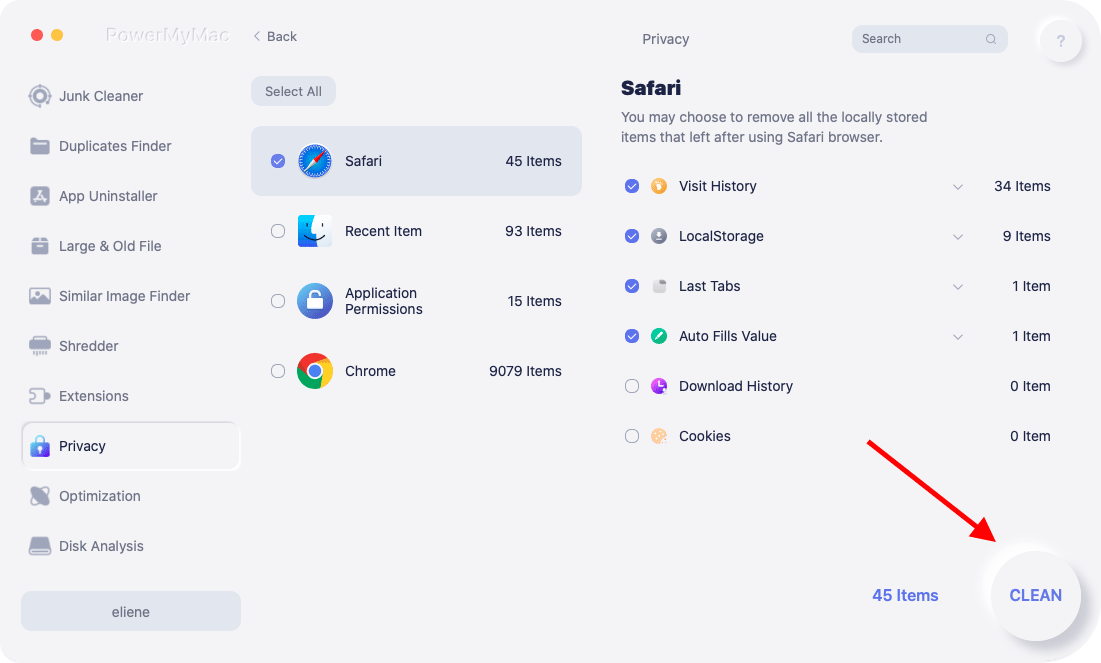
Med bara några få klick kan du bibehålla hög prestanda med iMyMac PowerMyMacs funktioner. Dess sekretessfunktion kan hjälpa dig att förhindra informationsläckage och rensa SSL-cachen på din Mac.
Med Sekretess kan du säkert radera all webbläsardata från vilken Mac-webbläsare som helst, inklusive lokala lagringsfiler, flikar, nedladdningar, cookies och mer. Kolla in åtgärden här för att rensa SSL-cachen på Mac.
- Skanna hela din Macs webbläsarhistorik efter körning IntegritetspolicyStäng alla öppna webbläsare du använder för att rensa bort ytterligare länkad information.
- Klicka SCAN, kommer du att se en lista över alla webbläsare, senast använda objekt och programbehörigheter till vänster. I webbläsare kan du kontrollera all webbläsarinformation som besökshistorik, sökhistorik, inloggningshistorik och nedladdningshistorik.
- Välj de data du vill radera och tryck på REN alternativet, raderas den valda webbinformationen omedelbart.
- Hur flera filer har rensats och hur mycket utrymme som redan finns tillgängligt på hårddisken visas båda i en "Rengörs klar"fönstret.
Del 3. Hur återställer man SSL-cachen på en Mac?
Det finns en möjlighet att din webbläsare då och då sparar information om SSL-certifikat i sin cache. Detta kan leda till en del konstiga problem, till exempel att en webbplats ger intryck av att den inte är säker även efter att ett giltigt SSL-certifikat har distribuerats för användning på webbplatsen. Så här rensar du SSL-cachen på en Mac.
Mozilla Firefox
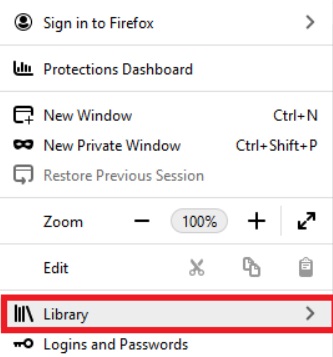
- Öppna Mozilla Firefox.
- För att komma åt biblioteket, gå till det övre högra hörnet av skärmen och klicka på symbolen som ser ut som tre parallella linjer.
- Välja Föregående sökning
- Klicka bara på "Rensa ut tidigare historik" knapp.
- Markera rutan bredvid Aktiva inloggningar för att se till att den är markerad.
- När du är redo trycker du på OK
Chrome för Windows, Internet Explorer och Microsoft Edge
Det är nödvändigt att göra det genom att navigera i operativsystemets inställningar så att du kan få en bättre förståelse för hur man rensar SSL-cachen helt på en Mac.
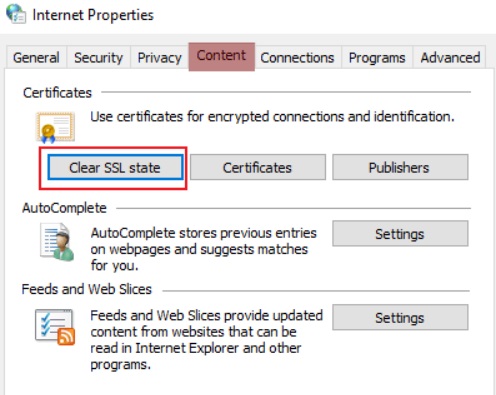
- Starta Windows Start
- Försök att leta efter "Internet-alternativ" och välj sedan den.
- Välj fliken Innehåll i dialogrutan, som öppnas efter att du klickat på knappen.
- Välj Rensa SSL-tillstånd
Mac OSX
Det är nödvändigt att radera cachen i din webbläsare för att rensa SSL-cachen på Mac.
- Öppna webbläsaren.
- För att komma åt lådan måste du först klicka på symbolen som finns i sidans övre högra hörn.
- För att komma åt Historik alternativet, gå först till din historikmeny och klicka sedan på alternativet Historik i den här menyn.
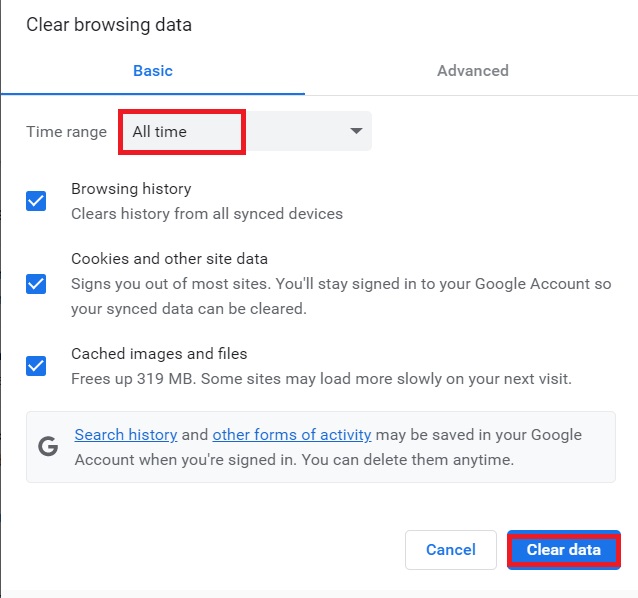
- Klicka bara på Rensa surfhistoriken
- Ändra tidsspannet till Hela tiden i Inställningar
- Klicka på "Radera data" knapp.
Del 4. Slutsats
Den största uppmärksamheten läggs alltid på säkerhet, och processen att migrera till en ny internetsäkerhetsstandard pågår nu. När du har fått en förståelse för vad SSL är och hur man... rensa SSL-cache på Mac, du har också fått kunskap om PowerMyMac-programmet och den sekretessfunktion som det erbjuder. Använd det här programmet för att snabbt och enkelt ta bort SSL-cachen på din Mac.


