


 PowerMyMac


Du har troligtvis hört talas om dem. Både PowerMyMac och MacKeeper är välkända Mac-rengöringsprogramDärför, om du letar efter rengöringsprogram, är du förmodligen osäker på vilket alternativ du ska välja. Vilket ska du välja om valet står mellan PowerMyMac och MacKeeper?
För det första sträcker sig rivaliteten bortom PowerMyMac jämfört med MacKeeperDu kommer att upptäcka att det finns ett annat alternativ för datorn allt eftersom du fortsätter läsa. Det skulle dock inte skada att jämföra några program så att du är medveten om vad vart och ett kan erbjuda.
Innehåll: Del 1. PowerMyMac vs MacKeeper: Vilka är skillnaderna? Del 2. Vilket är det bästa Mac-rengöringsprogrammet mellan PowerMyMac och MacKeeper?Del 3. Hur man djuprengör min Mac med PowerMyMacDel 4. Slutsats
Del 1. PowerMyMac vs MacKeeper: Vilka är skillnaderna?
På grund av deras funktioner kan PowerMyMac och MacKeeper vara praktiskt taget identiska. Varje app har dock vissa specialfunktioner som den andra appen inte har. Här är skillnaderna mellan PowerMyMac och MacKeeper:
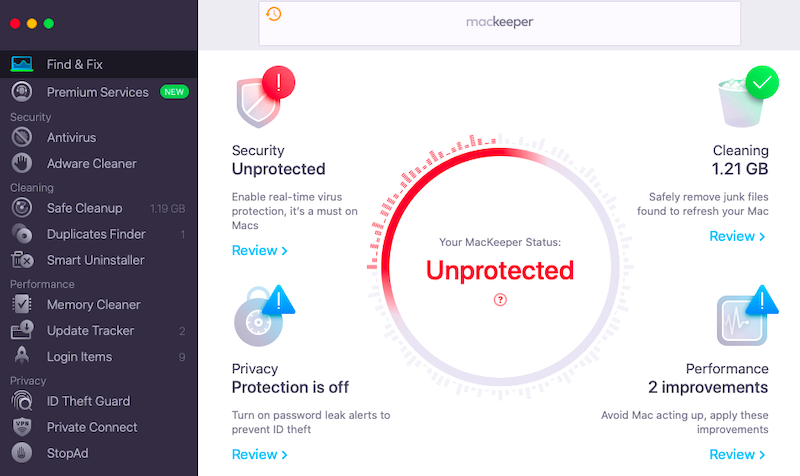
Det helt nya MacKeeper-programmet erbjuder flernivåskydd mot skadlig kod, internetfaror, identitetsstöld och Mac-prestandaförbättringEtt innovativt verktyg som skyddar din Mac och ökar produktiviteten heter MacKeeper.

Din dators effektivitet kommer att öka, den kommer att vara skyddad mot skadlig kod och virus, och den kommer alltid att ha tillräckligt med ledigt diskutrymme. Du kan använda det här programmet för att undvika påträngande annonser, skydda dig mot ID-stöld och helt skydda din personliga information. Kostnaden skulle vara 5.92 euro per månad, vilket skulle täcka upp till tre Mac-datorer i ett hem under ett helt år. Mac OSX är kompatibelt med det här programmet.
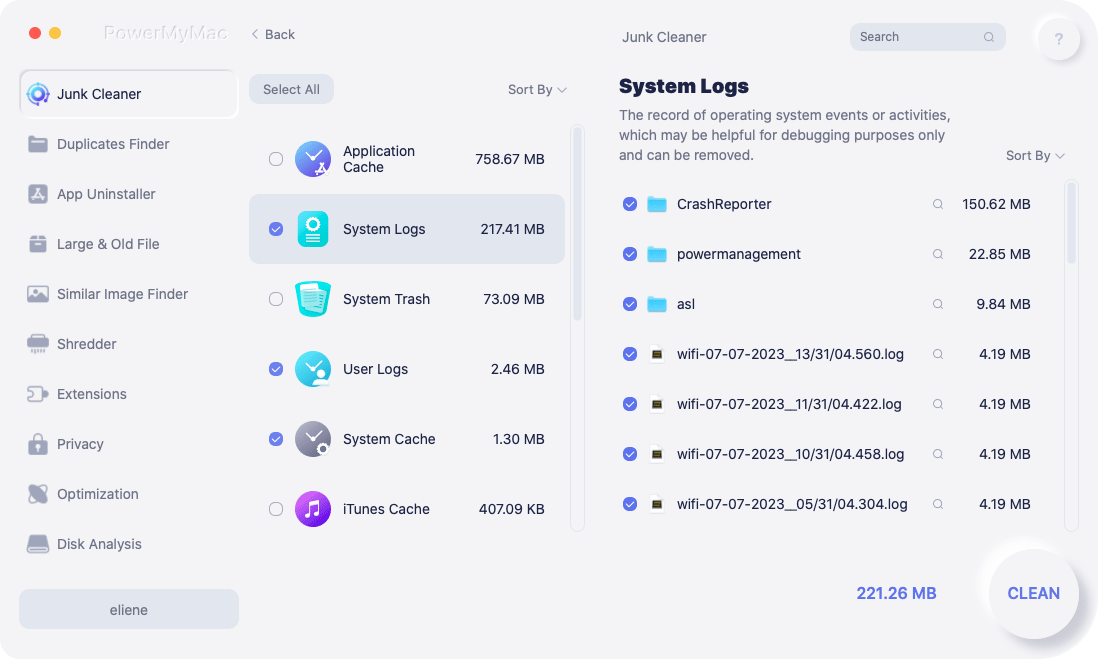
iMyMac PowerMyMac är mer än bara ett program för att rensa din Mac. Det kan hjälpa dig att optimera och snabba upp din Mac. PowerMyMac vs MacKeeper, PowerMyMacs nio huvudmoduler – Duplikatsökare, Stora och gamla filer, Dokumentförstörare, Sekretess, Skräprensare, Appavinstallationsprogram, Liknande bildsökare, Tillägg och Optimering – kan hjälpa dig att noggrant rensa din Mac från alla typer av skräpfiler och onödig programvara. Det kan användas för att omedelbart snabba upp din Mac.
Sök och rensa automatiskt skräpfiler, såsom cache, loggar, skräp, skadade program etc., för att spara Macs begränsade diskkapacitet. Ta bort program och tillhörande filer helt.
Dessutom kan det skydda din privata information från webbläsare. PowerMyMac gör det enkelt att snabbt hitta dubbletter av filer eller liknande bilder på din Mac. Filen sorteras efter storlek och datum, och du kan också ta bort föråldrade filer som du kanske inte längre behöver och stora filer som tar upp för mycket utrymme. Avseende kostnaden kommer en månadsavgift på 9.95 USD att tillämpas för en Mac. Både Windows och Mac är kompatibla med den här applikationen.
Del 2. Vilket är det bästa Mac-rengöringsprogrammet mellan PowerMyMac och MacKeeper?
Detta är listorna över för- och nackdelar med PowerMyMac respektive MacKeeper.
PowerMyMac
Alla tillgångar på ett och samma ställe
- Komplett processoptimeringPowerMyMac erbjuder ett urval av optimeringsverktyg som kan hjälpa dig att rensa bort överflödiga filer, förbättra systemeffektiviteten och rensa upp i systemet.
- AnvändarvänligPowerMyMacs användargränssnitt är enkelt och lätt att använda, lämpligt för nybörjare.
- SäkerhetUnder optimeringsprocessen skyddar PowerMyMac din maskins och dina datas säkerhet.
- Stöd för många språkPowerMyMac jämfört med MacKeeper. PowerMyMac erbjuder flerspråkigt stöd, vilket gör det tillgängligt för människor var som helst.
Nackdelar:
- Begränsad gratisversionPowerMyMacs gratisversion innehåller ett fåtal funktioner; du måste köpa fullversionen för att få tillgång till alla.
- Begränsad modifieringVissa användare kan tycka att det inte finns tillräckligt med alternativ för att anpassa PowerMyMac.
- Kanske inte nödvändigt för vissa användareOm du regelbundet underhåller datorn manuellt kanske PowerMyMac inte behövs.
MacKeeper
Alla tillgångar på ett och samma ställe
- Komplett systemeffektivitetPowerMyMac vs MacKeeper, MacKeeper erbjuder en mängd olika optimeringsfunktioner som kan hjälpa dig att rensa ut överflödiga filer, rensa upp systemproblem och förbättra systemets prestanda.
- SäkerhetMacKeeper levereras med säkerhetsverktyg, inklusive antivirusskydd, stöldskydd och webbläsarsäkerhet.
- AnvändarvänligÄven för nybörjare är mackeepers användargränssnitt tydligt och enkelt att använda.
- KundtjänstMacKeeper erbjuder kundtjänst via e-post och livechatt, vilket gör det enkelt att söka hjälp om du stöter på problem.
- Stöd för många språkMacKeeper har flerspråkigt stöd, vilket gör det tillgängligt för människor var som helst.
Nackdelar:
- Utmanande historiaPowerMyMac vs MacKeeper. MacKeeper har ett kontroversiellt förflutet som inkluderar påståenden om att det är en bluff eller ett virus och aggressiva marknadsföringsstrategier.
- DyrJämfört med andra kommersiellt tillgängliga program av liknande slag är MacKeeper mycket dyr.
- Effekt på prestandaEnligt vissa kunder kan MacKeeper göra deras Mac långsammare och ha en negativ inverkan på systemprestanda.
- Begränsad gratisversionFör att använda alla funktioner i MacKeeper måste du köpa fullversionen, som innehåller fler funktioner.
Del 3. Hur man djuprengör min Mac med PowerMyMac
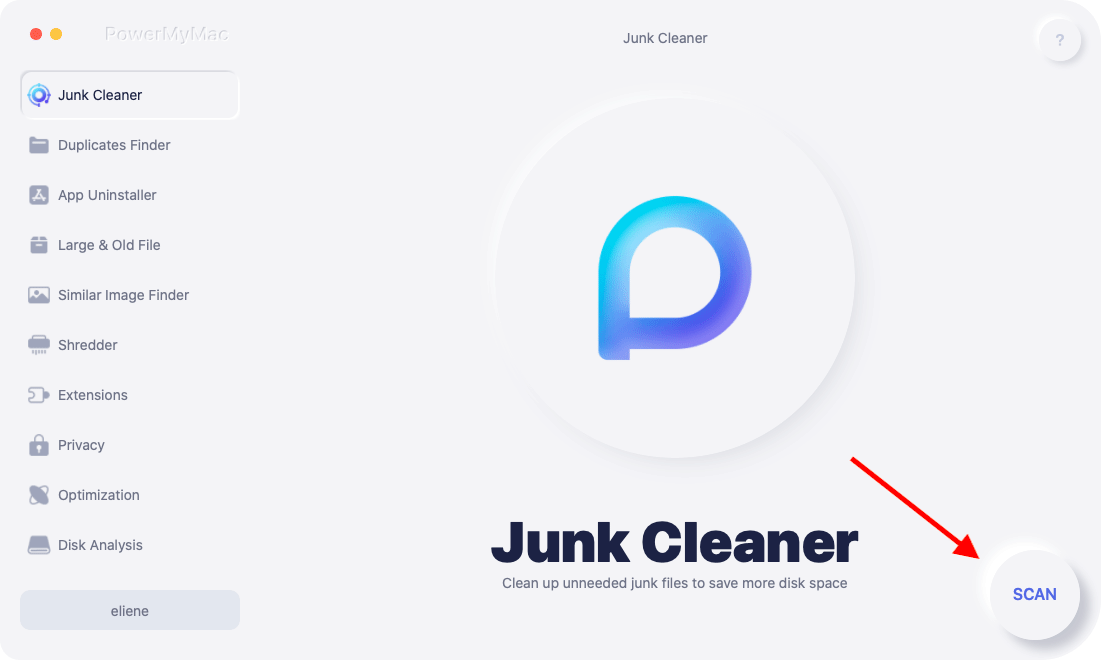
PowerMyMac jämfört med MacKeeper. PowerMyMac är det bästa rensningsverktyget för Mac och Windows. Dess skräprengöringsfunktion hjälper till att ta bort onödiga filer från ditt system. Du kan vidta följande åtgärder för att lära dig mer:
- Klicka SCAN för att starta PowerMyMacs genomsökning av alla skräpfiler på din Mac efter att du har valt Skräprensare.
- När skanningen är klar kan du sortera skräpfilerna på datorn i flera kategorier.
- Markera filen du vill radera, eller välj bara "Markera allt"för att bli av med alla skräpfiler."
- När du väljer "REN", PowerMyMac raderar omedelbart de filer du har valt.
- När rengöringsprocessen är klar visas ett nytt popup-fönster med orden "Rengörs klar", och du kan kontrollera hur mycket utrymme som nyligen rensades och hur mycket utrymme som nu finns tillgängligt på hårddisken. Om du vill ta bort fler filer klickar du bara på knappen Granska för att komma tillbaka till sidan med skanningsresultat.
Del 4. Slutsats
Nu har du en grundlig förståelse för PowerMyMac kontra MacKeeper. Om du vill jämföra MacKeeper och CCleaner kan du fortfarande hitta en recension mellan MacKeeper och CCleaner här.
Med PowerMyMac slutar jämförelsen. Du kan grundligt rensa din Mac från alla typer av skräpfiler och onödig programvara med hjälp av PowerMyMacs nio huvudkomponenter. Vid närmare granskning verkar det vara det enda rengöringsprogrammet du behöver.


