


 PowerMyMac


I takt med att våra liv blir alltmer hektiska är det viktigare än någonsin att hantera vår tid effektivt. Att använda en tidsspårningsapp kan hjälpa dig att hålla koll på ditt arbete och få ut det mesta av din dag. I den här artikeln ska vi utforska de viktigaste tidsspårningsappar för Mac användare. Oavsett om du behöver spåra fakturerbara timmar, hantera uppgifter eller helt enkelt förstå hur du spenderar din tid, kan rätt app göra stor skillnad. Så låt oss dyka in och hitta den perfekta tidsspårningsappen för dig!
Innehåll: Del 1. Topp 8 tidspårningsprogram för Mac-användareDel 2. Hur väljer man de bästa apparna för tidregistrering?Del 3. Tips: Optimera Macs prestanda för att öka din produktivitetDel 4. Slutsats
Del 1. Topp 8 tidspårningsprogram för Mac-användare
För att hjälpa dig att förbättra produktiviteten och minska administrativa bördor har jag sammanställt de bästa apparna för tidrapportering för Mac som finns på marknaden idag. Se och välj den app och dess funktioner som bäst passar din arbetsstil.
1. Växla spår
Pris: Gratisplan tillgänglig; Betalda planer börjar på 10 USD/månad
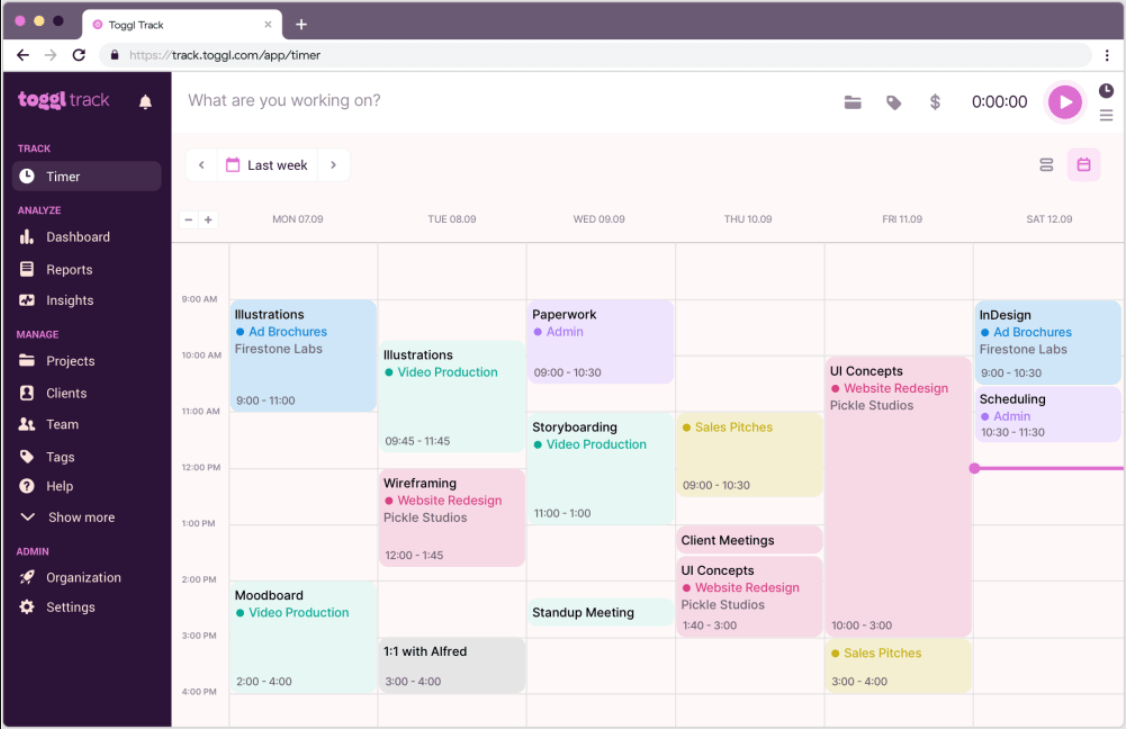
Toggl Track är en användarvänlig och mångsidig tidsregistreringsapp för Mac. Den är idealisk för frilansare och små team och möjliggör enkel tidsloggning med ett elegant gränssnitt. Viktiga funktioner inkluderar timers med ett klick, projekt-/uppgiftsmärkning, rapporteringsverktyg och integrationer med verktyg som Asana, Trello och Slack. Den är utmärkt för användare som vill ha enkelhet utan att offra strömförbrukning. Toggl Track erbjuder även mobil- och webbåtkomst, vilket gör det enkelt att spåra tid över olika enheter.
Alla tillgångar på ett och samma ställe
- Lätt att använda
- Utmärkta rapporteringsverktyg
- Generös gratis plan
Nackdelar:
- Begränsade avancerade funktioner i gratisversionen
2. RescueTime
Pris: Gratisplan; Premium för 12 USD/månad
RescueTime är en av de automatiska tidsspårningsapparna för Mac som körs i bakgrunden för att övervaka hur tiden spenderas. Istället för att starta timers manuellt får användarna en realtidsvy av produktiviteten på olika webbplatser och applikationer. Den kategoriserar aktiviteter i produktiva och distraherande, vilket hjälper till att identifiera vanor. Veckovisa rapporter och målsättningsfunktioner gör den till ett kraftfullt verktyg för beteendeförändring.
Alla tillgångar på ett och samma ställe
- Ingen manuell spårning krävs
- Insiktsfulla produktivitetsrapporter
Nackdelar:
- Mindre lämpad för fakturering av kunder
- Kan vara för passiv för uppgiftsspecifik spårning
3. Skörda
Pris: Gratis för 1 användare, 2 projekt; Betalt från 12 USD/månad
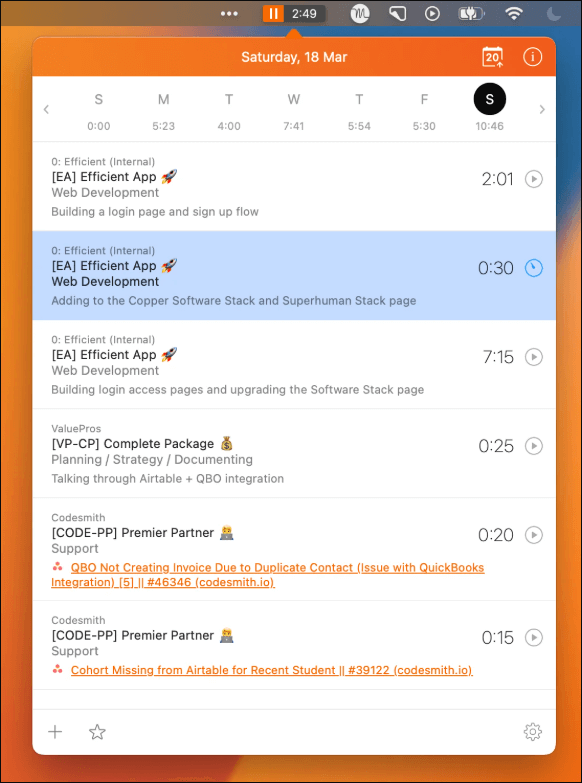
Harvest finns också med på listan över robusta tidsspårningsappar för Mac riktade mot frilansare och team. Den inkluderar tidsspårning, fakturering, utgiftsspårning och teamhantering. Harvest integreras med över 100 verktyg som QuickBooks, Asana och Basecamp. Det är särskilt användbart för företag som behöver både tidsspårnings- och faktureringsfunktioner på ett ställe.
Alla tillgångar på ett och samma ställe
- Inbyggd fakturering
- Utmärkt integrationsstöd
Nackdelar:
- Begränsade funktioner i gratisplanen
- Kan vara komplicerat för ensamanvändare
4. Tidig genom minne
Pris: Börjar vid $ 11 / månad
Timely är en AI-driven tidsspårningsapp för Mac som automatiserar tidsloggar med hjälp av intelligent aktivitetsspårning. Den övervakar appanvändning, webbplatser, e-postmeddelanden och mer – och bygger en exakt tidslinje utan manuell inmatning. Timely säkerställer integritet genom att låta användare kontrollera vilken data som loggas. Den är utmärkt för användare som vill ha enkel spårning utan mikrohantering.
Alla tillgångar på ett och samma ställe
- Smart automatisk spårning
- Rent, modernt gränssnitt
Nackdelar:
- Någon inlärningskurva
- Dyrare än grundläggande appar
5. Clockify
Pris: Gratis för obegränsade användare; Betalda funktioner från 3.99 USD/månad
Clockify är en av de populära apparna för tidrapportering för Mac som är perfekt för team och individer. Den inkluderar timers, manuell inmatning, projektledning och detaljerad rapportering. Användare kan spåra fakturerbara timmar, generera tidrapporter och till och med ställa in timpriser. Dess gratisversion erbjuder enormt värde för startups och växande team.
Alla tillgångar på ett och samma ställe
- Helt gratis plan med fantastiska funktioner
- Fungerar bra för team
Nackdelar:
- Gränssnittet kan kännas grundläggande
- Avancerade funktioner kräver betalning
6. Timing
Pris: Börjar vid $ 10 / månad
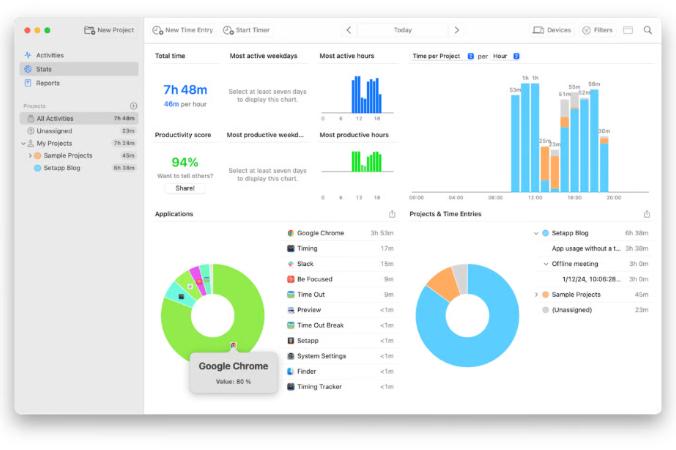
Timing är en Mac-exklusiv app känd för sin detaljerade automatiska spårning. Den loggar tid som spenderas på varje app och dokument och låter användare kategorisera uppgifter senare. Den här appen är perfekt för ensamstående yrkesverksamma som vill ha en detaljerad överblick över sina digitala vanor. Med sin snygga tidslinjevy kan användare enkelt upptäcka produktivitetsbrister.
Alla tillgångar på ett och samma ställe
- Automatisk spårning
- Inbyggd Mac-upplevelse
Nackdelar:
- Endast tillgängligt på Mac
- Inga funktioner för teamsamarbete
7. Hubstaff
Pris: Börjar vid $ 7 / månad
Hubstaff kombinerar tidsspårning med medarbetarövervakning, vilket gör det idealiskt för distansteam. Det innehåller skärmdumpar, aktivitetsnivåer, GPS-spårning och löneintegration. För Mac-användare som hanterar frilansare eller distansanställda är detta en kraftfull lösning för att övervaka produktivitet och hantera betalningar.
Alla tillgångar på ett och samma ställe
- Kraftfulla funktioner för teamövervakning
- Stödjer lönehantering och GPS
Nackdelar:
- Invasivt för vissa användare
- Överdrivet för individuellt bruk
8. Qbserve
Pris: Engångsköp för $40
Qbserve är en offline, integritetsfokuserad tidsspårningsapp för Mac. Den loggar automatiskt tid och genererar produktivitetsrapporter. Den är särskilt användbar för de som inte vill ha molnsynkronisering eller prenumerationer. Qbserve stöder även fakturagenerering och produktivitetsstatistik i realtid.
Alla tillgångar på ett och samma ställe
- Engångsbetalning
- Helt offline
Nackdelar:
- Inga lagfunktioner
- Endast för Mac
Del 2. Hur väljer man de bästa apparna för tidregistrering?
Med dussintals tidsspårningsappar för Mac tillgängliga nuförtiden kan det kännas överväldigande att välja rätt. Alla appar är inte skapade lika, och det bästa valet beror på dina mål. Här är en detaljerad sammanfattning av de viktigaste kriterierna jag använde för att utvärdera och välja de bästa apparna på den här listan.
1. Mac-kompatibilitet och prestanda
Först och främst måste appen fungera smidigt på macOS. Det betyder en inbyggd Mac-version eller en väloptimerad webbapp som inte saktar ner systemet. Jag har lagt särskild vikt vid appar som fungerar bra på både Intel- och Apple Silicon Mac-datorer. Prestanda är avgörande, särskilt för bakgrundsspårningsappar som RescueTime och Timing. Dåligt optimerad programvara kan tömma batteriet eller täppa till systemresurser, vilket motverkar syftet att förbättra produktiviteten.
 Relaterade ämnen: Hur får man en Mac-batteri att hålla längre?
2. Användarvänlighet och gränssnittsdesign
En app för tidsregistrering ska förenkla ditt arbetsflöde – inte komplicera det. Jag prioriterade appar med intuitiva gränssnitt, tydliga dashboards och enkel introduktion. Oavsett om du är en tekniskt kunnig användare eller nybörjare, ska en bra app låta dig börja registrera din tid med bara några få klick.
3. Spårningsmetoder: Manuell vs. Automatisk
Olika användare föredrar olika spårningsstilar. Manuella timers fungerar utmärkt om du gillar kontroll, men de kan vara ett problem om du glömmer att starta eller stoppa klockan. Det är därför automatisk spårning växer i popularitet – den övervakar din aktivitet i bakgrunden och bygger din tidslogg åt dig.
4. Funktioner och integrationer
Inte alla användare behöver samma funktioner. Frilansare kan prioritera fakturering och fakturagenerering, medan team kan behöva projektspårning, tidsgodkännanden och samarbetsverktyg. Ju mer anpassningsbar och välintegrerad en app är, desto mer värde ger den en mängd olika användare.
5. Säkerhet och integritet
Med appar som spårar detaljerad aktivitet och ibland loggar personuppgifter är integritet viktigt. Jag funderade över hur varje app hanterar din information, särskilt de som använder bakgrundsspårning. Appar som Qbserve och Timely betonar användarkontroll och datasäkerhet, vilket är ett stort plus.
Relaterade ämnen: Den bästa Mac-säkerhetsprogramvaran att överväga för Mac
Del 3. Tips: Optimera Macs prestanda för att öka din produktivitet
Din produktivitet handlar inte bara om tidsspårningsappar för Mac – det beror också på hur bra ditt system fungerar. Oavsett hur avancerad eller väldesignad din tidsspårare är, hjälper det inte mycket om din Mac är långsam, överhettas eller ständigt kraschar. Därför bör optimering av din Mac gå hand i hand med tidshantering.
Genom att regelbundet optimera din Mac säkerställer du att din tidrapporteringsprogramvara fungerar smidigt och utan problem, vilket gör det lättare att hålla fokus, undvika distraktioner och hålla ditt arbetsflöde oavbrutet. Ett av de mest effektiva verktygen för att optimera din Mac är iMyMac PowerMyMac.
Detta allt-i-ett-verktyg är speciellt utformat för macOS och förbättrar prestanda, rensar ut skräp och övervakar systemets hälsa – allt från ett rent, intuitivt gränssnitt. Så här hjälper PowerMyMac dig:
- Smart städare: Tar bort systemskräp, cachefiler, gamla loggar och trasiga nedladdningar som tar upp utrymme och saktar ner prestandan.
- App-avinstallerare: Tar bort oönskade eller oanvända program helt, inklusive dolda överblivna filer som vanliga avinstallationer missar.
- Minneshanterare: Frigör RAM direkt, vilket hjälper dina appar för tidsregistrering att laddas och svara snabbare.
- Duplicate Finder: Hittar och tar bort dubbletter av filer som slösar diskutrymme – särskilt användbart för kreatörer som arbetar med många mediefiler.
- Startoptimering: Låter dig hantera inloggningsobjekt och starta agenter, vilket snabbar upp din Macs starttid.
- Sekretessrensare: Tar bort webbläsarspår, cookies och känsliga data för att upprätthålla integriteten och hålla ditt system säkert.
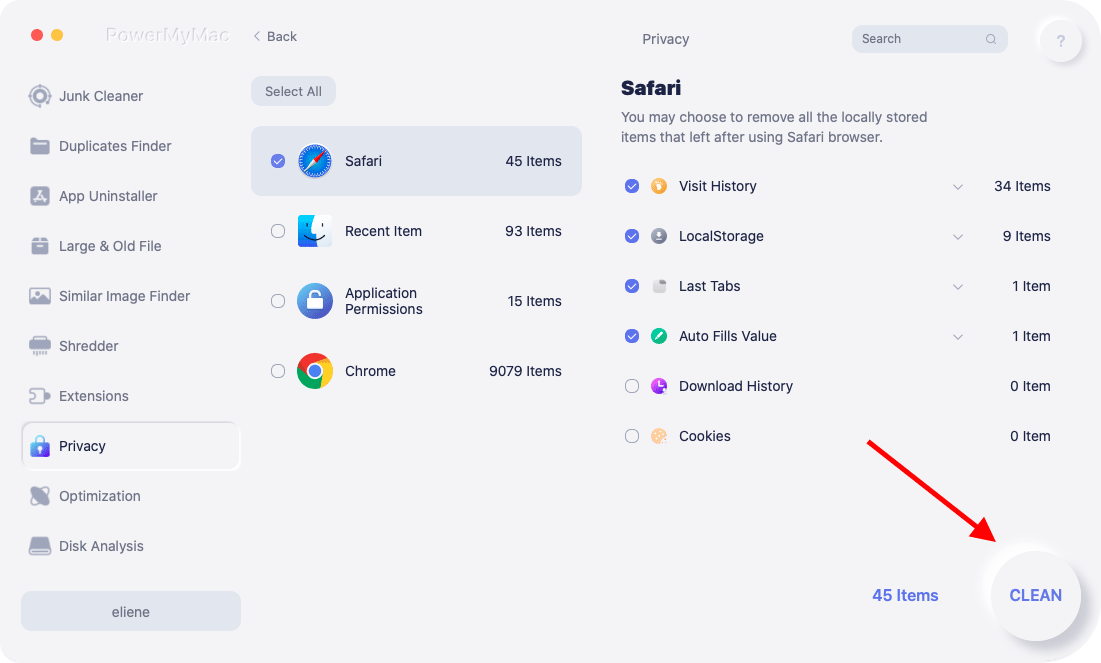
Tänk på PowerMyMac som den tysta partnern till din tidsspårningslösning. Med ditt system igång utan problem kan du starta appar snabbt, spåra din tid korrekt och generera produktivitetsrapporter utan fördröjning eller krascher. Det tar bort tekniska hinder och låter dig fokusera på det som är viktigast – ditt arbete och dina mål.
Del 4. Slutsats
Att använda appar för tidspårning för Mac kan dramatiskt förbättra ditt arbetsflöde, din ansvarsskyldighet och ditt fokus. Oavsett om du är en frilansare som letar efter enkel loggning eller en chef som övervakar distansteam finns det ett perfekt verktyg där ute. Och glöm inte – att öka produktiviteten börjar med en väloptimerad Mac. Verktyg som iMyMac PowerMyMac kan säkerställa att din enhet förblir snabb, ren och pålitlig, så att dina tidspårningsverktyg körs utan avbrott.


