


 PowerMyMac


När applikationsservrar använder ett Java-program för att leverera sitt innehåll, tillhandahåller Java Object Cache cachning för dyra eller ofta använda Java-objekt. Java Object Cache kan också cacha mindre ofta använda Java-objekt. I nästa avsnitt går vi igenom de steg som krävs för att rensa Java-cachen och hur man ska rensa programvarans cachefiler automatiskt.
Varför är det nödvändigt att radera innehållet i Java-cachen? Det rekommenderas att du regelbundet raderar Java-cachen. Om du rensar Java-cachen i din webbläsare kommer den att tvinga webbläsaren att ladda den senaste versionen av alla Java-appletar och -appar.
Innehåll: Del 1. Är det säkert att ta bort Java-cache?Del 2. Hur rensar man Java-cachen på macOS eller Windows?Del 3. Rekommenderad cacherensare som hjälper dig att ta bort skräp på MacDel 4. Slutsats
Del 1. Är det säkert att ta bort Java-cache?
Java är en sorts programmeringsspråk vilket möjliggör en smidig drift av ett betydande antal webbplatser. När du besöker en webbplats som använder Java sparar din enhet data i en cache, vilket gör att webbplatsen laddas snabbare nästa gång du besöker den.
Om du har problem med java På en Mac eller PC kan du rensa Java-cachen, vilket gör att dess data uppdateras. Detta borde lösa problemet. Eliminering av buggar och andra konstiga beteenden kan bli resultatet av att göra det.

Det är dock viktigt att notera att numera endast ett litet antal populära appar eller webbplatser använder Java, och många tror att Java utgör ett allvarligt hot mot deras dators säkerhet. Det rekommenderas att du tar bort Java och rensar Java-cachen från din dator om du inte har något särskilt behov av det.
Del 2. Hur tar man bort Java-cache på macOS eller Windows?
Om du rensar Java-cachen i din webbläsare kommer den att tvinga webbläsaren att ladda den senaste versionen av alla Java-applets och -program.
Ta bort allt innehåll som lagras i din Java-cache i Windows
- Klicka på Start-menyn från de tillgängliga alternativen.
- Tryck på knappen och välj sedan Konfigurera Java
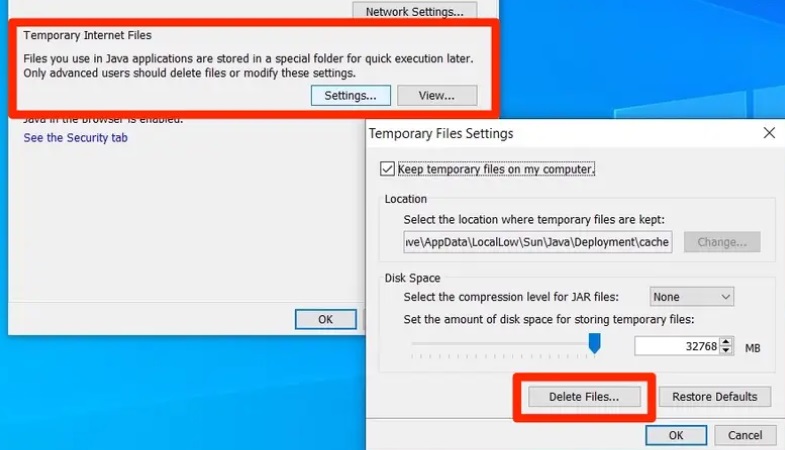
- Välja Inställningar från rullgardinsmenyn som finns i avsnittet Tillfälliga internetfiler.
- Välja Ta bort filer.
- Inom Ta bort tillfälliga filer I fönstret kontrollerar du att alla rutor är markerade och klickar sedan på OK.
- I rutan Inställning för tillfälliga filer väljer du OK för att spara dina ändringar.
- För att avsluta Java-kontrollpanelen, välj OK-knappen och klicka sedan på X
Ta bort alla Java-cachefiler från Mac
- För att komma åt Apple menyn, välj symbolen som finns i det övre högra hörnet.
- För att komma åt Systeminställningar klicka på ikonen i systemfältet i fönstret.
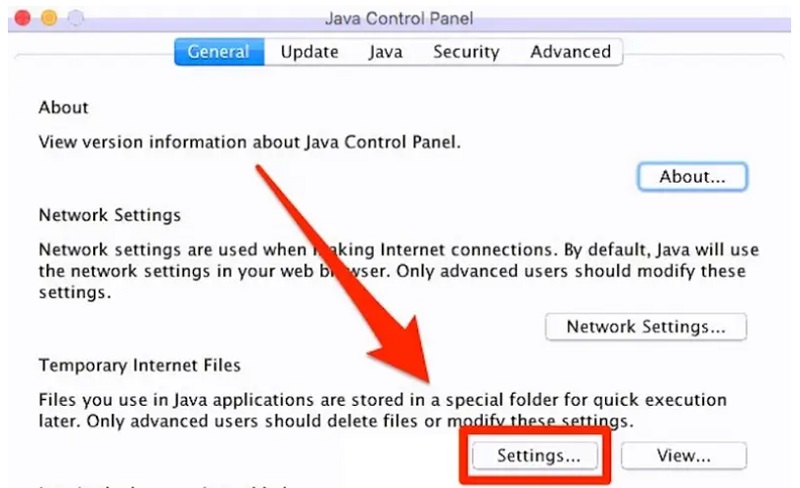
- För att komma åt Java-kontrollpanelen, leta upp "Övrigt"-området och välj ikonen som ser ut som ett Java-program.
- För att ändra inställningarna för dina tillfälliga internetfiler, gå till Java-kontrollpanelen och klicka på Inställningar.
- För att ta bort dina tillfälliga internetfiler, öppna fliken Tillfälliga internetfiler och klicka på Ta bort filer
- Detta skulle visa rutan Ta bort filer och program; efter att ha klickat på OK bekräftar du att du vill ta bort objekten.
Del 3. Rekommenderad cacherensare som hjälper dig att ta bort skräp på Mac
Med hjälp av allt-i-ett-programmet som kallas iMyMac PowerMyMac, din Mac kan rengöras och förbättras. Med bara några få musklick kan du göra din Mac mer produktiv, bibehålla dess säkerhet och frigöra lagringsutrymme som inte används, allt utan att offra någon av dess lagringskapacitet.
Den kan snabbt upptäcka och radera allt på en Mac-enhet som du inte längre använder, vilket kan frigöra en betydande mängd lagringskapacitet för dig. Du kan till exempel enkelt radera cacheminnen med designprogramvara som ta bort Adobes cachefiler från Mac.
Du kan rensa upp din Mac helt genom att använda PowerMyMac för att bli av med all skräp och onödiga program. Genom att använda Junk Cleaner-programmet kan du bli av med allt skräp på din Mac.
Efter att du har bekantat dig med programmets funktion är det enkelt att rensa Java-cachen, det medför inga risker och hjälper dig att frigöra extra diskutrymme på din enhet. Du kan göra en uttömmande sökning i vilken del av Mac-datorn du vill.
Hitta den specifika platsen där de värdelösa filerna skapas och ta en titt på den. Du bör titta runt för att se om det finns några onödiga saker som kan tas bort utan att orsaka någon skada så att du kan bli av med dem direkt.
Följ bara anvisningarna för att rensa Java-cachen.
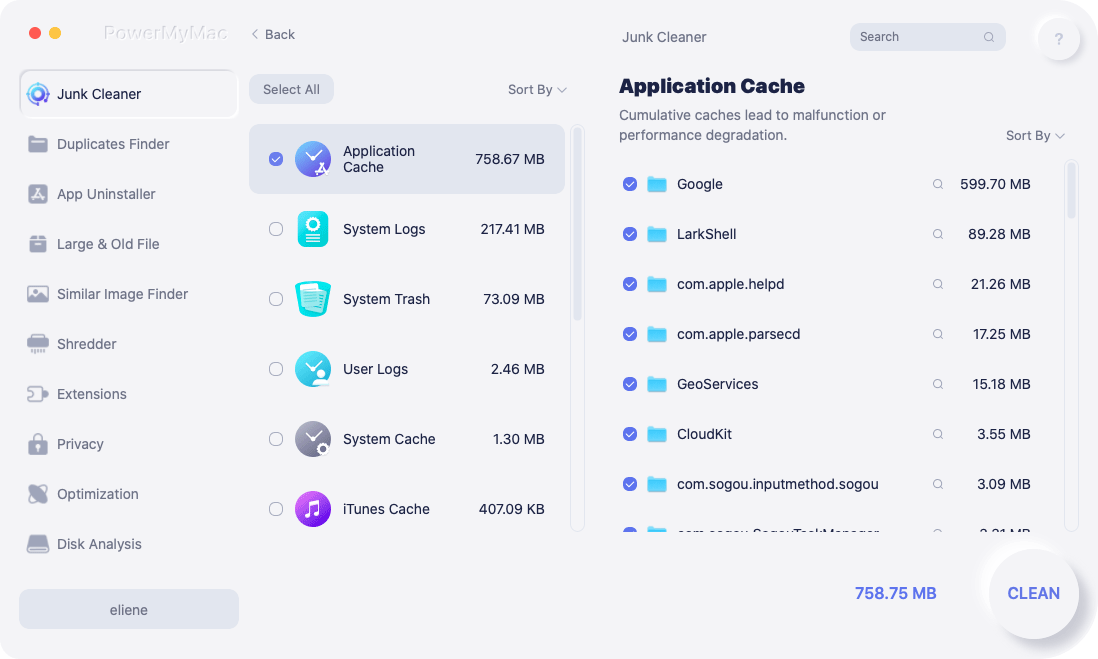
- Efter att ha klickat SCANväljer Skräpstädare för att börja skanna alla oönskade filer på din Mac.
- När skanningen är klar kan du bläddra bland alla skräpfiler på din Mac efter kategori.
- Markera filen du vill radera, eller välj bara "Markera allt"för att bli av med alla oönskade filer."
- När du väljer "REN"PowerMyMac tar snabbt bort de filer du har valt.
- När rengöringsproceduren är klar visas ett popup-fönster med titeln "Rengörs klar" kommer att visas, så att du kan se hur mycket utrymme som just rensades och hur mycket utrymme som nu finns tillgängligt på hårddisken.
Del 4. Slutsats
Det kan finnas två eller flera versioner av Java som är inkompatibla med varandra, eller så kan Java-cachen behöva rengöras. Det rekommenderas att du börjar med att försöka rensa Java-cachen innan du försöker rensa upp motstridiga versioner av Java eftersom det är enklare att göra det.
PowerMyMac är det bästa verktyget för att rensa Java-cachefiler automatiskt. Det sparar dig tid avsevärt och du slipper oroa dig för hur du rensar programvarucacheminnen. Skaffa det här verktyget nu!


