


 PowerMyMac


Det här inlägget ger läsarna användbara tips och instruktioner om hur man rensa WinZip-cachenWinZip måste skapa en tillfällig kopia av alla zip-formatfiler när en aktuell zip-fil uppdateras på något sätt, inklusive tillägg av filer.
I en normal situation genererar WinZip den temporära filen i exakt samma mapp som Zip-filen som den nu öppnar. Cachefunktionen i WinZip är främst implementerad för detta ändamål. När cachen tar upp för mycket lagringsutrymme är den nödvändigt för att rensa cachen.
Om filen som nu bearbetas finns på en extern lagringsenhet, genererar WinZip den tillfälliga Zip-filen i arbetskatalogen. Denna åtgärd vidtas på grund av möjligheten att det flyttbara mediet inte har tillräckligt med ledig kapacitet för att lagra två versioner av objektet.
Innehåll: Del 1. Vad är WinZip?Del 2. Hur rensar jag WinZip-cachen från min Mac?Del 3. Manuella steg för att ta bort WinZip-cache från Mac/WinSlutsats
Del 1. Vad är WinZip?
Innan du rensar WinZip-cachen, ta reda på den först. Företaget som för närvarande är känt som WinZip Computing hette en gång Nico Mak Computing, och det är de som skapade WinZip. Det kan komprimera och arkivera data för Android-enheter, iOS, macOS, Windows och operativsystem.
Det här verktyget låter dig arkivera dokument som en fil i zip-format, och du kan använda den för att packa upp sådana arkiv. Du har också möjlighet att läsa komprimerade dokument av typen .zip.
WinZip är egentligen ett program som körs på Windows och som gör det möjligt för användare att komprimera dokument och öppna dokument som har komprimerats med .zip-filformatet. Dessutom erbjuder WinZip inbyggd kompatibilitet för de allra flesta vanliga filkomprimerings- och arkiveringstyper, såsom .gzip, .hqx, .cab, tar och Unix-komprimering.
Det här är bara några exempel. Fortsätt sedan med att lära dig hur du rensar WinZip-cachen på din dator.
Del 2. Hur rensar jag WinZip-cachen från min Mac?
iMyMac PowerMyMac är ett Mac-verktyg som grundligt rengör och förbättrar din dator. Det är möjligt att detta ökar produktiviteten, skyddar användarnas integritet och frigör utrymme på en maskin som kör Windows eller Mac. Det kan snabbt hitta och ta bort allt onödigt från din Windows- eller Mac-maskin, vilket frigör en betydande mängd lagringsutrymme.
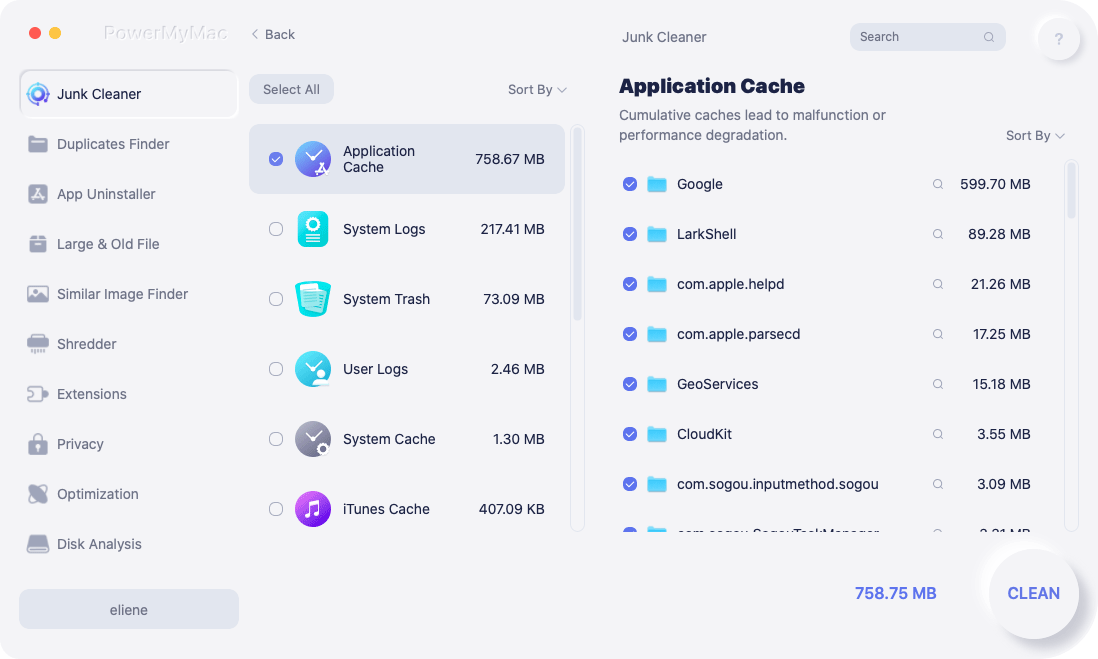
Med hjälp av PowerMyMac kan du ta bort onödiga program och skräpfiler. PowerMyMac är ett utmärkt verktyg för att rensa bort skräp från Mac-operativsystem. Du kan frigöra mer utrymme på ditt system om du rensar WinZips cache med funktionen Junk Cleaner. Undersök filerna för att avgöra vilka som kan raderas utan att lämna spår, och ta sedan bort dem med bara ett musklick.
Det rekommenderas att du rensa Mac e-postcache eller rensa WinZip-cachen på din Mac med PowerMyMac Junk Cleaner.
- Välj Skräpstädare modulen och välj sedan knappen märkt SCAN, vilket börjar skanna din dator efter filer som du inte vill ha där.
- När skanningsproceduren är klar har du möjlighet att sortera alla skräpdokument på din maskin i de grupper du väljer.
- Välj bara det dokument du vill ta bort och klicka på "Markera allt", eller markera alla dokument du inte vill ha och klicka sedan på "Markera alla".
- När du väljer "REN", de objekt som du har valt att ta bort raderas omedelbart efter ditt val.
- När rengöringsproceduren är avslutad visas en popup-skärm med rubriken "Rengjord Färdig" kommer att visas.
Del 3. Manuella steg för att ta bort WinZip-cache från Mac/Win
Rensa WinZip-cachen på Mac
När du stänger programmet som orsakade cachedata ska lagras på din Mac, förväntas programmet radera dessa filer automatiskt som en del av sin rensningsprocess. Med det sagt är det inte alltid fallet. Det finns tillfällen då du måste hantera saker på egen hand. Så här rensar du WinZip-cachen på en Mac.
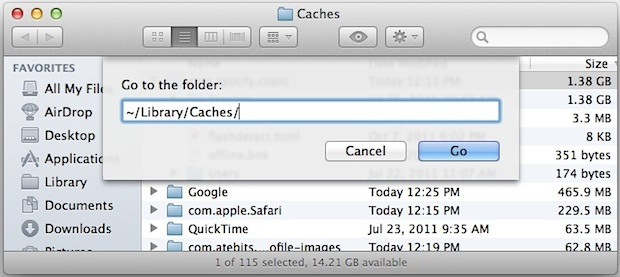
- Starta Finder applikation, välj Gå till inställningar menyn och välj sedan Gå till mapp ut från de tillgängliga alternativen.
- I det nya fönstret som har dykt upp skriver du
/Users/[YourUserName]/Library/Caches - Du får åtkomst till profilerna och alla användarcachelagar som är kopplade till de program du använder. Markera de filer du vill ta bort eller rensa och dra sedan filerna till trash.
Ta bort WinZip-cachen från Windows
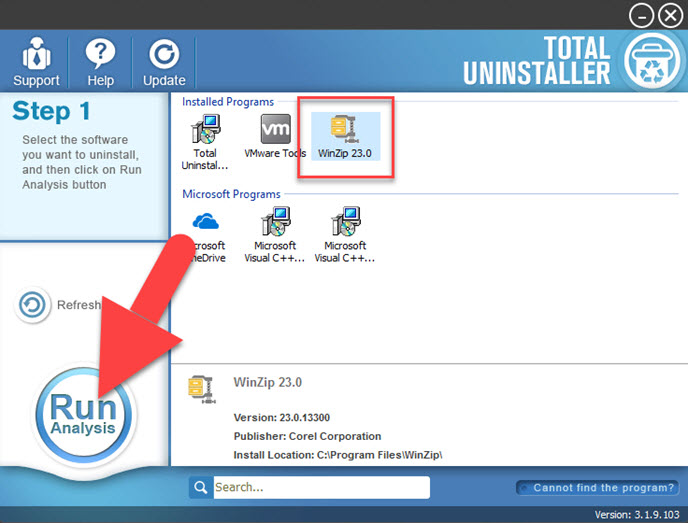
Ta bort tillfälliga filer från nuvarande användare via Local AppData:
- I sökfältet nära Windows-symbolen skriver du "
%temp%". - Enter för att komma åt mappen för tillfälliga filer för den aktuella användaren.
- Genom att samtidigt trycka på "Ctrl + A", kommer du att välja alla filer i mappen.
- För att ta reda på hur mycket lagringsutrymme filerna för närvarande tog upp på hårddisken, högerklicka och välj egenskaper.
- Slå RADERA knappen för att ta bort dokumenten samtidigt som alla angivna filer och kataloger behålls markerade.
- Välja Hoppa om visas, eftersom öppna filer inte kommer att tas bort.
- För att frigöra utrymme, titta i papperskorgen och TÖMMA för att permanent radera det borttagna innehållet.
Använd Kör och rensa WinZip-cachen:
- Ocuco-landskapet Körning kan väljas genom att högerklicka på Windows-symbolen på skärmen.
- I terminalfältet som är öppet skriver du "
%temp%". - För att komma åt mappen med tillfälliga filer för den aktuella användarens personliga appar, tryck på ange.
- Genom att trycka Ctrl och A, då markerar du alla filer.
- Klicka på RADERA knappen för att ta bort objekten samtidigt som alla angivna filer och kataloger behålls markerade.
- Välja Skip eftersom öppna filer inte tas bort.
- TÖMMA det raderade innehållet i Papperskorgen korgen~~POS=HEADCOMP.
Slutsats
Vi hoppas att du genom att läsa den här artikeln har en bättre förståelse för vad WinZip är, hur man rensar WinZips cache, de många tillgängliga teknikerna och hur man använder PowermyMac Junk Cleaner för att radera WinZips cache.


