


 Video Converter


Även om TP-filer bibehåller utmärkt videokvalitet, har de ofta kompatibilitetsproblem, vilket gör dem svåra att spela upp, redigera eller dela mellan enheter och plattformar. Av denna anledning blir det viktigt att konvertera TP-filer till ett mer tillgängligt och allmänt stödt format. I den här artikeln ska vi utforska de viktigaste skillnaderna mellan TP- och AVI-format och sedan guida dig genom hur du konverterar. TP till AVIOavsett om du är en vanlig användare eller någon som ofta arbetar med stora videofiler, hjälper vi dig att välja rätt metod som passar dina behov.
Innehåll: Del 1. Skillnaden mellan TP- och AVI-formatDel 2. Konvertera TP-filer till AVI på Windows/MacDel 3. Konvertera TP-filer till AVI onlineDel 4. Slutsats
Del 1. Skillnaden mellan TP- och AVI-format
TP och AVI är båda videofilformat, men de tjänar väldigt olika syften och erbjuder kontrasterande funktioner.
TP, eller Transport Stream Packet, är ett format som främst används för inspelning av HD-TV-sändningar. Dessa filer spelas vanligtvis in av TV-mottagare och innehåller inte bara video- och ljudströmmar utan även metadata som programinformation och kanaldata. TP-filer är strukturerade för att vara robusta under dataöverföring, vilket möjliggör återställning från fel eller förlorad data vid strömning över nätverk. Detta gör dem idealiska för sändningsändamål, men inte särskilt effektiva för uppspelning på vanliga mediaspelare eller enheter. TP-filer är ofta stora och kan kräva specialiserad programvara för smidig uppspelning eller konvertering.
AVI, som står för Audio Video Interleave, är däremot ett mycket mer universellt stödt containerformat utvecklat av Microsoft. Det används ofta för lokal videouppspelning och redigering. AVI-filer lagrar ljud- och videodata på ett sätt som möjliggör synkron uppspelning, och formatet stöder olika codecs, vilket gör det mycket flexibelt. AVI-filer är allmänt kompatibla med mediaspelare, redigeringsprogram och till och med äldre hårdvara.
Medan TP är optimerat för streamingmiljöer och för att bibehålla sändningsintegritet, är AVI optimerat för tillgänglighet, uppspelningskonsekvens och redigeringsprestanda. Konvertering från TP till AVI flyttar i huvudsak din video från ett sändningsklart format till ett som är redo för personlig eller professionell användning över en mängd olika plattformar.
Del 2. Konvertera TP-filer till AVI på Windows/Mac
Hur konverterar man TP till AVI? iMyMac Video Converter är en professionell men ändå användarvänlig videokonverteringsprogramvara som fungerar smidigt på både Windows- och Mac-plattformar. Den är utformad för att hantera en mängd olika filformat – inklusive TP – och konvertera dem till mer praktiska format som AVI. Detta gör den till en kraftfull lösning för alla som vill bearbeta högkvalitativa videor från HDTV-inspelningar med lätthet.
Det fina med det här verktyget är att du också kan redigera dina videor med det. Du kan till exempel rotera, trimma, klippa eller beskära videor. Du kan också välja att redigera mättnad, nyans, ljusstyrka och andra inställningar med verktyget.
Viktiga funktioner i iMyMac Video Converter:
- Stöder fler än 1000 format: Inklusive TP, AVI, MP4, MOV, MKV och mer.
- Höghastighetskonvertering: Tack vare hårdvaruacceleration och multitrådning.
- Batchkonvertering: Konvertera flera filer samtidigt för att spara tid.
- Videoredigeringsverktyg: Grundläggande redigeringsalternativ som att trimma, beskära, lägga till vattenstämplar, justera ljusstyrka/kontrast och infoga undertexter.
- Förlustfri konvertering: Bibehåller originalvideokvaliteten samtidigt som filstorleken optimeras.
Steg-för-steg-guide för att använda iMyMac
Låt oss utforska hur du kan använda iMyMac Video Converter för att enkelt konvertera TP till AVI.
- Starta Mac- eller Windows-versionen av iMyMac Video Converter-programmet på din dator. Logga in på ditt konto när du är klar.
- Att dra och släppa TP-filen till systemets skärm är ett ytterligare alternativ.
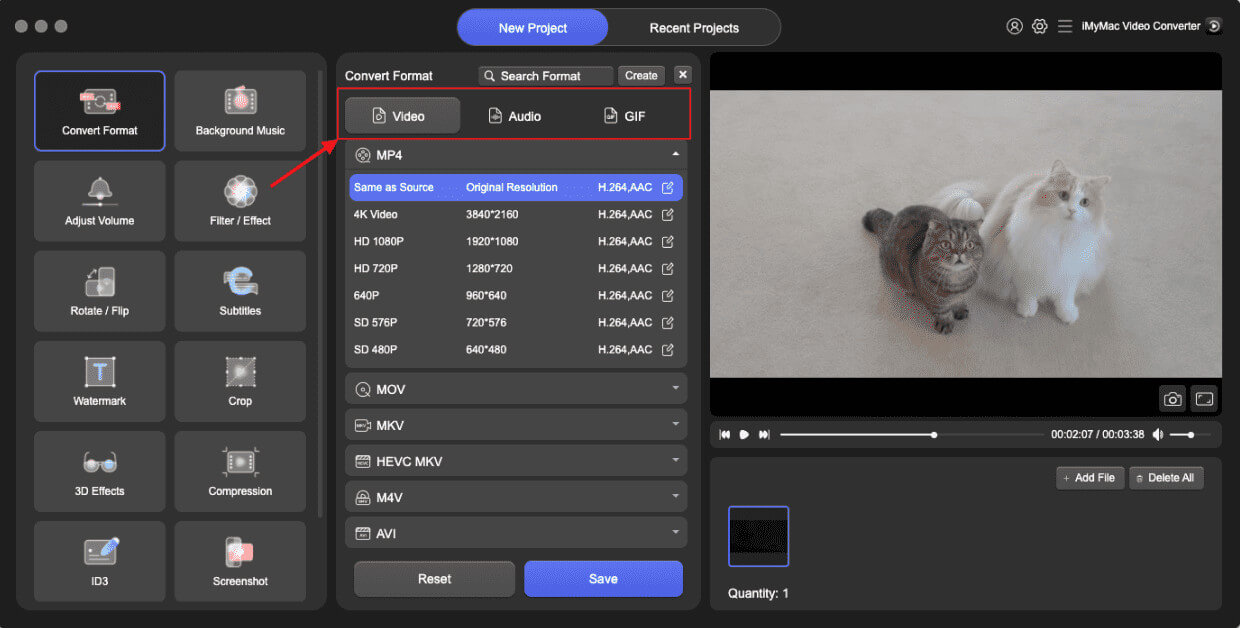
- När du klickar på "Konvertera format" visas ett rullgardinsmeny där du kan välja vilken typ av fil originalet ska konverteras till, till exempel AVI.
- Tack vare användargränssnittet är det nu enklare att hitta filändringar. Du kan göra vilka ändringar du vill i filerna.
- Genom att välja Spara kan du spara alla dina ändringar.
- Välj ett konverteringsalternativ i verktygsfältet för att starta konverteringsprocessen.
Del 3. Konvertera TP-filer till AVI online
Om du letar efter en snabb lösning utan installation, finns det flera gratis videokonverterare online kan konvertera TP till AVI. Här är tre populära och pålitliga alternativ:
1. CloudConvert
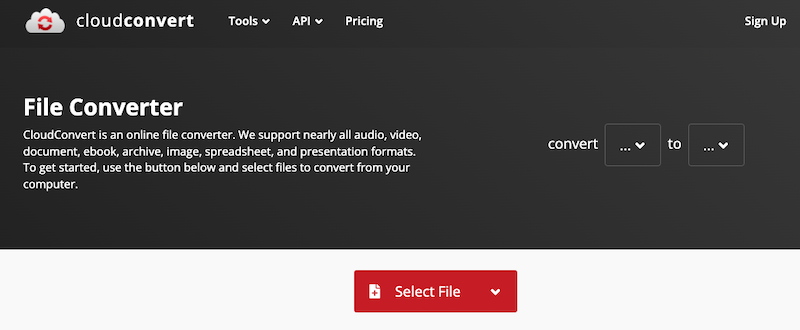
CloudConvert är en robust webbaserad filkonverteringstjänst som stöder en mängd olika format, inklusive TP och AVI. CloudConvert integreras också med molnlagringstjänster som Google Drive, Dropbox och OneDrive, vilket gör filhanteringen enklare. Även om den är idealisk för tillfälliga konverteringar kanske den inte hanterar särskilt stora filer lika effektivt som skrivbordsprogram.
2. Convertio
Convertio är ett molnbaserat verktyg utformat för snabb och enkel filkonvertering. Det stöder över 300 filtyper och erbjuder valfria anpassningsmöjligheter som codec- och kvalitetsinställningar. Uppladdningar kan komma från din lokala hårddisk eller molnlagring. Filer raderas automatiskt efter 24 timmar, vilket garanterar användarnas integritet.
3. Online-Convert
Online-Convert erbjuder en detaljerad videokonverteringsplattform med avancerade inställningar. Den stöder TP till AVI-konvertering och låter användare justera videoupplösning, bildförhållande, bildfrekvens och ljudkvalitet.
Del 4. Slutsats
Att konvertera TP till AVI förbättrar kompatibilitet, användbarhet och uppspelningsprestanda på en mängd olika enheter och plattformar. Medan onlineverktyg som CloudConvert, Convertio och Online-Convert erbjuder snabba lösningar, är de bäst lämpade för små filer och tillfällig användning. För de som hanterar stora videofiler eller behöver högkvalitativa, snabba och anpassningsbara konverteringar, framstår iMyMac Video Converter som det bästa valet. Den är funktionsrik, pålitlig och optimerad för både prestanda och användarvänlighet. Oavsett om du arkiverar HD-inspelningar eller förbereder filer för redigering har det aldrig varit enklare att konvertera TP-filer till AVI.


