


 Video Converter


Inte alla videospelare kan spela MPG-filer. Konvertering MPG till OGG är det bästa alternativet om du har MPG-filer som inte går att öppna på din dator. Försöker du hitta ett sätt att konvertera MPG-filer till OGG-format? I den här guiden ska vi utforska några effektiva metoder för att konvertera MPG-filer till OGG. Låt oss dyka in och hitta den bästa metoden som passar ditt arbetsflöde och dina behov.
Innehåll: Del 1: Vad är MPG- och OGG-filer?Del 2: Konvertera MPG-filer till OGG på Windows/MacDel 3: Konvertera MPG-filer till OGG gratis onlineDel 4: Slutsats
Del 1: Vad är MPG- och OGG-filer?
Vad är MPG?
MPG, även känd som MPEG, är ett multimediafilformat som främst används för videouppspelning. Det använder antingen MPEG-1- eller MPEG-2-komprimering, vilket möjliggör relativt hög videokvalitet vid reducerade filstorlekar. MPG-filer stöds i stor utsträckning i mediaspelare och redigeringsprogram, vilket gör dem till ett vanligt val för distribution av videoinnehåll. Formatet stöder både ljud- och videoströmmar i en fil, och det används ofta för filmer, digital-TV-sändningar och video-CD-skivor.
Vad är OGG?
OGG är ett multimediaformat med öppen källkod som utvecklats av Xiph.Org Foundation. Det är mest känt för att lagra ljuddata, särskilt Ogg Vorbis-ljudkodeken, som ger högkvalitativt ljud vid lägre bithastigheter jämfört med MP3. OGG-filer används för streaming och komprimering av högkvalitativt ljudinnehåll. Att vara patentfritt och royaltyfritt gör OGG till ett populärt val bland utvecklare och ljudentusiaster.
 Relaterade artiklar: MP3 VS OGG: Vilket är det bättre formatet?
Vad är skillnaden mellan MPG och OGG?
Den primära skillnaden ligger i deras syfte och innehåll: MPG är ett videoformat som kan innehålla både video och ljud, medan OGG är ett format som endast innehåller ljud. MPG är mer komplext på grund av videokodning, medan OGG är optimerat för ljudkvalitet och effektivitet. Att konvertera MPG till OGG innebär i huvudsak att extrahera ljudspåret från en videofil och spara det i ett högkvalitativt, komprimerat ljudformat.
Del 2: Konvertera MPG-filer till OGG på Windows/Mac
Om du letar efter en pålitlig och högkvalitativ lösning för att konvertera MPG till OGG på din dator, iMyMac Video Converter är ett utmärkt alternativ. Denna programvara är kompatibel med både Windows och Mac och erbjuder ett användarvänligt gränssnitt, avancerade redigeringsalternativ och stöd för en mängd olika format. Denna kraftfulla programvara låter dig inte bara konvertera OGG utan också enkelt MPG-filer till MP4, WMV, MPG, AVI och mer, med bara några få klick.
Varför välja iMyMac videokonverterare?
- HöghastighetskonverteringStöder hårdvaruacceleration för snabbare resultat.
- BatchkonverteringKonvertera flera MPG-filer samtidigt.
- AnpassningGer full kontroll över utgångsinställningar.
- Hög KvalitetBibehåller utmärkt ljudkvalitet efter konvertering.
Steg-för-steg-guide för att använda iMyMac Video Converter:
Låt oss se hur man konverterar MPG till OGG med iMyMac Video Converter:
- Starta iMyMac Video Converter-programvaran på din dator, antingen Mac- eller Windows-versionen. När du är klar loggar du in på ditt konto.
- Att släppa eller dra MPG-filen till systemets skärm fungerar alltid.
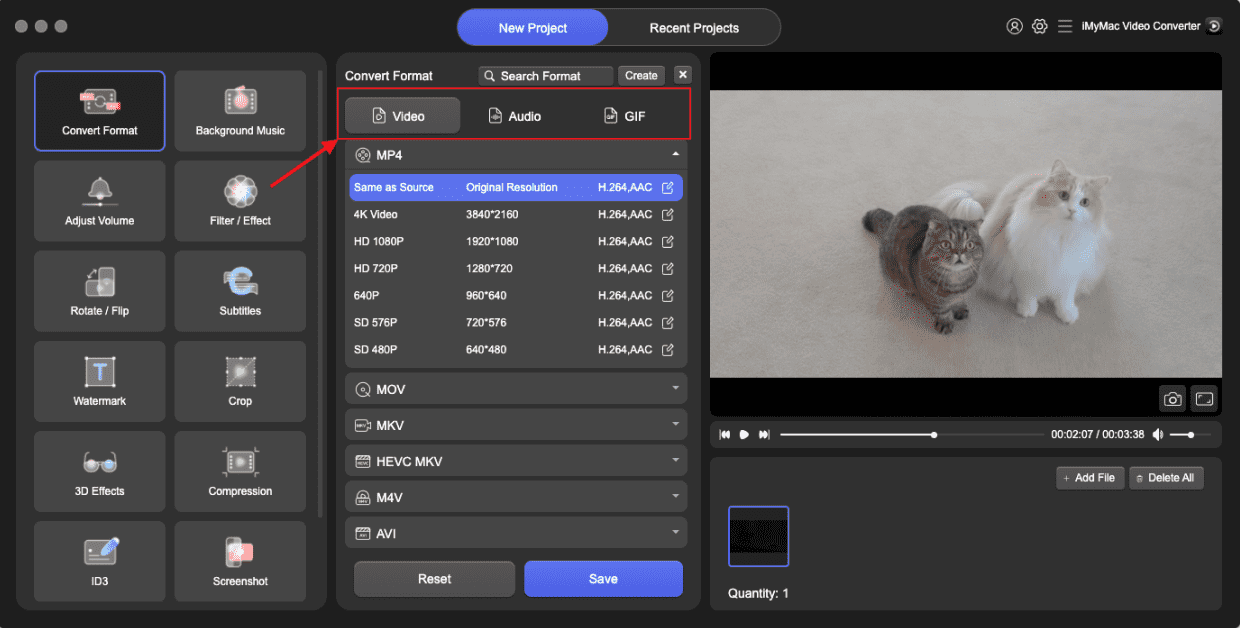
- Efter att du valt "Konvertera format" visas ett rullgardinsmeny som låter dig välja vilken typ av fil originalet ska konverteras till, till exempel OGG.
- Att hitta filändringar är nu mycket enklare tack vare användargränssnittet. Filerna kan redigeras på vilket sätt du vill.
- Du kan spara alla dina ändringar genom att välja Spara.
- För att starta konverteringsprocessen, välj ett konverteringsalternativ i verktygsfältet.
Del 3: Konvertera MPG-filer till OGG gratis online
För användare som föredrar att inte ladda ner någon programvara är FreeConvert ett kraftfullt och lättillgängligt onlineverktyg som låter dig konvertera MPG till OGG utan problem. Det är gratis att använda och stöder en mängd olika in- och utdataformat. FreeConvert fungerar direkt i din webbläsare. Grundläggande konverteringar är gratis. Det stöder uppladdningar/nedladdningar från Dropbox och Google Drive.
Steg för att konvertera MPG-filer till OGG med FreeConvert:
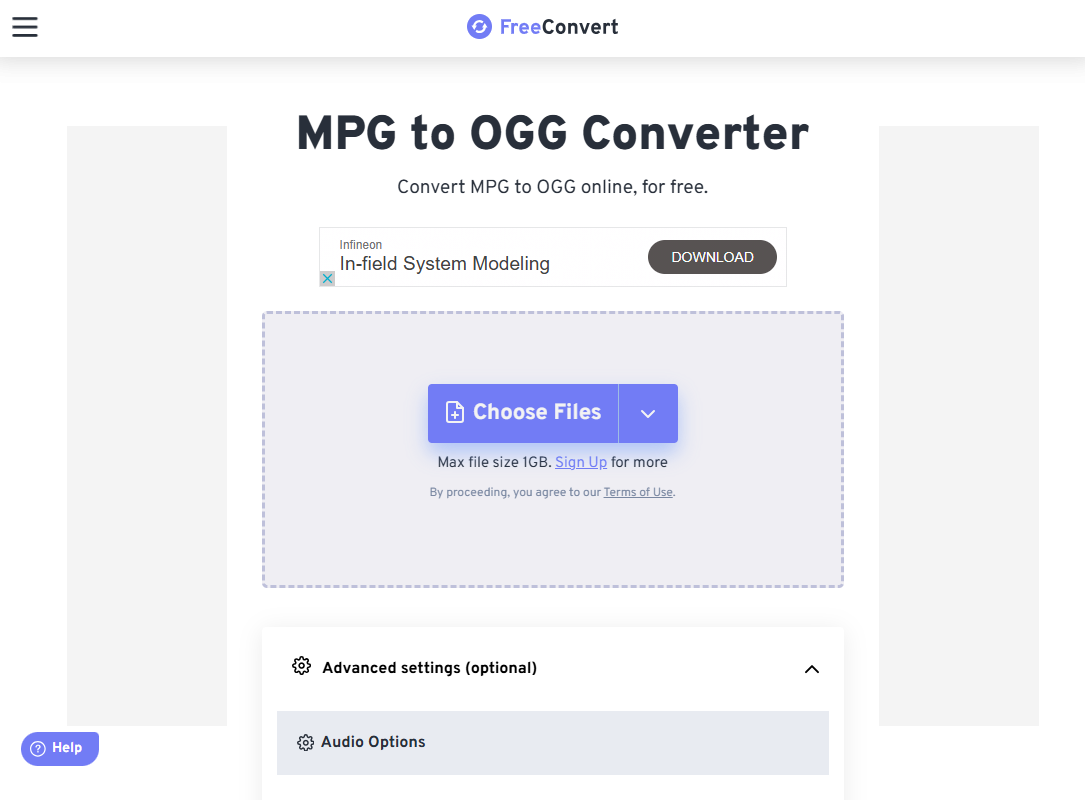
- Öppna din webbläsare och gå till FreeConvert MPG to OGG Converter.
- Klicka på "Välj filer" och välj din MPG-fil från din dator. FreeConvert stöder även filer från Dropbox, Google Drive och URL:er.
- Webbplatsen kommer automatiskt att upptäcka att du vill konvertera till OGG. Om det behövs kan du klicka på inställningsikonen för att justera utdatakvalitet, ljudkodek och volym.
- Klicka på knappen ”Konvertera”. Verktyget kommer att bearbeta din fil online. Konverteringstiden kan variera beroende på filstorlek och internethastighet.
- När konverteringen är klar klickar du på "Ladda ner" för att spara OGG-filen på din enhet.
FreeConvert är idealiskt för användare som letar efter en snabb och problemfri lösning för tillfälliga konverteringar utan att installera programvara. Men gratiskonton har en maximal filstorleksgräns. Du behöver också en stabil anslutning.
Del 4: Slutsats
Att konvertera MPG till OGG är en enkel process, oavsett om du väljer att använda ett skrivbordsverktyg som iMyMac Video Converter eller en onlineplattform som FreeConvert. Skrivbordsprogramvara passar bättre för användare som behöver avancerade funktioner och frekventa konverteringar, medan onlineverktyg erbjuder snabb och bekväm åtkomst för engångs- eller sporadisk användning.
Genom att förstå skillnaderna mellan MPG- och OGG-format kan du välja det bästa verktyget för dina behov och säkerställa högkvalitativ ljudutgång varje gång. Oavsett dina preferenser gör båda alternativen det enkelt att extrahera och konvertera ljud från dina videofiler effektivt.



