


 PowerMyMac


Ableton är för alla musikälskare och blivande musiker. Det är en app som låter dig streama och justera låtar och musik efter din smak. Nu, trots att den är populär, sägs det att Ableton-appen har börjat stöta på problem nuförtiden.
Det är därför många Ableton-användare vill lära sig hur man avinstallera Ableton på MacOm du är en av dessa användare, här är en artikel som visar dig hur du tar bort Ableton från Mac på olika sätt som du känner dig bekväm med.
Innehåll: Del 1. Det snabbaste sättet att avinstallera Ableton på MacDel 2. Hur avinstallerar man Ableton manuellt på Mac?Del 3. Vad är Ableton Live?Del 4. Slutsats
Del 1. Det snabbaste sättet att avinstallera Ableton på Mac
Om du verkligen vill ta bort Ableton från din Mac, så går vi rakt på sak och presenterar omedelbart det bästa och snabbaste sättet att avinstallera det från din dator. På så sätt kan du... lär dig hur du avinstallerar Ableton och använd din enhet med ett avslappnat och bekvämt sinne.
Men hur tar man bort Ableton från sin Mac? Den här gången ska vi visa dig ett mycket speciellt verktyg som lär dig hur du avinstallerar appen från din Mac-enhet.
För att enkelt och säkert ta bort Ableton från Mac behöver du hjälp av ett mycket kraftfullt verktyg som heter iMyMac PowerMyMacDet stämmer. Detta kraftfulla verktyg är ett professionellt rengöringsverktyg som hjälper dig att rensa upp och optimera datorns arbetshastighet. Utöver det kan det också hjälpa dig att bli av med filer som din dator inte behöver och som du tycker är värdelösa.
PowerMyMac kan till exempel hjälpa dig att rensa din webbhistorik så att du kan skydda din integritet hela tiden. Den hjälper också till att hitta och ta bort skräpfiler från dina datorer, till exempel föråldrade, stora, duplicerade och till och med liknande filer.
Till exempel om du ta bort Facebook från din Mac Genom att använda PowerMyMac kommer dess webbhistorik och cacheminne också att raderas helt.
Detta rensningsverktyg hjälper också användare att permanent radera filer från sina datorer så att de aldrig får se dem igen. Och slutligen kan denna kraftfulla programvara hjälpa dig att avinstallera olika typer av program på din dator med bara ett klick.
Om du vill lära dig hur du använder den här applikationen avinstallera Ableton på Mac, allt du behöver göra är att följa dessa steg:
- Gå till App Uninstaller efter att ha startat PowerMyMac
- Klicka sedan på SCAN för att låta den skanna din enhet efter alla dina installerade appar
- Hitta Ableton i listan och klicka på den.
- Tryck sedan på REN knappen och vänta tills den är klar med raderingsprocessen
- A Rengörs klar tecknet indikerar att avinstallationsprocessen är avslutad
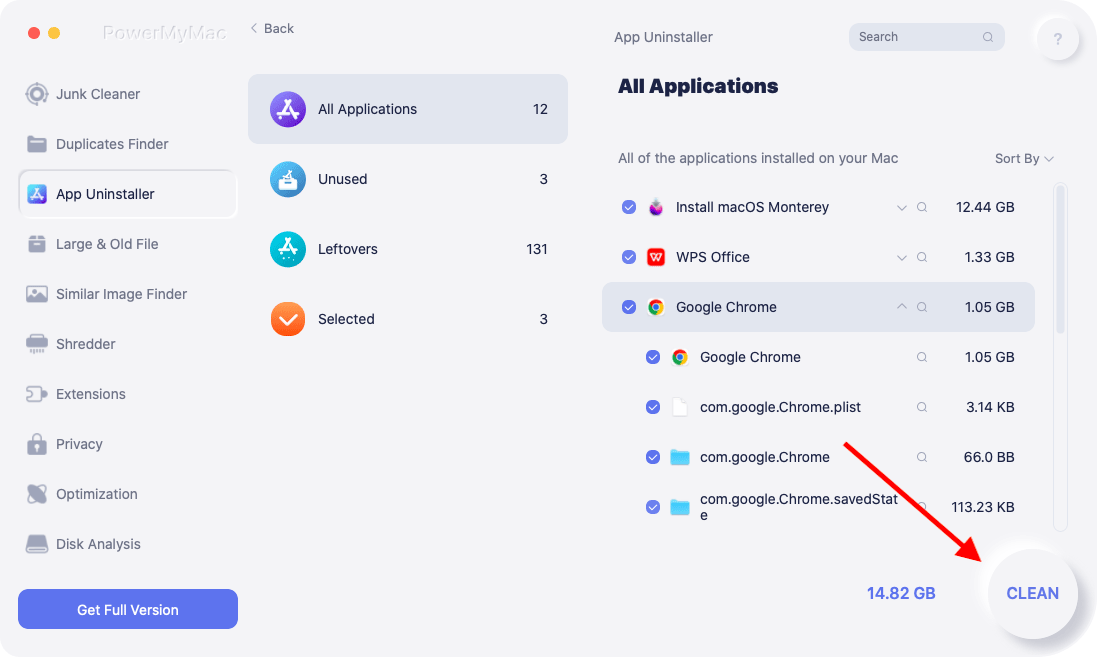
Och så avinstallerar du Ableton med hjälp av det mycket kraftfulla verktyget som heter PowerMyMacDet här verktyget har använts av miljontals användare över hela världen, så du behöver inte oroa dig för din dators säkerhet. Utöver det är det mycket användarvänligt och skadar inte din dator alls. Så om du vill rensa upp din dator föreslår vi att du använder PowerMyMac.
Del 2. Hur avinstallerar man Ableton manuellt på Mac?
Nu när du äntligen har lärt dig hur enkelt PowerMyMac-verktyget kan hjälpa dig att avinstallera Ableton-appen är det dags för dig att lära dig den manuella processen för att ta bort Ableton från Mac. Du behöver inte följa och läsa det här avsnittet, men det visar en enkel jämförelse mellan de två metoderna och hjälper dig att se hur användbar och kraftfull PowerMyMac-programvaran är.
För er som vill lära er hur man avinstallerar Ableton manuellt på Mac, följ alla dessa steg:
- Gå till din Dock och högerklicka på Ableton-appen och välj sedan Avsluta
- Körning Kommando + Q Klicka sedan på Sluta med Ableton, Klicka Kommando + Opt + Escoch välj sedan Ableton-appen en gång till Tvinga avsluta it
- Gå sedan till Finder, Välj Tillämpningar, och välj sedan Aktivitetskontroll
- Tryck på nätverks kategori och klicka på Ableton och klicka sedan helt enkelt på Avsluta processen Knappen
- Bekräfta åtgärden genom att trycka på Avsluta en gång till och öppna sedan din Tillämpningar mappen och klicka sedan och håll nere Ableton-appen
- Dra ikonen mot trash på Dock och sedan släppa den där
- Välja Töm papperskorgen och starta om datorn
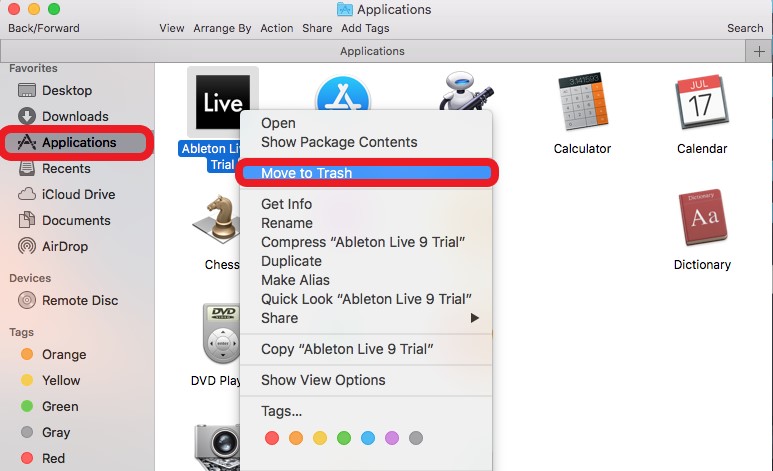
Så gör du manuellt avinstallera Ableton på MacSer du? Det är en väldigt lång process som kräver att du följer många steg. Men det kommer att vara värt det så länge du blir av med den och alla filer som är kopplade till Ableton-appen. På så sätt kan du frigöra utrymme på din enhet och få den att fungera snabbare med färre problem.
Del 3. Vad är Ableton Live?
Ableton-appen eller Ableton Live är en app som låter användare redigera, komponera, analysera, mixa och mastra musik. Många "vloggare" och "youtubers" använder den här appen för att uppträda live för sina fans och följare. Numera är Ableton-appen väldigt användbar och väldigt populär, men på något sätt har den nuförtiden börjat få många problem som påverkar en användares prestanda.
Det är därför de tenderar att flytta Ableton från Mac för att fixa det. dessa problemVissa av dem installerar om det efter avinstallation för att se om problemet är löst medan andra tenderar att hitta liknande appar som Ableton Live-appen.

Del 4. Slutsats
Ableton-appen är väldigt hjälpsam och fantastisk, men om du börjar få problem med den är det bästa sättet att åtgärda det att avinstallera Ableton på MacOch för att göra det måste du välja mellan två metoder; den manuella metoden eller metoden som använder hjälp av appavinstallationsprogram för PowerMyMacVi rekommenderar att du använder PowerMyMac eftersom det är ett verktyg som är utformat för att göra saker enklare och snabbare för dig. Så om jag vore du skulle jag ladda ner och installera den här användbara applikationen på min dator och använda dess funktioner.


