


 PowerMyMac


Wireshark är en mycket användbar app som hjälper dig att se mikroskopiska data från din nätverksanslutning. Den fungerar för husägare och kontorsanställda som alltid vill veta vad som händer med sin internetanslutning.
Men med tiden har Wireshark utvecklat vissa problem som irriterar många användare. Det är därför de tenderar att hitta ett sätt att... avinstallera Wireshark på MacOm du också använder appen Wireshark, här är några olika metoder som kan hjälpa dig att lära dig olika metoder för att ta bort appar som Wireshark från Mac.
Innehåll: Del 1. Det snabbaste sättet att avinstallera Wireshark på MacDel 2. Manuella sätt att avinstallera Wireshark på MacDel 3. Vad är Wireshark?Del 4. Slutsats
Del 1. Det snabbaste sättet att avinstallera Wireshark på Mac
Vill du redan bli av med din Wireshark-app från din dator? Då ska vi lära oss hur du snabbt och effektivt tar bort Wireshark från din Mac med hjälp av detta speciella och kraftfulla verktyg som vi älskar att använda. Det här verktyget är inget annat än... iMyMac PowerMyMac.
PowerMyMac är ett fantastiskt verktyg som kan hjälpa till att optimera din dators hastighet och prestanda. Denna programvara har många funktioner som användare älskar att njuta av och använda, särskilt de som vill rengöra och använda sina datorer med snabbare hastighet och jämnare grafik.
Den har också en funktion som låter användare ta bort olika appar samtidigt (vi kommer att fördjupa oss i det senare). Utöver det kan det här verktyget hjälpa dig att hitta oönskade och oanvändbara filer från din enhet och ta bort alla åt dig, till exempel dubbletter av filer, stora och föråldrade filer samt liknande bilder.
Det här verktyget hjälper också användare att permanent ta bort filer från sin dator som de aldrig vill ha att göra med längre. Och det hjälper också till att skydda din integritet genom att rensa din webbhistorik.
Dessutom, även om du upptäcker problem med ditt webbläsartillägg, kan PowerMyMac avinstallera det. Du kan till exempel enkelt avinstallera din Flash Player om du upptäcker att den inte kan köras eller att den går för långsamt.
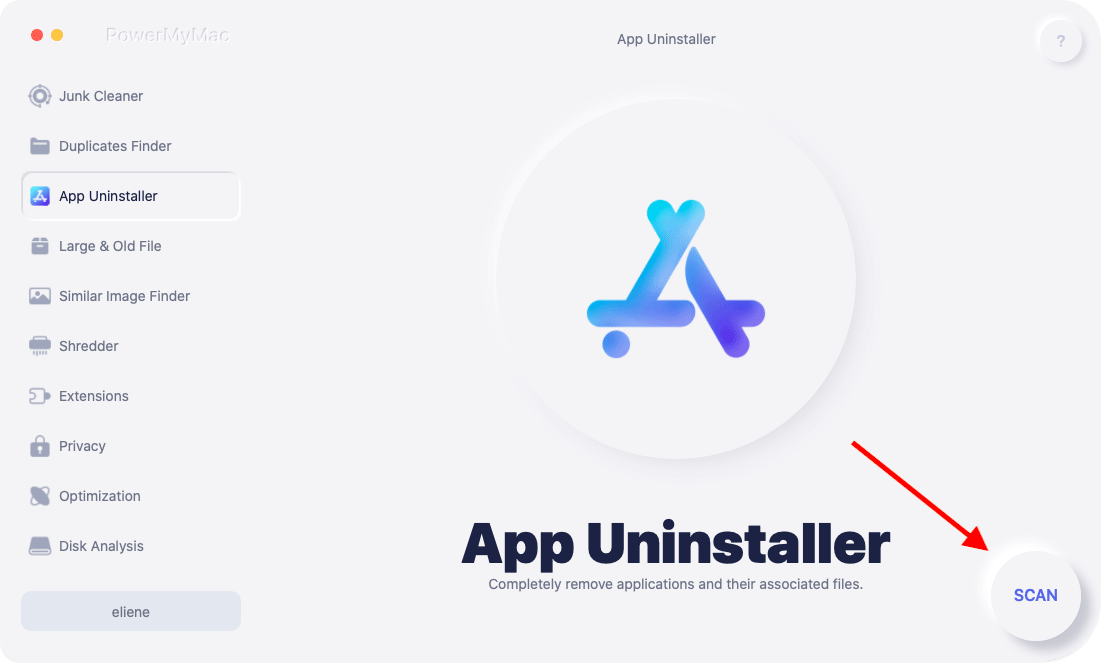
Om du vill veta mer om hur PowerMyMac kan hjälpa dig avinstallera Wireshark på Mac med hjälp av dess App Uninstaller-funktioner, här är en steg-för-steg-guide som du kan följa:
- Öppna PowerMyMac när du har installerat det på din Mac
- Klicka sedan på App Uninstaller och välj SCAN Knappen
- Appen kommer sedan att söka igenom din dator efter alla appar som är installerade i den.
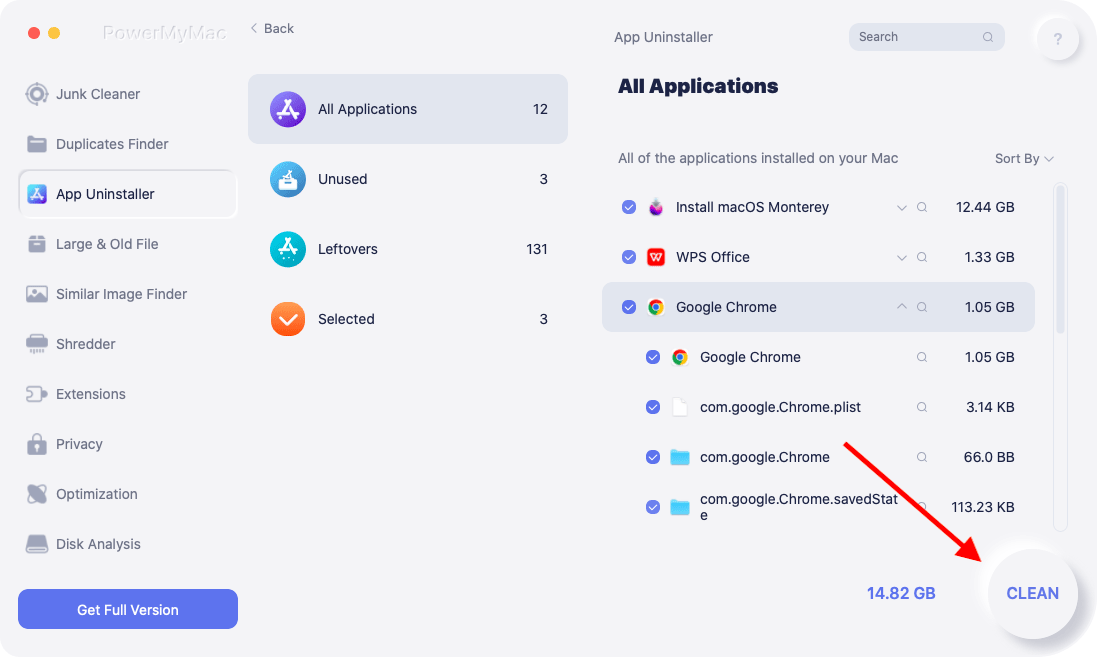
- Bläddra igenom resultaten och hitta Wireshark
- Klicka Wireshark.app och välj sedan REN
- När raderingsprocessen är klar Rengörs klar ordet kommer att visas på din skärm
PowerMyMac är ett verktyg som hjälper dig att rensa din dator från oönskade filer och onödiga appar som du vill bli av med. Det här verktyget kan göra saker enklare för dig. Om du vill se till att din dator är väl underhållen och fri från virus och skräpfiler, varför inte försöka ladda ner och installera det nu?
Del 2. Manuella sätt att avinstallera Wireshark på Mac
Om det finns ett enklare sätt, finns det också ett långt sätt. Den här gången ska vi presentera hur man manuellt tar bort Wireshark från Mac. Den långa processen är verkligen lång och den kommer att ta upp din tid, ditt tålamod och din ansträngning.
Även om det är lika effektivt som att använda iMyMac PowerMyMac, rekommenderar vi naturligtvis fortfarande starkt att använda den här kraftfulla applikationen eftersom den är enklare och även säkrare. Dessutom ser den till att ingen data finns kvar efter att du avinstallera Wireshark på Mac.
Om du vill lära dig den manuella metoden för att ta bort Wireshark, följ alla dessa steg:
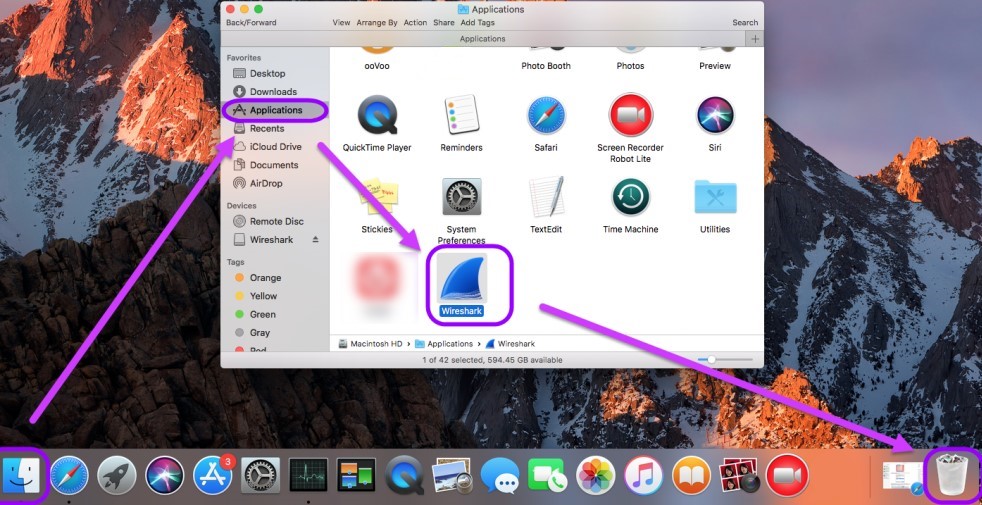
- Gå till din Finder välj sedan Tillämpningar mapp
- Välj Wireshark och dra den sedan till din trash
- Högerklicka på trash ikonen på din Dock Och välj Tom trash
- Gå sedan tillbaka till din Finder, Välj GoOch klicka sedan på Gå till mapp Knappen
- Typ
~/Libraryvälj sedan Go - Radera all data som följer med din Wireshark-app
- Gå sedan till din trash igen och välj sedan Töm papperskorgen
- Starta om enheten och se om Wireshark har tagits bort och avinstallerats.
Efter det är din app nu fri från Wireshark-appen. Det är bra att avinstallera Wireshark på Mac innan det kan påverka datorns prestanda. Nu kan den manuella processen vara en lång resa men det är värt det så länge du kan följa alla steg vi har gett dig ovan.
Del 3. Vad är Wireshark?
Wireshark är ett verktyg som hjälper dig att analysera och spåra vad som händer med din internetanslutning. Det här verktyget är bäst användbart för de som arbetar på ett kontor eller för de vänner hemma som alltid arbetar vid sina datorer.
Nu är Wireshark den mest använda nätverksprotokollanalysatorn i hela världen för dess enorma fördelar men på grund av de problem som det börjar uppstå nu har fler och fler användare börjat avinstallera Wireshark på Mac.
Det är en enorm minskning av antalet användare som använder Wireshark-appen varje månad. Detta beror på att användarna har upplevt många frågor med Wireshark-appen. Det är förståeligt med tanke på att appen hanterar analys av problem och metoder med internetanslutning.
För de som också upplever problem med sin Wireshark-app föreslår vi att du lär dig hur du flytta Wireshark från Mac för att åtgärda problemet och inte orsaka ytterligare skador på din enhet. Wireshark kan vara användbart men det kan vara skadligt om det inte gör det. används på rätt sätt.

Del 4. Slutsats
Efter att ha läst den här artikeln från topp till tå är vi hundra procent säkra på att du nu har massor av kunskap om hur man avinstallerar Wireshark på Mac och själva Wireshark-appen. Om du planerar att avinstallera den, se till att välja en metod som du är mest bekväm med.
Naturligtvis föreslår vi fortfarande att man använder iMyMac PowerMyMac eftersom det är ett enklare och säkrare sätt. För att inte tala om att det också har andra funktioner som kan hjälpa din dator att arbeta snabbare och ge den mer utrymme för nyare filer. Så ladda ner och prova det idag!


