


 PowerMyMac


YouTube är en utmärkt plattform för att titta på videor. Förutom att lära sig mycket från informationsmedia kan du till och med underhållas med olika videoalternativ att välja mellan. Det är därför YouTube har blivit en mycket populär plattform runt om i världen.
Det finns dock tillfällen då du inte har en internetanslutning. Dessutom är du inte säker på om YouTube faktiskt kommer att finnas kvar för alltid. Därför kanske du vill ladda ner YouTube-videor på Mac och spara dina favoritvideor på YouTube så att du kan titta på dem om och om igen.
Innehåll: Ladda ner videor på Mac, vilket strider mot YouTubes villkor?Hur laddar man ner YouTube-videor på Mac snabbt online?Hur man spelar in YouTube-videor på din Mac [Bästa gratismetoden]Hur laddar man ner YT-videor på Mac med VLC?Hur laddar man ner YouTube-videor direkt med Parallels Toolbox för Mac?Hur sparar och hämtar man YouTube-videor på Mac med QuickTime?Slutsatser
Ladda ner videor på Mac, vilket strider mot YouTubes villkor?
Kan jag ladda ner YouTube-videor på min Mac? YouTube Premium låter dig ladda ner videor med dina mobiltelefoner. YouTube har dock inte tillhandahållit ett officiellt sätt att spara YouTube-videor på din Mac.
Även om vi lär dig hur man gör det betyder det inte att vi tolererar handlingen. Det finns en stor risk när du bryter mot YouTubes regler.
Många vill ladda ner videor som finns på YouTube. Det ansvarsfulla sättet att göra det är att betala för YouTube Premium. Detta är tillgängligt på både Android- och iOS-enheter. Men om du inte gör det via YouTube Premium bryter du mot reglerna. deras användarvillkor.
Enligt deras villkor får du tillgång till innehåll för personligt bruk. Det står dock att du inte kan ladda ner innehåll om du inte ser en länk som heter "Ladda ner" eller liknande från YouTube. Brott mot dessa regler leder till att ditt konto avslutas. Detta gäller ifall du anses vara en upprepa intrång och beror också på omständigheterna.
Därför rekommenderar vi inte att du laddar ner YouTube-videor utan att välja YouTube Premium. Det är bäst att följa reglerna medan du kan.
Människor Läs också:Hur man redigerar videor på Mac med iMovieHur du spelar in video på Mac
Hur laddar man ner YouTube-videor på Mac snabbt online?
Att kringgå YouTubes regler är inte enkelt. Vi säger inte att det är säkert heller. Det enklaste sättet att ladda ner YouTube-videor med din Mac är dock via en online Youtube-videokonverterare.
Så här laddar du ner YouTube-videor på din Mac- eller Windows-dator online steg för steg:
- Gå till YouTube och sök efter din favoritvideo. Kopiera URL: n av den YT-videon från webbläsarens adressfält.
- Öppet en YT-videokonverterare online, en av de berömda platserna är OnlineVideoConverter-tjänstSe till att du avböjer aviseringsförfrågningar.
- Klistra in webbadressen av YouTube-videon du kopierade tidigare.
- Välj ett videoformat. Du kanske till exempel vill välja .mp4 eftersom det är ett universellt format som är populärt på de flesta enheter.
- Klicka fler inställningarDen visar olika alternativ. Du kan nu välj en upplösning du vill. Högre upplösningar resulterar i skarpare videor med större filstorlekar.
- Avmarkera rutorna som är märkta Konvertera till och Konvertera frånDu kan dock också lägga till din egen tid för att starta eller avsluta videon. Detta bör göras om du inte vill ladda ner hela videon utan bara en del av den.
- Klicka StartVänta tills hela processen är klar. Klicka sedan på Download för att spara YouTube-videor på Mac.
- Stäng alla popup-fönster som dyker upp. Det mesta är nonsens. Tänk på det, det är priset du betalar för att använda en gratistjänst. Tryck på Lämna om det visas en popup-dialogruta.

Hur man spelar in YouTube-videor på din Mac [Bästa gratismetoden]
Du kan också spela in videor från YouTube med hjälp av Macs inbyggda skärmdumpsprogram.
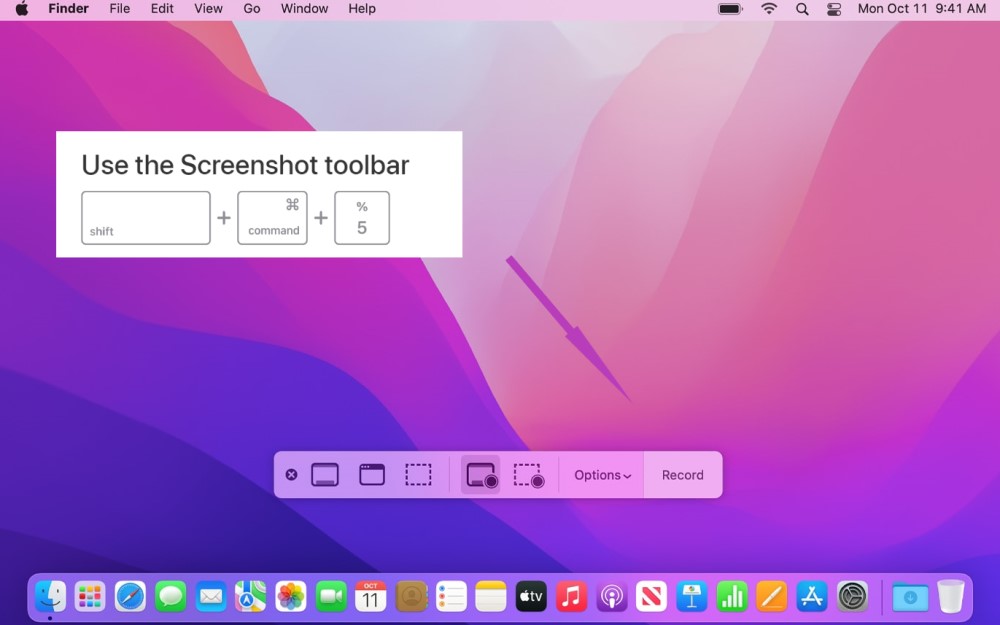
- Om du har macOS Mojave, tryck bara på tangenterna Skift + Kommando + 5Detta visar en regionsväljare för skärmen.
- Du måste dra och sedan släppa hårkorset för att välj regionen av Youtube-videon du vill spela in.
- Tryck sedan på knappen för Spela in vald delTryck därefter på Spela in.
Nästa steg är att fortsätta och spela upp YT-videonNär den är klar med uppspelningen trycker du på Sluta knappen. Denna finns längst upp till höger på skärmen.
Hur laddar man ner YT-videor på Mac med VLC?
Detta är också en populär metod när folk vill ladda ner YouTube-videor snabbt. VLC Media Player är ett känt verktyg med öppen källkod. Låt oss se hur vi kan använda detta gratisverktyg för att ladda ner YouTube-videor på Mac:
- Hitta och kopiera URL:en till den YouTube-video du vill ha (VLC Media Player kanske inte fungerar om YouTube-videon är åldersbegränsad. I det här fallet kan du prova att använda en online-YouTube-videokonverterare som vi har visat i del 2).
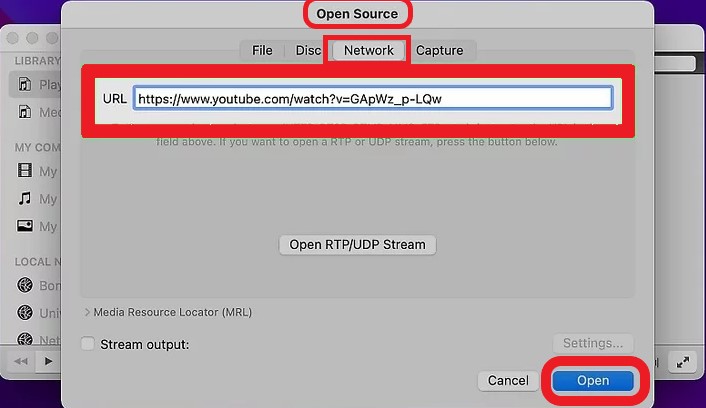
- Kör VLC Media Player-appen på din Mac och välj " i menyraden längst upp till vänster.Fil">"Öppna nätverk"
- I URL-rutan klistra in adressen till YT-videon och klicka sedan på "ÖppetNu kommer Youtube-videon du vill ladda ner på Mac att läggas till i VLC-spellistan.
- Efter att du öppnat den här YT-videon i VLC, välj " i menyradenFönster">"Medieinformation".
- Längst ner i fönstret "Mediainformation" letar du efter och kopiera "Plats-URL:en".
- Klistra in den här webbadressen i webbläsarens sökfält (t.ex. Safari eller Google Chrome) och klicka på Retur knappen för att spela det online.
- Det sista steget är att högerklicka på den här videon och välj "Ladda ner video som..."Eller"Spara video som...Nu kan du enkelt ladda ner YT-videor på Mac med VLC.
Hur laddar man ner YouTube-videor direkt med Parallels Toolbox för Mac?
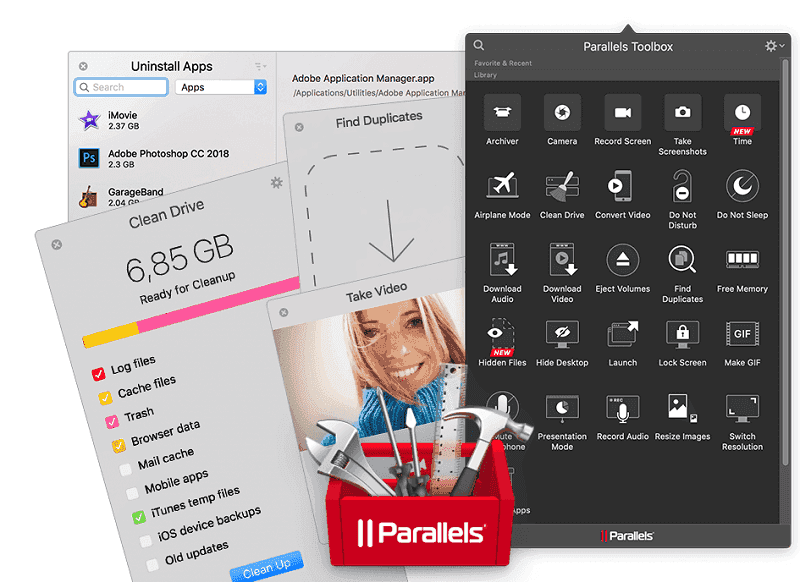
Om du vill veta hur man laddar ner YouTube-videor med din Mac, då har du något att vänta. Vi rekommenderar att du använder Parallels Verktygslåda vilket kostar cirka 19.9 USD per år. Även om det inte är ett gratisalternativ är nämnda företag en utmärkt leverantör av denna funktion.
När du har köpt och installerat programvaran startar du Verktygslådan. Denna Verktygslåda innehåller multifunktionella verktyg. Den kan startas genom att trycka på stapelikonen för Verktygslådemenyn. Tryck sedan på Ladda ner video.
Verktygslådan öppnar en fråga som frågar om du vill installera dess tillägg på SafariDetta är ett utmärkt alternativ för användare som älskar Safari. Men om du föredrar Chrome eller Firefox kan du helt enkelt hoppa över det.
Här är nästa steg för hur du använder Parallels Toolbox för att ladda ner YouTube-videor på din Mac:
- kopiera URL till YouTube-videon du vill ladda ner.
- Öppna och kör Parallels Toolbox. Tryck sedan på ladda ner video.
- Uppmaningen att installera ett Safari-tillägg visas. För en snabb handledning, klicka på Annullera.
- Tryck Inställningsikon, som ser ut som ett kugghjul, för alternativ.
- Du får alternativ för båda destination och videokvalitétVälj dina önskade alternativ.
- Klicka förbi och ange sedan din YouTube-videos URL. Börja sedan nedladdningsprocessen.
Hur sparar och hämtar man YouTube-videor på Mac med QuickTime?
Den här metoden är lämplig för de med system före macOS Mojave och fungerar enligt samma princip som skärminspelning. Du kan använda QuickTime för att spela in Youtube-videor på Mac-datorer och sedan spara dem.
- Med QuickTime Player öppen väljer du Fil > Ny skärminspelning från toppmenyn.
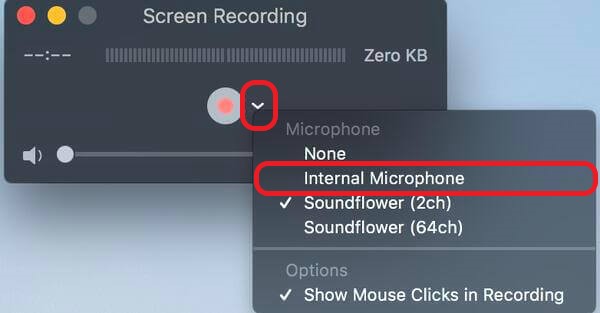
- I popup-fönstret klicka på nedåtpilen bredvid den röda knappen och se till att du har valt den inbyggda mikrofonen (intern mikrofon alternativ).
- Klicka på den röda knappen för att justera och modifiera inspelningsalternativen och inställningarna
- Du kan se instruktionerna som hjälper dig att spela in Mac-skärmen.
- Klicka Spela in och börja spelar upp YouTube-videon du vill ladda ner.
- Spara den inspelade videon för att ladda ner en YouTube-video på din Mac med QuickTime.
Slutsatser
Svarade vi på din fråga om hur man laddar ner YouTube-videor för Mac-datorerVi hoppas att vi gjorde det. Guiden vi nämnde ovan kan hjälpa dig att få YouTube-videor som du önskar. Men kom ihåg att vi inte tolererar detta.
Oavsett om du vill använda YT-nedladdaren online eller använda VLC Player, Parallels Toolbox, QuickTime eller någon annan YouTube-videonedladdare, kom ihåg det Det är bäst att följa YouTubes användarvillkor för att undvika att bli straffad eller avstängd av den populära videojätten.


