


 PowerMyMac


Datorspel har varit ett av de bästa sätten att njuta av de senaste och mest populära spelen, trots att det kan vara ganska dyrt. Även om fysiska CD-skivor fortfarande finns tillgängliga är Steam den absolut vanligaste metoden för att spela spel på en persondator eller Mac.
Men precis som att få tillräckligt med lagringskapacitet för andra appar kan det vara svårt att hitta tillräckligt med utrymme för att installera dina favoritspel.
Om du vill avinstallera Ark på Mac, du borde läsa det här inlägget för att lära dig några enkla sätt att ta bort appar noggrant först.
Innehåll: Del 1. Kan jag spela Ark Survival Evolved på Mac?Del 2. Olika sätt att avinstallera Ark på Mac eller PCDel 3. Hur avinstallerar jag Ark helt på Mac?Del 4. Slutsats
Del 1. Kan jag spela Ark Survival Evolved på Mac?
Skapad av Studio Wildcard, Ark överlevnad utvecklad är ett actionäventyrsspel i överlevnadsanda. Spelaren släpps av på en stor, gåtfull ö utanför ingenstans kust med bara kläderna på ryggen och det primära målet att lista ut hur man ska leva.
Ön är dock hem för en mängd olika utdöda förhistoriska arter, vilket ger spelet en unik twist. Spelaren kommer att stöta på ullhåriga mammutar, dinosaurier, sabeltandade tigrar och andra utdöda djur medan de navigerar i spelvärlden och kämpar för överlevnad.
Dessa djur är extremt farliga för spelaren, men de kan också tränas och användas som transportmedel och försvar.
Du kan spela Ark Survival Evolved på en Mac; du måste dock använda lösningar om Macen kör Catalina 10.15 eller senare. OS X-utgåvan av Ark Survival Evolved är inkompatibel med senare versioner av macOS. Det finns faktiskt... så många krav på kompatibilitet av detta spel.
Varför vill många avinstallera Ark på Mac eller sina PC-datorer?
När du använder macOS 10.14 Mojave eller en tidigare version kan du få macOS-versionen via Steam. Om inte kan du spela Ark Survival Evolved på Mac eller på Google Stadia med Windows installerat.
Du måste välja det tillvägagångssätt som bäst uppfyller dina behov bland dessa alternativ eftersom de alla är gångbara. Det måste vara en enkel process att ladda ner spelet från Steam och sedan installera det på Mac om Macen har en OS X-version tidigare än 10.15.
Det enda sättet att ladda ner och njuta av spelet på en nyare version av macOS är dock antingen med hjälp av virtualiseringsprogramvara eller Boot Camp Assistant.
Om du ändå behöver avinstallera Ark på din Mac och försöker frigöra utrymme, kan den här guiden hjälpa dig.
Del 2. Olika sätt att avinstallera Ark på Mac eller PC
1. Hur man tar bort Ark på Mac/PC via Steam
Att avinstallera Ark Mac med Steam är det snabbaste och enklaste sättet.
- Starta Steam och ange din inloggningsinformation, om det behövs.
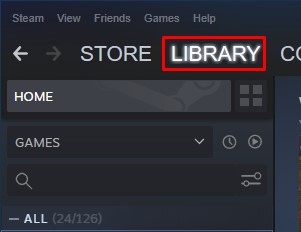
- Välja Bibliotek alternativet i den övre navigeringsmenyn.
- Hitta spelet Ark som du vill ta bort från biblioteket och högerklicka sedan på den. Detta bör få en rullgardinsmeny att visas där du kan välja.
- Gå sedan till botten av sidan och välj Hantera. Därefter kommer en ny rullgardinsmeny att visas. Välj Avinstallera på den rullgardinsmenyn.
- Steam kommer att fråga dig om du behöver ta bort Ark-spelet helt från ditt system innan du fortsätter.
- När du är klar, välj objektet från din lista och välj sedan AvinstalleraEfter det avinstallerar du slutligen Ark på Mac.
2. Hur man avinstallerar Ark manuellt på en Windows-dator
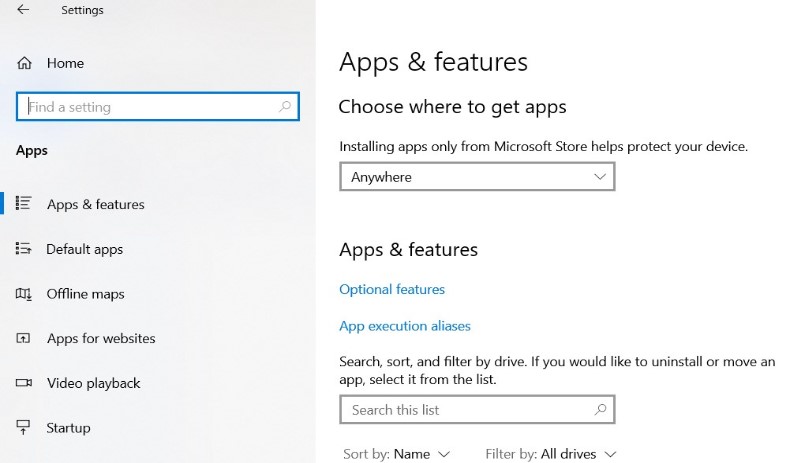
- Klicka Start, Välj sedan Inställningar för att komma åt konfigurationsalternativen.
- Gå till System > Appar och funktioner.
- Välj den programvara du vill avinstallera (Ark) och klicka sedan på AvinstalleraDet är omöjligt att ta bort alla program som är förinstallerade på Windows.
- Håll koll på instruktionerna som visas på skärmen.
Och om du fortfarande har problem med att avinstallera programvaran, bör metoderna som listas nedan hjälpa.
- Skriv "kontrollpanelen"i sökfältet och välj sedan kontrollpanelen.
- Först navigera till Program > Program och funktioneroch välj applikationen.
- Välj den programvara du vill avinstallera och klicka på AvinstalleraDet är inte möjligt att ta bort alla program som är förinstallerade på Windows.
- Håll koll på instruktionerna som visas på skärmen.
Del 3. Hur avinstallerar jag Ark helt på Mac?
Eftersom du inte behöver söka efter alla filer som är kopplade till programmet individuellt, är det det enklaste sättet att avinstallera Ark Mac helt från din enhet.
Detta kommer att radera Ark: Survival Evolved för alla användare, såväl som nycklarna till registret och installationskatalogen, som innehåller all speldata från Mac OS-systemet.
För att lära sig använda applikationen iMyMac PowerMyMac, kan du hänvisa till följande steg:
- Borttagningsprocessen kan startas genom att välja App Uninstaller från menyn som visas.
- Klicka på SCAN knappen för att göra en grundlig genomsökning av all programvara som för närvarande är installerad på din dator.
- Från en lista över alla program som för närvarande är installerade kan du välja vilka du vill avinstallera. Genom att ange namnet i sökfältet kan du hitta en programvara.
- Välj Ark-spelappen
- Välj "REN" för att ta bort alla filer från din dator, inklusive de som är kopplade till spelet "Ark: Survival Evolved". Sedan kan du avinstallera Ark på Mac.
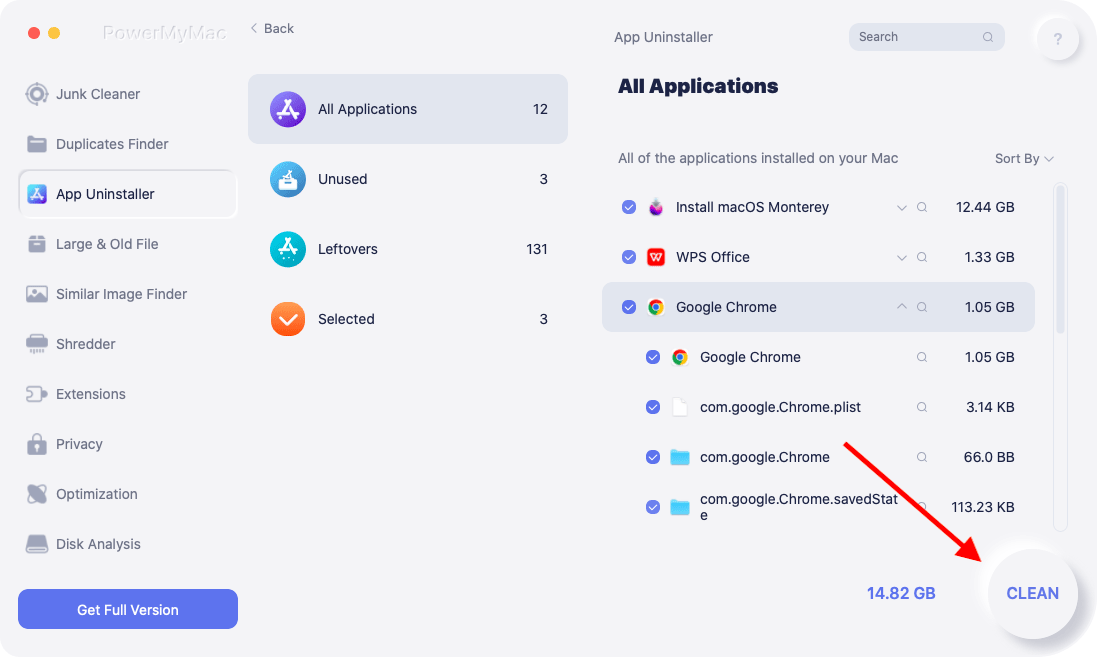
Allt du vill ta bort från din Mac kan tas bort utan problem med hjälp av det här avinstallationsverktyget. Andra spelprogram som Rost kan tas bort helt genom att använda detta rengöringsverktyg.
Del 4. Slutsats
Vissa har uttryckt sitt missnöje med att Ark tar upp för mycket utrymme i systemet. Som ett resultat kommer enheten att arbeta långsammare än normalt.
Andra kan försöka frigöra utrymme och avinstallera Ark på MacDu kommer tack och lov att lära dig hur du avinstallerar ett program helt genom att läsa det här inlägget.


