


 PowerMyMac


Det finns tillfällen då vi installerar gratis programvara på vår dator och fastnar i ett nät av olika irriterande program som installeras tillsammans med den. Ett sådant program är RocketTab och du kanske inte vet hur man gör det. avinstallera dessa appar på din Mac. Här kommer vi att diskutera hur du avinstallerar eller ta bort RocketTab från Mac dator. Detta hjälper dig att ta bort irriterande annonser från din dator.
Vi kommer att diskutera varför RocketTab är en farlig eller värdelös applikation som du bör ta bort omedelbart. Sedan kommer vi faktiskt att hjälpa dig att ta bort appen från din dator manuellt eller automatiskt.
Innehåll: Del 1. Är RocketTab farligt?Del 2. Hur tar jag bort RocketTab från Mac?Del 3. Hur tar man bort RocketTab från Mac-webbläsare?Del 4. Slutsats
Del 1. Är RocketTab farligt?
Gratisappar som du hämtar från nätet, men som inte tydligt anger att ytterligare programvara kommer att installeras med dem, kommer att installera RocketTab åt dig. Och det är avgörande att du är särskilt uppmärksam på licensavtal och installationsskärmar när du installerar något från internet.
Anledningen är att RocketTab kommer att infoga reklam på webbplatserna du besöker. Dessa kampanjer, även kända som RocketTab, Adverts by RocketTab eller Brought by RocketTab, gör det omöjligt att förstå innehållet på webbplatsen du besöker eftersom annonserna kommer att läggas ovanpå det.

Det är en bra idé att välja Anpassad installation eller Avancerade installationsalternativ om en installationsskärm visar dem eftersom de ofta anger vilken ytterligare programvara från tredje part som kommer att installeras. Dessutom uppmanas du att omedelbart stoppa installationen och avstå från att använda gratisprogrammet om licensavtalet eller installationsskärmarna indikerar att de kommer att installera RocketTab, ett annat verktygsfält eller annan oönskad annonsprogramvara.
Del 2. Hur tar jag bort RocketTab från Mac?
#1. Hur man avinstallerar RocketTab manuellt
Här är stegen att följa:
- Ta bort RocketTab-applikationen i Applikationer. Kolla in Rocket Tab och alla program som du inte vet hur man får in i din dator. Flytta dem mot trash på din dator. Töm papperskorgen när du är klar.
- Gå sedan till datorns startskärm och tryck på kortkommandot SKIFT + CMD + GDetta öppnar fönstret för Gå till mapp.
- I fönstret Gå till mapp, besök följande mappar:
/Library/ Application Support,/Library/ LaunchDaemons,~/Library/ LaunchAgents - Inom varje mapp raderar du alla filer och undermappar relaterade till RocketTab.
- Tömma papperskorgen av din macOS-dator efteråt.
- Gå till Apple-menyn i din macOS-dator och besök Systeminställningar.
- Inom den, tryck på Användare och grupper. Välj fliken märkt Startobjekt.
- Om ett visst inloggningsalternativ är ovanligt och inte verkar vara nödvändigt, tryck på det och klicka sedan på minusknappen i det.
#2. Automatiskt sätt att ta bort RocketTab från Mac
Använda iMyMac PowerMyMac, kan du ta bort RocketTab från din Mac-dator. PowerMyMac är faktiskt ett program för att optimera macOS-datorer. För din Mac tillhandahåller det en mängd olika rengöringsverktyg.
Den har också en avinstallationsprogramvara som låter dig ta bort alla program från din macOS-enhet. All programvara eller app kan tas bort helt av PowerMyMac. Den stöder dig också att ta bort Photoshop och andra program för grafisk design också. Utan din inblandning kommer avinstallationsprogrammet automatiskt att slutföra en fullständig avinstallation.
Så här tar du bort RocketTab från Mac med hjälp av verktyget:
- Ladda ner och installera programmet på din Mac.
- Starta datorns program.
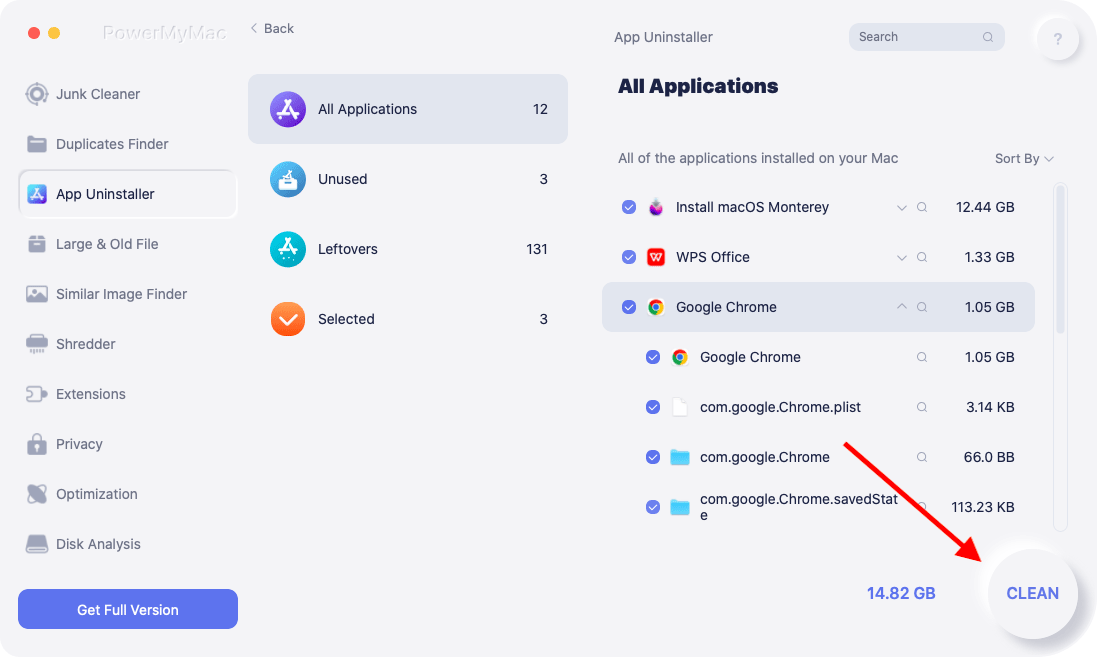
- Klicka App Uninstaller på huvudskärmens vänstra sida.
- För att söka bland alla appar på din smartphone klickar du på SCAN symbol i mitten.
- Välj RocketTab och relaterade appar från listan över program på din dator efter det.
- Du kan påbörja avinstallationsproceduren genom att välja REN Din macOS-enhet kommer att rensas från appen och alla relaterade filer.
Del 3. Hur tar man bort RocketTab från Mac-webbläsare?
#1. Ta bort RocketTab-annonser manuellt från Mac-webbläsare
Här kommer vi att diskutera hur man tar bort RocketTab och andra tvivelaktiga tillägg från olika webbläsare som Safari, Chrome och Firefox. Kolla in hur man gör det med varje webbläsare du kan använda nedan:
Safari
- Öppna Safari och välj meny
- Välja förlängningar under "Inställningar".
- Sök efter ett tvivelaktigt tillägg som du inte installerade.
- När du klickar på den, välj Avinstallera.
krom
- Starta Chrome.
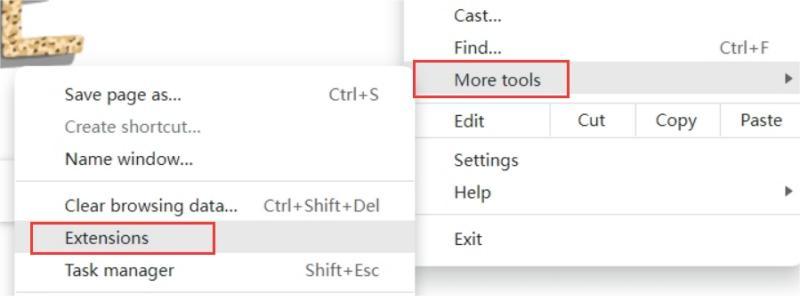
- Besök Chrome:
/extensionsAlternativt kan du välja förlängningar genom att klicka på de tre punkterna i skärmens övre högra hörn (menyikonen). - Se upp för eventuella olycksbådande tillägg.
- Välja ta bort.
firefox
- Starta Firefox.
- För att starta Tilläggshanteraren, klistra in
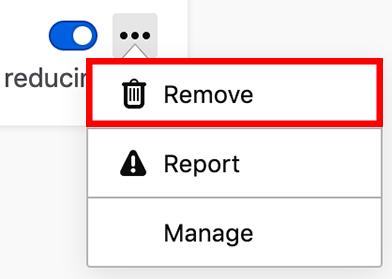
about:addonsin i URL-fältet och tryck på Enter. - Välj att ta bort genom att välja de tre punkterna bredvid ett skadligt tillägg.
#2. Ta bort skadliga webbläsartillägg automatiskt
Vi har tidigare introducerat sättet att ta bort RocketTab från Mac och nu kan du välja att automatiskt ta bort skadliga tillägg med verktyget PowerMyMac och dess "förlängningar"nytta."
Med funktionen Tillägg kan du hantera dina tillägg på olika webbläsare som Chrome, Safari och Firefox. Dessutom hjälper det dig att enkelt ta bort oönskade tillägg från dina webbläsare.
Här är stegen för hur du använder den:
- Starta PowerMyMac på din dator.
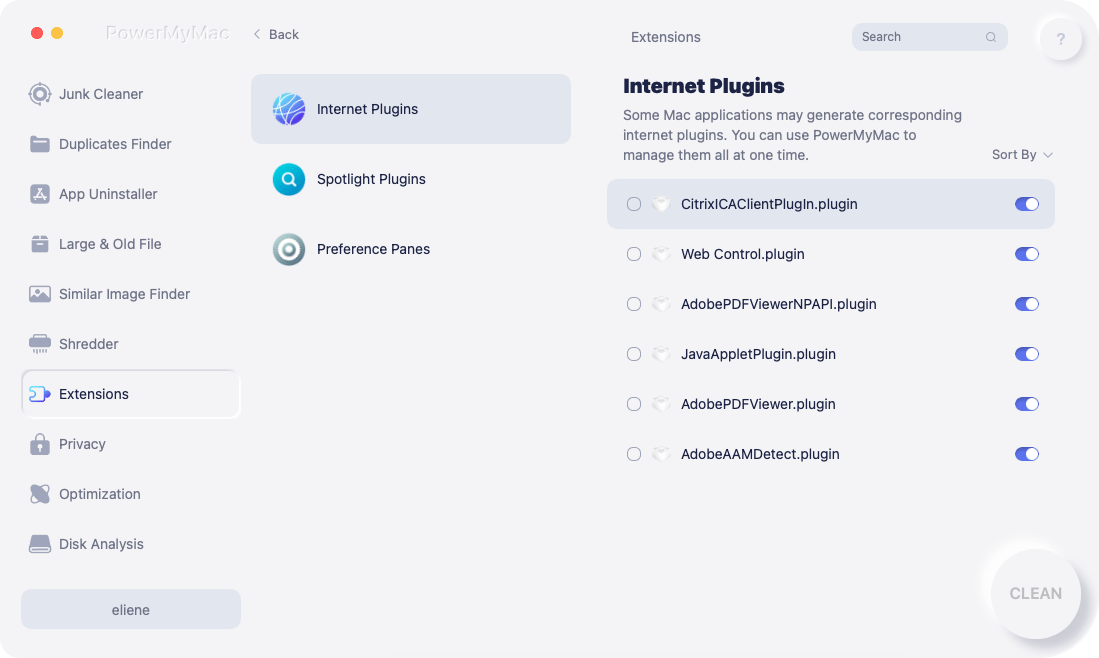
- Klicka förlängningar.
- För att söka efter och visa alla Mac-tillägg, klicka på SCAN Som du kan se finns det tre kategorier för tillägg: Spotlight-plugins, inställningsrutor och internet-plugins.
- Växla bara knappen under tillägget från på till av för att aktivera eller inaktivera det.
Del 4. Slutsats
Denna guide har gett dig De bästa sätten att ta bort RocketTab från MacVi pratade om hur du kan installera RocketTab på din dator via andra gratisappar på internet. Vi pratade också om varför det är en farlig applikation som du bör ta bort.
Slutligen pratade vi om hur man avinstallerar RocketTab manuellt och automatiskt. Stegen för att ta bort det och andra tvivelaktiga tillägg från webbläsare gavs också här.
Det bästa sättet att ta bort RocketTab från en Mac-dator och webbläsare är via PowerMyMac. Det är ett rensningsverktyg som hjälper dig att ta bort oönskade appar och oönskade webbläsartillägg!


