


 PowerMyMac


Vi använder alltid våra Mac-datorer för olika ändamål. Vi använder dem i skolan och i arbetet. Om vi har använt dem länge kan de vara tröga eller långsamma. Därför rekommenderas det att du använder ett optimeringsverktyg. Ett sådant verktyg är BuhoCleaner. Men om du inte behöver det längre kanske du vill... Avinstallera BuhoCleaner på Mac. Avinstallera appar som du inte längre använder kan snabba upp din Mac avsevärt.
Här kommer vi att diskutera hur man avinstallerar BuhoCleaner-appen och de bästa sätten att ta bort verktyget både manuellt och automatiskt. Vi kommer också att rekommendera ett rengöringsmedel som du kan använda enkelt och snabbt. Dessutom kan vi ge dig det bästa alternativet du kan använda, vilket är ett fantastiskt val efter att du har tagit bort det. BuhoCleaner-applikationen.
Innehåll: Del 1. Ta bort BuhoCleaner från Mac med hjälp av dess avinstallationsprogramDel 2. Kan du inte avinstallera BuhoCleaner på Mac? Testa det här verktyget!Del 3. Det bästa alternativet till BuhoCleanerDel 4. Slutsats
Del 1. Ta bort BuhoCleaner från Mac med hjälp av dess avinstallationsprogram
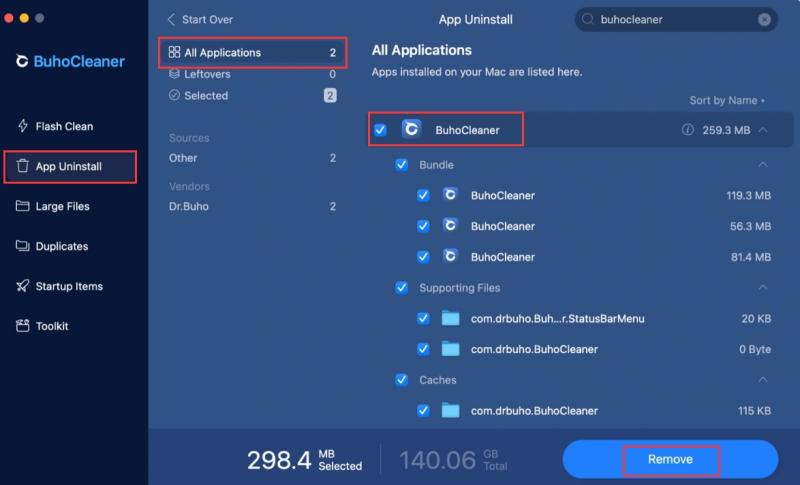
Följande steg är vad du behöver följa för att avinstallera BuhoCleaner på Mac med dess inbyggda avinstallationsprogram:
- Öppna BuhoCleaner-appen på din macOS-dator.
- Välja Avinstallation av app, tryck sedan på scan
- Markera rutan bredvid BuhoCleaner i applistan och klicka sedan på ta bort.
- När du klickar på Avinstallera knappen och bekräfta avinstallationen, kommer alla BuhoCleaner-relaterade filer att raderas.
Del 2. Kan du inte avinstallera BuhoCleaner på Mac? Testa det här verktyget!
För att avinstallera programmet från din Mac-dator, använd iMyMac PowerMyMacPowerMyMac är faktiskt ett program för att förbättra macOS-datorer.
För din Mac erbjuder den en mängd olika rengöringsverktyg. Dessutom har den ett avinstallationsprogram som låter dig ta bort alla appar från din macOS-enhet. Avinstallationsprogrammet utför automatiskt en grundlig avinstallation utan att du behöver göra något.
PowerMyMac-programvaran gör det enkelt att ta bort appar från datorn. Det är jättekul att ta bort CIeanMyMac från din Mac PowerMyMac används för att optimera Mac-datorer genom att erbjuda ett antal praktiska verktyg.
Ocuco-landskapet App Uninstaller är ett av dess verktyg, och det har möjlighet att helt ta bort oönskad programvara från din Mac. Det säkerställer att det inte finns några rester eller filer relaterade till det oönskade programmet.
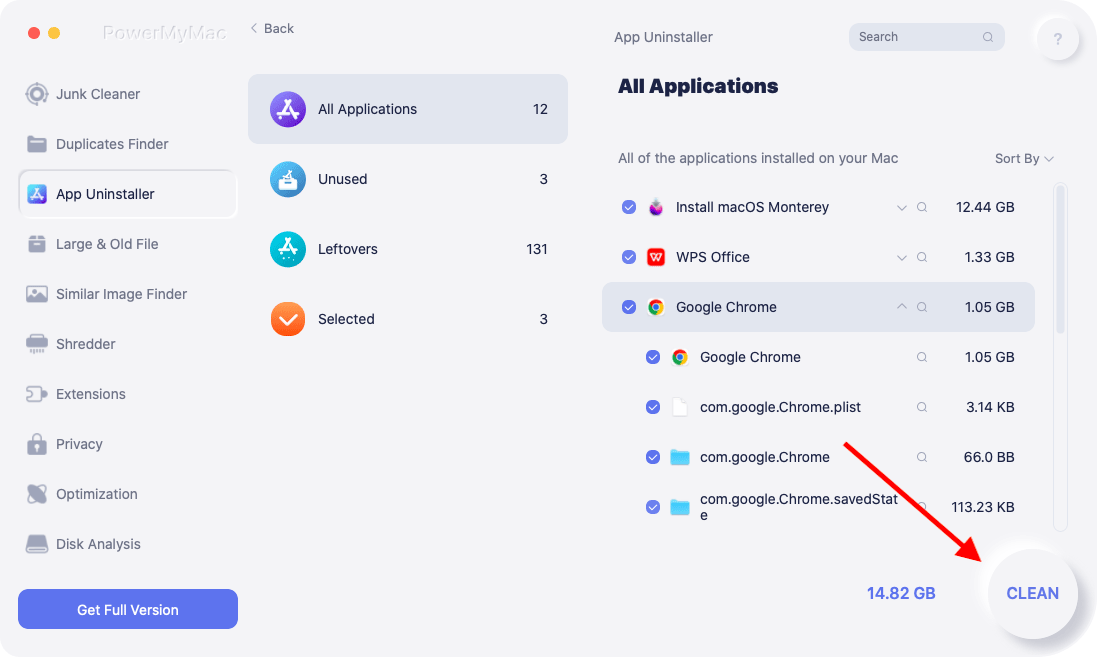
Följande tekniker kan användas för att avinstallera BuhoCleaner på Mac med hjälp av programmet:
- När du har laddat ner installationsprogrammet använder du det nedladdade paketet för att installera programvaran på din dator.
- För att använda programmets funktioner, starta det.
- Därefter klickar du på App Uninstaller på gränssnittets vänstra sida.
- Klicka på SCAN knappen för att hitta all installerad programvara och verktyg på din bärbara eller stationära Mac.
- Välj sedan från listan över program som visas BuhoCleaner.app för att ta bort det.
- Klicka REN för att helt ta bort programmet från din Mac och se till att inga filer finns kvar.
Del 3. Det bästa alternativet till BuhoCleaner
Vilken är den bästa alternativ till BuhoCleaner? Enkelt! Det är PowerMyMac-verktyget som kan avinstallera BuhoCleaner på Mac.
Det här optimeringsverktyget är fantastiskt eftersom det verkligen rensar din Mac-dator för att ta bort oönskade filer. Dessutom har det många miniverktyg som hjälper dig att optimera din Mac-dator. PowerMyMac kan också enkelt avinstallera flera appar på din dator.
På din Mac finns det otaliga platser där skräp och skräp samlas, samt ett överflöd av platser att spara filer på. Vem har tid att spendera hela dagen med att titta igenom filer och mappar? Det är därför PowerMyMac är nödvändigt. Verktyget är städinriktat; det försöker hjälpa användare att ta bort onödiga filer och program för att frigöra utrymme på sin Mac.
PowerMyMac har ett fantastiskt användargränssnitt och ett stort urval av funktionella funktioner. Det kan användas för att ta bort onödiga filer från systemet, rensa upp filer som blivit kvar efter avinstallation av program och snabbt hitta och ta bort dubbletter och relaterade filer.
Som det bästa alternativet till BuhoCleaner kan PowerMyMac inte bara avinstallera BuhoCleaner på Mac utan också rensa skräpfiler eller cacher och så vidare.
Följande är de viktigaste funktionerna:
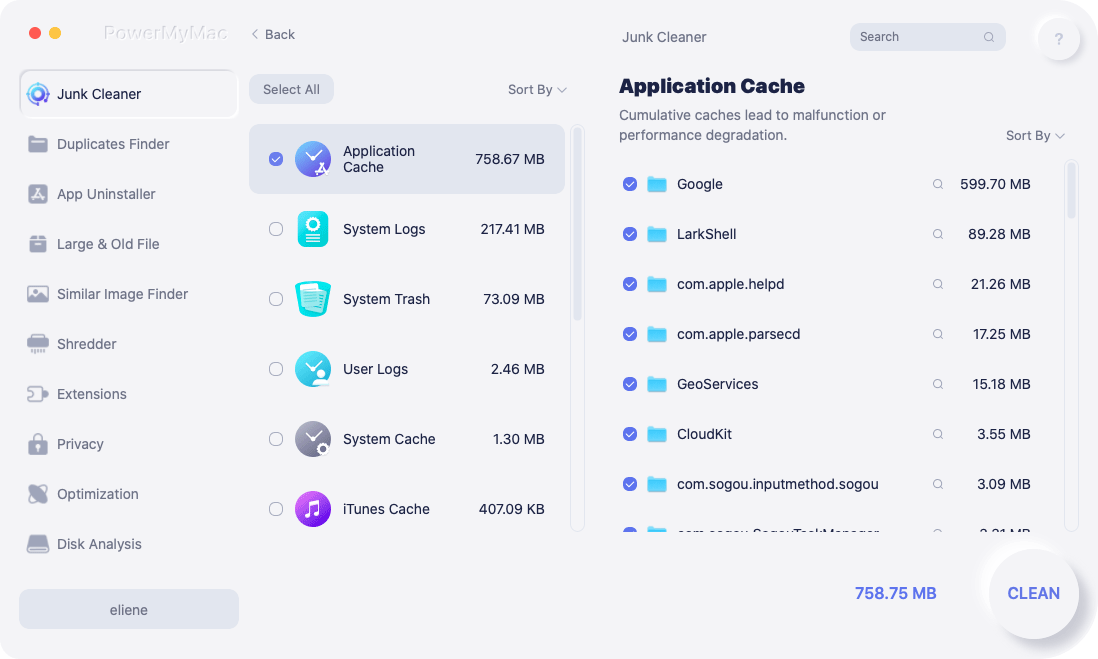
- Rengöring av skräpfilerDu kan använda PowerMyMac för att hitta alla onödiga filer i ditt system. När dessa har hittats kan de enkelt tas bort med några få klick, vilket optimerar din dator.
- Hitta liknande bilderDu kan använda den för att hitta liknande bilder på din Mac-dator. På så sätt kan du ta bort dubbletter av bilder och spara mer utrymme på systemet.
- Rengör cacherDet här verktyget kan användas för att ta bort tillfälliga cacheminnor på din Mac-dator för att påskynda dess prestanda.
- Avinstallera AppsDu kan använda verktyget för att avinstallera program på din dator. Även appar som är svåra att ta bort kan raderas av verktyget. Dessutom kommer inga kvarvarande filer att sparas, vilket innebär att en fullständig avinstallation är klar.
Du bör få PowerMyMac att avinstallera BuhoCleaner på Mac om du upplever någon av följande situationer:
- Särskilt om du får varningen "Din hårddisk är nästan full" håller din Mac på att ta slut på diskutrymme.
- Du är medveten om hur du rengör din Mac manuellt, men det är inte värt besväret.
- På din Mac vill du identifiera alla dubbletter av filer eller fotografier som är identiska.
- Du är en nybörjare och tycker att det är utmanande att rengöra din Mac ensam, men du kan lära dig hur du hanterar situationen på egen hand.
Del 4. Slutsats
Detta är den mest omfattande instruktionen för att ta bort BuhoCleaner från din MacVi gav en kort beskrivning av appen i tidigare delar av det här inlägget.
Programmets manuella avinstallation från din Mac blev därefter tillgänglig. Denna metod rekommenderas inte eftersom själva rensningsprogrammet "kan fortfarande finnas kvar" när du tar bort programmet med dess inbyggda avinstallationsprogram. Dessutom kan kvarvarande filer finnas kvar.
Av denna anledning rekommenderar vi att du avinstallerar BuhoCleaner på Mac med PowerMyMac. Detta optimeringsprogram erbjuder ett antal applikationer, inklusive en appavinstallationsprogram, för att hjälpa dig att förbättra din Mac. Använd verktyget för en bättre och snabbare Mac-dator eller bärbar dator!


