


 PowerMyMac


For Mac users who love classic action RPGs, the question “how can I play Diablo 2 Resurrected on Mac?” is both common and pressing. Since Blizzard did not natively support macOS for this remastered version, fans have had to explore creative workarounds. This guide will show you safe and effective methods to play Diablo 2 Resurrected on your Mac. We’ll also introduce a helpful tool to enhance your system's gaming capability. By the end of this article, you’ll have a clear path to enjoy RPGs on Mac without technical headaches.
Contents: Part 1. About Diablo 2: ResurrectedPart 2. How Can I Run Diablo 2 Resurrected on My Mac?Part 3. Bonus: Optimize Your Mac for Better Game ExperiencesPart 4. Conclusion
Part 1. About Diablo 2: Resurrected
Diablo 2 Resurrected is a faithful remaster of Blizzard’s legendary 2000 release, Diablo II, now with updated graphics, quality-of-life improvements, and full online multiplayer support via Battle.net. This version includes the base game and its expansion, Lord of Destruction. Fans love its dark atmosphere, strategic gameplay, and complex character progression.

Despite being available on Windows and consoles, one major limitation is its lack of native support for macOS. That’s why many Apple users are searching for how to play Diablo 2 Resurrected on Mac. Thankfully, with the right setup, Mac gamers can still immerse themselves in the world of Sanctuary and slay demons like never before.
Part 2. How Can I Run Diablo 2 Resurrected on My Mac?
Since Blizzard does not provide a native macOS version, playing Diablo 2 Resurrected on Mac requires alternative solutions. Here are the most reliable methods, with detailed steps to get you started:
Method 1: Using Parallels Desktop (For Intel and Apple Silicon Macs)
Parallels Desktop is a virtualization software that allows you to run Windows alongside macOS seamlessly. This method is user-friendly and works well for both Intel and M1/M2 Macs.
- Go to the Parallels website and download the latest version compatible with your Mac.
- Open the installer and follow the on-screen instructions.
- Parallels can download and install Windows 11 automatically, or you can use your own Windows ISO file.
- Complete the Windows setup inside Parallels.
- Open the Windows environment, go to Blizzard’s official website, download the Battle.net launcher, and install it.
- Launch Battle.net, log in to your account, and download Diablo 2 Resurrected.
- Once installed, launch the game inside the Windows virtual machine.
Method 2: Using Boot Camp (Intel Macs Only)
Boot Camp allows Intel-based Macs to dual-boot macOS and Windows. This method offers native Windows performance, which is better for gaming. To Diablo 2 Resurrected on Mac, follow these steps:
- Obtain a legitimate Windows 10 or 11 ISO file from Microsoft’s website.
- Found Boot Camp Assistant in Applications > Utilities.
- Follow the Boot Camp Assistant prompts to partition your drive and install Windows.
- After reboot, complete the Windows setup.
- Install Boot Camp drivers to ensure hardware compatibility.
- Launch Windows, install Battle.net, and download the game.
- Boot into Windows whenever you want to play Diablo 2 Resurrected on Mac.
Method 3: Cloud Gaming Services (For All Mac Types)
Cloud gaming platforms like NVIDIA GeForce NOW or Shadow let you stream Diablo 2 Resurrected to your Mac without installing Windows locally.
- Choose a provider that supports Diablo 2 Resurrected.
- Follow instructions from the provider.
- Link your Blizzard account by logging in through the cloud platform.
- The game runs on powerful remote servers, streaming gameplay to your Mac.
- Play with minimal local hardware requirements.
Using any of these methods, you can successfully play Diablo 2 Resurrected on Mac and enjoy the full experience of this classic ARPG remaster. If you need help with system performance, check out the bonus section about optimizing your Mac!
Part 3. Bonus: Optimize Your Mac for Better Game Experiences
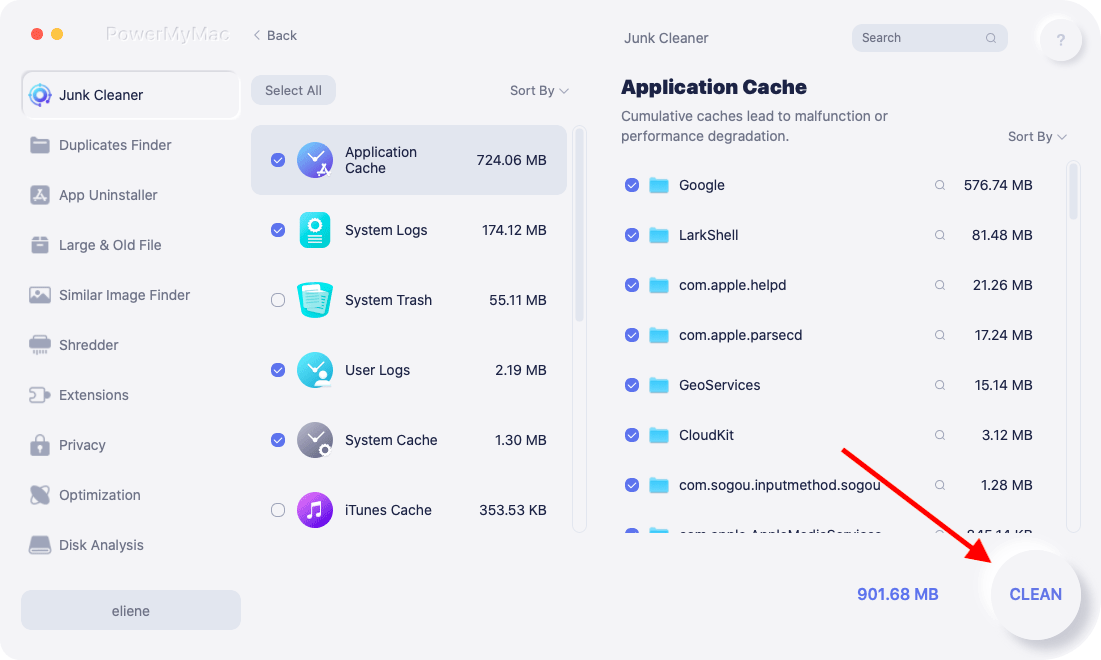
To make sure Diablo 2 Resurrected on Mac runs smoothly, you’ll want to maximize system performance. iMyMac PowerMyMac is a great all-in-one tool that cleans up system junk, frees up memory, and monitors CPU usage. By reducing background processes and optimizing storage, it can boost your Mac's gaming performance significantly. Especially when using resource-heavy virtual machines or emulators, every bit of efficiency counts.
PowerMyMac also offers real-time system health monitoring, helping you maintain stable gameplay sessions. Whether you're exploring the Rogue Encampment or battling Baal, using PowerMyMac ensures your experience with Diablo 2 Resurrected on Mac is fast, stable, and lag-free.
Part 4. Conclusion
Playing Diablo 2 Resurrected on Mac is entirely possible with the right tools and setup. Though macOS isn't natively supported, solutions like Parallels, Boot Camp, or cloud gaming make the game accessible. Once installed, tools like iMyMac PowerMyMac can dramatically improve your system’s performance, ensuring a smooth and enjoyable experience.


